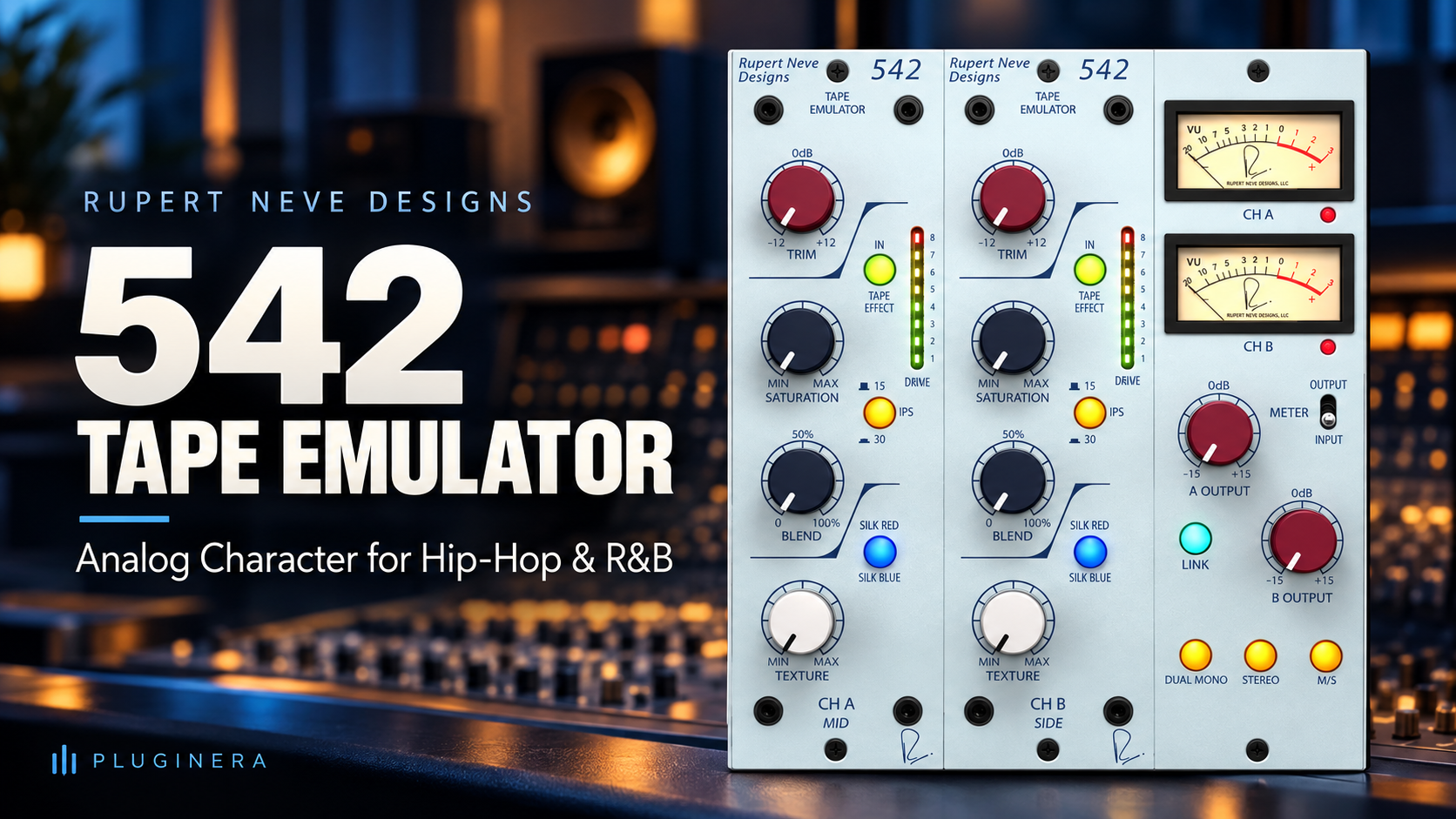
 Rupert Neve Designs 542 Tape Emulator: Analog Warmth for Hip-Hop and R&B Producers
There’s something special about a clean digital recording. It can be clear, detailed, and easy to shape.
But sometimes a track needs a little more personality.
Maybe your electric piano sounds too polished. Your drums hit hard but feel disconnected. Or your R&B vocal needs a little extra texture to sit comfortably in the mix.
That’s where a plug-in like the Rupert Neve Designs 542 Tape Emulator comes in.
Modeled after Rupert Neve Designs’ 542 hardware module, the plug-in combines tape-style saturation with the company’s Silk harmonic coloration. It gives producers a way to experiment with warmth, density, and harmonic character directly inside their DAW. plugins.rupertneve.com
In this guide, we’ll look at what the 542 offers and how hip-hop, R&B, and Trap Soul producers can put its controls to work.
Check out the Rupert Neve Designs 542 Tape Emulator at Plugin Boutique →
Replace this link with your Plugin Boutique affiliate link before publishing.
What Is the Rupert Neve Designs 542 Tape Emulator?
The 542 Tape Emulator is a saturation plug-in based on the Rupert Neve Designs 542 500-series hardware module.
It combines a tape emulation section with a soft clipper and the company’s Silk Red and Silk Blue modes. The plug-in also adds features such as mid/side processing and input/output metering. www.pluginboutique.com
That combination makes it useful to explore on individual instruments, vocals, drum groups, and buses whenever you want to experiment with harmonic color.
A note on terminology: the original 542 hardware is itself a tape emulator. The plug-in models that hardware’s approach to tape-style processing; it isn’t a model of a particular tape machine.
Rupert Neve Designs 542 Tape Emulator at a Glance
| Feature | What it does |
|---|---|
| Tape emulation | Adds tape-style saturation, with the amount affected by the level feeding the processor |
| Soft clipper | Engages at higher levels to help tame peaks |
| 15 and 30 IPS modes | Offer two tape-speed settings to compare |
| Silk Red | Emphasizes harmonic saturation in the highs and high-mids |
| Silk Blue | Emphasizes harmonic saturation in the lows and low-mids |
| Texture control | Adjusts the amount of Silk coloration |
| Blend control | Adjusts the balance between the pre-tape and post-tape signals |
| Mid/side processing | Offers separate processing options for the center and sides of a stereo signal |
| Input/output metering | Helps you monitor levels while adjusting the plug-in |
These features are based on the manufacturer’s product information. Their usefulness in a particular mix will depend on the source and how hard you drive the processor. www.pluginboutique.com
What Does Tape Saturation Do?
Tape saturation adds harmonic distortion as a signal is driven into a tape-style processor. Depending on the source and settings, that can make a sound feel denser, rounder, more textured, or more controlled.
For producers, the goal doesn’t have to be an obvious lo-fi effect. A small amount of saturation can be worth trying when a part feels a little too clean or separate from the rest of the production.
For example:
- A digital electric piano may benefit from a little extra character.
- A drum bus may respond well to some gentle peak control.
- A vocal may benefit from added texture.
- A sample may sound more at home alongside programmed drums after some saturation.
The key word is may. Saturation is a creative decision, not an automatic improvement. If the processed version loses the punch, clarity, or emotion you liked in the original, dial it back—or leave it off.
Silk Red vs. Silk Blue: What’s the Difference?
The 542’s Silk section gives you two ways to shape its harmonic coloration.
Silk Red
According to Rupert Neve Designs, Silk Red emphasizes saturation in the high and high-mid frequencies. plugins.rupertneve.com
That makes it an interesting option to explore when you want to bring attention to the character of:
- Lead vocals
- Snares and claps
- Electric piano
- Guitars
- Synth melodies
For an R&B vocal, try a modest amount and listen for whether it helps the vocal feel more present. If it draws too much attention to sibilance or harshness, reduce the Texture setting or try a different approach.
Silk Blue
Silk Blue emphasizes saturation in the lows and low-mids. plugins.rupertneve.com
You might experiment with it on:
- Bass guitar or synth bass
- Kick drums
- Electric piano
- Drum buses
- Warm pads
On a bass part, listen for whether the added harmonics help you hear the notes on smaller speakers. Also listen for any buildup that makes the low end feel cloudy.
Use Your Ears, Not Just the Labels
Red doesn’t automatically make every sound better in the high frequencies, and Blue won’t fix every thin bass.
Start with the sound in context, choose a mode, and adjust the Texture control slowly. Then switch modes and compare at a similar output level.
The best choice is the one that supports the track.
15 IPS vs. 30 IPS: Which Should You Choose?
The 542 includes 15 IPS and 30 IPS modes. IPS stands for inches per second, a reference to tape speed.
Different tape-speed settings are traditionally associated with different tonal and transient characteristics, but the effect you hear depends on the particular emulation, your source, and the other settings you choose.
A practical approach is simple:
- Loop a section of your song.
- Set the 542 to 15 IPS and listen.
- Switch to 30 IPS without changing the other controls.
- Pay attention to the low end, brightness, and drum transients.
- Choose the setting that works best in the full mix.
Don’t worry about memorizing a rule for which speed is “warmer.” Let the track make the decision.
How to Use the 542 Tape Emulator on R&B Electric Piano
Electric piano is a natural place to experiment with saturation. A clean, bell-like sound might be perfect on its own, but a little texture can help it feel more settled in a soulful arrangement.
Starting approach
- Insert the 542 on your electric piano track.
- Start with a conservative input level.
- Try Silk Blue with a low Texture setting.
- Increase the input or Texture gradually while the piano plays.
- Adjust the blend to find a balance you like.
- Match the output level as closely as you can and bypass the plug-in.
- Listen again with the bass, drums, and vocal playing.
The goal could be a slightly fuller piano that still leaves space for the vocal. If the piano becomes cloudy or loses its attack, back off the processing.
Pluginera tip: Listen to the spaces between the chords as well as the chords themselves. Saturation can change how the tails and sustained notes feel in an arrangement.
How to Use the 542 on Hip-Hop Drums
A drum bus is another useful place to try the 542. Rather than treating each drum separately, you can process a group of drums together and listen for how the relationship between them changes.
Starting approach
- Route your kick, snare, hi-hats, and percussion to a drum bus.
- Insert the 542 on the bus.
- Begin with a modest input level and low Texture.
- Try both Silk modes.
- Increase the drive gradually and listen to the kick and snare.
- Compare the processed and bypassed signals at similar loudness.
As you drive the plug-in harder, listen for the soft clipper’s effect on peaks. The right amount might make your drums feel more controlled; too much could flatten the transients that make the groove exciting.
Important: A drum bus doesn’t have to sound obviously distorted. Sometimes the most useful setting is one you miss when you bypass it.
How to Use the 542 on R&B Vocals
A vocal can be beautifully recorded and still feel a little too pristine for the instrumental. Saturation is one way to explore adding texture and density.
Starting approach
- Insert the 542 on the vocal track.
- Start with a low input level and subtle processing.
- Try Silk Red and gradually raise Texture.
- Listen closely to consonants and “S” sounds.
- Adjust the blend and output level.
- Bypass the plug-in and compare in the full mix.
If Silk Red brings out more edge than you want, lower Texture, try Silk Blue, or disengage Silk and explore the tape section on its own.
The vocal should remain clear and emotionally engaging. Don’t add saturation just because the plug-in is on the track.
Can You Use the 542 on a Bass or 808?
Yes. The 542 can be used on bass instruments, including an 808, but the amount of processing matters.
Saturation can add upper harmonics that make a bass part easier to perceive on smaller speakers. At the same time, too much processing can change the low-end balance or soften the attack.
Try this on an 808
- Insert the 542 on the 808 track.
- Start with a low input level.
- Try Silk Blue at a modest Texture setting.
- Increase the drive slowly.
- Listen to the bass on your main monitors and headphones.
- Compare the processed and unprocessed versions at similar loudness.
Pay attention to whether you can follow the notes more clearly without losing the weight or punch you wanted.
Avoid judging the 808 in solo alone. What sounds impressive by itself may compete with the kick once the full beat is playing.
Using the 542 in Reason
Reason producers can use the 542 as a VST3 plug-in on compatible tracks and buses, provided their version of Reason supports VST3 plug-ins. The 542 supports VST3, AU, and AAX formats. www.pluginboutique.com
Here’s a straightforward way to try it in a Reason session:
- Open a project with a drum loop, electric piano, or vocal.
- Select the track you want to process.
- Add the 542 Tape Emulator as an insert effect.
- Play the track in the context of the full arrangement.
- Experiment with input level, tape speed, Silk mode, Texture, and Blend.
- Adjust the output so the processed and bypassed signals are close in level.
- Decide whether the change improves the part’s role in the mix.
If Reason doesn’t show the plug-in after installation, check that you installed the VST3 version and that your Reason version and operating system meet the current requirements.
A Simple Reason R&B Chain to Try
For an electric piano or vocal, you could experiment with a chain like this:
Source → 542 Tape Emulator → EQ → Compression
The 542 adds the color you choose, the EQ helps shape the result, and the compressor controls dynamics.
That order is only a starting point. Try moving the 542 after the EQ or compressor and listen to how the response changes. The best chain is the one that helps you reach the sound you’re after.
What About Mid/Side Processing?
Mid/side processing separates a stereo signal into its mid, or center information, and its side, or difference information.
The 542 plug-in includes mid/side processing, which gives you another way to explore saturation on stereo material. plugins.rupertneve.com
For example, you might experiment with processing the sides of a stereo pad while listening to how the center holds up. On a drum bus or full mix, make small adjustments and check the result in mono as well as stereo.
Mid/side processing is easy to overdo. If the mix starts feeling disconnected or the center loses focus, return to a simpler setting.
Rupert Neve Designs 542 vs. RC-20 Retro Color
The 542 and XLN Audio RC-20 Retro Color can both add character, but they encourage different approaches.
| Rupert Neve Designs 542 | XLN Audio RC-20 Retro Color | |
|---|---|---|
| Main focus | Tape-style saturation and Silk harmonic coloration | A broader collection of retro and lo-fi effects |
| Useful for exploring | Subtle color, saturation, and peak control | More deliberately aged or textured sounds |
| Approach | Drive, tape speed, Silk, Texture, and Blend | Multiple effect modules and creative degradation controls |
The 542 may appeal to producers looking for a focused saturation tool. RC-20 may appeal to those who want a wider range of creative retro effects in one plug-in.
You can also use both in the same project. For example, try RC-20 on a melodic sample for a more obvious effect and the 542 on a drum bus for separate saturation. As always, level-match and listen for whether each processor earns its place.
How the 542 Fits With the 551 Inductor EQ and Portico II Master Buss Processor
If you’re already interested in the Rupert Neve Designs plug-in range, the 542 gives you another type of processing to explore alongside the 551 Inductor EQ and Portico II Master Buss Processor.
A possible signal chain is:
542 Tape Emulator → 551 Inductor EQ → Portico II Master Buss Processor
In that setup, you could use the 542 for saturation, the 551 for tonal shaping, and the Portico II for bus processing. But there’s no requirement to use all three together—or to use them in that order.
On a mix bus, start gently. Small changes can accumulate across an entire track, so bypass each processor individually and make sure it contributes something useful.
Who Is the 542 Tape Emulator For?
The 542 could be a good fit for producers and engineers who want:
- A dedicated tape-style saturation plug-in
- Silk Red and Blue tonal coloration
- A way to experiment with harmonic character on tracks and buses
- Soft clipping at higher signal levels
- Mid/side processing for stereo material
- A plug-in modeled on Rupert Neve Designs hardware
It may be less compelling if you already have several saturation plug-ins you love and don’t hear a meaningful difference in the free trial. It’s also worth comparing against more feature-heavy creative effects if you want noise, wobble, and other obvious lo-fi processing in the same plug-in.
Price, Compatibility, and Authorization
At the time of writing, Plugin Boutique lists the 542 Tape Emulator at $129, with a free trial available. Prices and promotions can change, so check the product page for the current offer.
The plug-in supports VST3, AU, and AAX, runs natively on Intel and Apple silicon processors, and is available for supported macOS and Windows systems.
A free iLok License Manager account is required. Authorization options include machine-based activation, iLok Cloud, or a compatible iLok USB key, so a physical dongle is not required for every option. Check the current system requirements before purchasing. www.pluginboutique.com
View the 542 Tape Emulator at Plugin Boutique →
Replace this link with your affiliate link before publishing.
Frequently Asked Questions
Is the Rupert Neve Designs 542 a tape plug-in?
The 542 is a tape-emulation plug-in modeled on Rupert Neve Designs’ 542 hardware tape emulator. It also includes Silk harmonic coloration and a soft clipper.
Can I use the 542 Tape Emulator in Reason?
You can use the VST3 version in a compatible version of Reason. Confirm your Reason version, operating system, and plug-in requirements before installing.
Is the 542 good for hip-hop and R&B?
Its tape-style saturation and Silk controls make it a relevant plug-in to try on hip-hop and R&B sources such as drums, electric piano, bass, samples, and vocals. Whether it improves a particular sound depends on your source and settings.
Does the 542 require an iLok USB dongle?
No. An iLok account is required, but the listed authorization options include machine-based activation and iLok Cloud as well as compatible iLok USB keys.
Should I put the 542 on every track?
Not necessarily. Start with the tracks where you can identify a reason to add saturation. Use it where the result helps the music, and leave it off where the original already works.
Final Thoughts
The Rupert Neve Designs 542 Tape Emulator offers a focused way to explore tape-style saturation and Silk coloration inside a DAW.
For hip-hop, R&B, and Trap Soul producers, the most exciting possibilities may be the everyday ones: giving an electric piano more character, adding texture to a vocal, or finding a little more density in a drum bus.
The free trial is the best way to decide whether the 542 brings something you don’t already have. Put it on a track you know well, match the levels, and listen in the context of the full song.
You don’t need more plug-ins to make great music. But when a tool helps you hear a familiar sound in a new way, it can be worth exploring.
Explore the Rupert Neve Designs 542 Tape Emulator →
Related Reading
Link the following to the closest relevant published articles on Pluginera:
- How to Make Retro 90s R&B Beats in Reason
- Best R&B Vocal Plugins for 2026
- How to Build an R&B Vocal Chain in Reason
- Rupert Neve Designs 551 Inductor EQ — if you have a published article covering it
- Portico II Master Buss Processor — if you have a published article covering it
Once you’ve bought it and spent some time with it, we can add your own listening impressions to make this article even stronger. First experiment: your MX61 electric piano through the 542 in Reason. I want to hear what you think of Silk Blue on those chords! 🎹🔥