 Best R&B Vocal Plugins for 2026: 8 Picks for Smooth, Professional Vocals
Great R&B vocals have a way of pulling listeners into a song. Whether it’s an intimate lead vocal, a stack of lush harmonies, or a melodic Trap Soul performance, the voice often carries the emotional weight of the entire production.
But getting that smooth, polished vocal sound isn’t simply about loading an expensive preset.
It requires the right balance of EQ, compression, pitch correction, ambience, and creative processing.
Fortunately, today’s music production software offers plenty of options for achieving professional-quality vocal mixes without requiring a commercial recording studio.
In this guide, we’ll explore eight of the best R&B vocal plugins in 2026, explain what each one does, and show you how to use them in real production situations.
Affiliate Disclosure: This article contains affiliate links. Pluginera may earn a commission from qualifying purchases at no additional cost to you.
Best R&B Vocal Plugins in 2026: Quick Comparison
| Plugin | Best For |
|---|---|
| iZotope Nectar 4 | Complete vocal processing |
| FabFilter Pro-Q 4 | Detailed vocal EQ |
| Softube Tube-Tech CL 1B | Smooth vocal compression |
| Antares Auto-Tune Pro 11 | Pitch correction and melodic vocals |
| Valhalla VintageVerb | Atmospheric vocal reverb |
| Soundtoys EchoBoy | Creative vocal delays |
| FabFilter Pro-DS | Controlling sibilance |
| Soundtoys Little AlterBoy | Vocal textures and effects |
These plugins cover the essential stages of a modern R&B vocal chain, from corrective processing to creative sound design.
You don’t need all eight to make a great record. The goal is to identify which tools solve problems in your current workflow.
1. iZotope Nectar 4 — Best All-in-One R&B Vocal Plugin 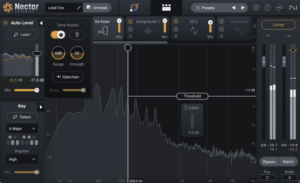
If you’re looking for one plugin that handles several stages of vocal mixing, iZotope Nectar 4 is a strong place to start.
Nectar combines multiple vocal processing tools in a single environment, making it useful for producers who want a streamlined workflow.
Its processing capabilities include EQ, compression, de-essing, pitch-related tools, and vocal effects, with exact features depending on the edition.
Why It’s Great for R&B
Modern R&B vocals often need to sound polished without losing their natural emotion.
Nectar makes it possible to address common problems without building an extensive chain of separate plugins.
For example, you might start with a vocal recording that has inconsistent volume, slightly harsh upper frequencies, and some low-mid buildup.
Nectar provides tools for addressing those problems within one workflow.
Its Vocal Assistant can also provide a starting point, although you should always adjust the results by ear.
Practical R&B Mixing Tip
Use Nectar to establish a balanced lead vocal before adding creative reverb or delay.
Start with moderate compression, address any obvious tonal problems, and compare the processed vocal against the original at matched loudness.
Best for: Beginners, home studios, and producers who want an efficient vocal mixing workflow.
Check iZotope Nectar 4 at Plugin Boutique.
2. FabFilter Pro-Q 4 — Best EQ for R&B Vocals 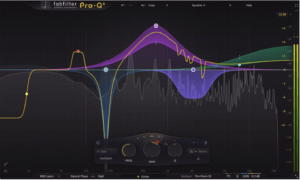
Equalization is one of the most important stages of vocal mixing.
A vocal can sound muddy, nasal, harsh, or overly bright depending on the recording, microphone, performance, and surrounding instruments.
FabFilter Pro-Q 4 provides detailed frequency control with a modern visual interface.
Its dynamic EQ and spectral processing capabilities are especially useful for controlling problems that change throughout a performance.
How to EQ a Smooth R&B Vocal
Start by listening to the vocal in context with the instrumental.
You might investigate these areas:
- Below 80–100 Hz: Unwanted rumble, depending on the voice
- 200–400 Hz: Excessive low-mid buildup
- 500 Hz–1 kHz: Boxiness or nasal character
- 2–5 kHz: Vocal intelligibility and potential harshness
- 8–12 kHz: Brightness and perceived air
These are listening areas, not mandatory EQ settings.
A naturally warm vocal may need very little correction, while a harsh recording might benefit from careful dynamic EQ.
Why Dynamic EQ Matters
Imagine a vocalist who becomes noticeably harsh only during louder phrases.
A permanent EQ cut might make the quieter phrases sound dull.
Dynamic EQ can reduce the problematic frequencies when they become excessive, leaving the rest of the performance less affected.
Best for: Engineers and producers who want detailed control over vocal tone.
Check FabFilter Pro-Q 4 at Plugin Boutique.
3. Softube Tube-Tech CL 1B — Best for Smooth Vocal Compression 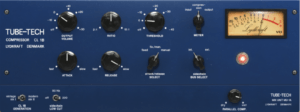
Compression helps control changes in vocal level and can influence the character of a performance.
The Softube Tube-Tech CL 1B is modeled after a respected optical-style hardware compressor associated with smooth, musical dynamic control.
For R&B, this style of compression can be particularly useful when you want to preserve the emotional movement of a vocal while keeping it consistent in the mix.
How to Use It
Start with a moderate ratio and adjust the threshold until the compressor provides a few decibels of gain reduction on louder phrases.
Listen carefully to the ends of words and sustained notes.
If the vocal sounds unnaturally flat or the compressor seems to breathe with every phrase, reduce the amount of compression or adjust its timing.
The goal is to control the performance without removing its expression.
Why It Works for R&B
R&B singers often move between soft, intimate passages and more powerful notes.
A well-adjusted compressor can help those dynamics feel controlled while retaining their musical impact.
Best for: Smooth lead vocals, expressive performances, and controlled vocal dynamics.
Explore Softube Tube-Tech CL 1B.
4. Antares Auto-Tune Pro 11 — Best for Modern R&B Pitch Correction
Pitch correction is an important part of many contemporary vocal production workflows.
Antares Auto-Tune Pro 11 offers tools for correcting pitch and creating more noticeable tuning effects.
It’s particularly relevant to melodic Hip-Hop, Trap Soul, and contemporary R&B.
Natural vs. Creative Pitch Correction
For a natural vocal sound, use settings that allow some of the singer’s original pitch movement to remain.
For a more stylized performance, experiment with faster retuning and more noticeable pitch transitions.
Neither approach is automatically better.
The appropriate sound depends on the song and the artist’s creative direction.
Practical Tip
Always select the correct musical key and scale before making tuning decisions.
If the song is in E minor, for example, configuring the pitch correction appropriately can help avoid unwanted notes.
However, be mindful of borrowed chords and intentional notes outside the basic scale.
Best for: Melodic R&B, Trap Soul, and modern vocal production.
Check Auto-Tune Pro 11 at Plugin Boutique.
5. Valhalla VintageVerb — Best Reverb for Atmospheric R&B Vocals
Reverb helps create the sense of space surrounding a vocal.
For R&B, that space can be just as important as the vocal’s tonal character.
Valhalla VintageVerb offers a collection of digital-inspired reverb algorithms suitable for everything from intimate vocal ambience to expansive atmospheric effects.
How to Create a Spacious R&B Vocal
Instead of inserting reverb directly on the lead vocal, try placing it on an auxiliary return.
Set the reverb to 100% wet and control the amount of ambience using a send.
Start with:
- A plate or chamber-style algorithm
- A moderate decay time
- Enough pre-delay to preserve the clarity of the lead vocal
- High-pass filtering on the reverb return to reduce low-frequency buildup
For slower R&B songs, experiment with longer reverb tails.
But remember that a longer reverb isn’t always better.
If the vocal begins to disappear behind the instrumental, reduce the send level or shorten the decay.
Best for: Atmospheric R&B, Neo-Soul, ballads, and spacious vocal production.
Explore Valhalla VintageVerb.
6. Soundtoys EchoBoy — Best Delay for R&B Vocals 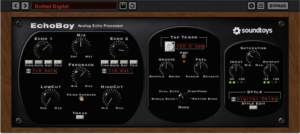
Delay is one of the most versatile creative effects in modern vocal production.
Soundtoys EchoBoy provides multiple delay styles and extensive control over the character of repeated signals.
It can create everything from subtle slapback effects to rhythmic echoes that fill the spaces between vocal phrases.
Three R&B Delay Techniques
Slapback Delay
Use a short delay to add subtle thickness and dimension to a vocal.
Keep the effect low enough that it supports the lead rather than sounding like a distinct repeat.
Quarter-Note Delay
Synchronize the delay to your song’s tempo and experiment with quarter-note repeats.
This can work well on selected phrases, particularly when the singer leaves space between lines.
Delay Throws
Automate the delay send so that only certain words or phrases trigger noticeable repeats.
For example, you might emphasize the final word before a chorus.
This creates movement without filling every moment of the song with effects.
Best for: Creative R&B vocal production, vocal throws, and rhythmic effects.
Check Soundtoys EchoBoy at Plugin Boutique.
7. FabFilter Pro-DS — Best for Controlling Vocal Sibilance 
Sibilance refers to sharp consonant sounds, particularly those associated with letters such as S and T.
Excessive sibilance can make an otherwise smooth vocal sound harsh or uncomfortable.
FabFilter Pro-DS is designed to control those sounds without requiring broad, permanent reductions in high-frequency content.
How to Use a De-Esser
Start by identifying the phrases where sibilance becomes distracting.
Adjust the detection range and threshold until the plugin reduces the sharpness of those consonants.
Avoid excessive processing.
Too much de-essing can make a singer sound as though they’re developing a lisp.
Listen to the vocal in the full mix, not just in isolation.
A vocal that sounds slightly bright on its own may sit perfectly once the instrumental is playing.
Best for: Smooth lead vocals, bright recordings, and controlling harsh consonants.
Check FabFilter Pro-DS at Plugin Boutique.
8. Soundtoys Little AlterBoy — Best for Creative Vocal Textures 
Contemporary R&B often uses vocal layers as musical instruments.
Pitch-shifted harmonies, formant-shifted textures, and unusual background vocal effects can add character to a production.
Soundtoys Little AlterBoy provides pitch and formant manipulation tools that make it useful for these creative applications.
How to Create Atmospheric Vocal Layers
Record a short background vocal phrase or harmony.
Duplicate the recording onto a separate track.
Experiment with pitch and formant adjustments until the layer develops a contrasting character.
Then blend the processed layer underneath the original vocal.
You can also add reverb or delay to push the effect farther into the background.
The result can be a distinctive vocal texture that supports the arrangement without distracting from the lead.
Best for: Experimental R&B, Trap Soul, vocal textures, and creative harmonies.
Check Little AlterBoy at Plugin Boutique.
How to Build a Professional R&B Vocal Chain
You don’t need an enormous collection of plugins to create a polished vocal sound.
A practical starting chain might look like this:
- Pitch correction: Address tuning where needed.
- Corrective EQ: Remove unwanted rumble and problematic frequency buildup.
- Compression: Control the vocal’s dynamic range.
- De-essing: Reduce distracting sibilance.
- Tonal EQ: Make subtle adjustments for presence, warmth, or brightness.
- Saturation: Introduce harmonic character if the vocal needs it.
- Reverb and delay sends: Add depth, width, and creative ambience.
This isn’t a fixed order for every recording.
For example, de-essing may work better before compression on one vocal and after compression on another.
The most important skill is understanding what each processor contributes.
How to Mix R&B Vocals in Reason
If you’re producing in Reason, you already have access to capable mixing tools through its SSL-style mixer.
Start by recording or importing your vocal and setting a healthy input level.
Use the channel EQ to remove unwanted low-frequency energy and make gentle tonal adjustments.
Next, experiment with the channel compressor to control the vocal’s dynamics.
Listen to how the compressor affects the relationship between quieter phrases and louder notes.
Once the vocal feels balanced, introduce reverb and delay through auxiliary sends.
You can add third-party plugins where they provide a specific advantage, but don’t overlook what Reason already offers.
A well-balanced vocal using stock processing can sound considerably better than a poorly mixed vocal running through expensive plugins.
Are Expensive Vocal Plugins Worth It?
Not necessarily.
Professional-quality vocals depend on several factors, including the performance, recording environment, microphone technique, arrangement, and mixing decisions.
A premium plugin can provide a faster workflow or a particular sonic character.
However, it cannot completely compensate for a poorly recorded performance.
Before purchasing another vocal processor, identify the specific problem you’re trying to solve.
If your vocals sound muddy, learn corrective EQ.
If they’re inconsistent in level, practice compression and vocal automation.
If they feel disconnected from the instrumental, experiment with reverb, delay, and arrangement balance.
Buying the right tool becomes much easier when you understand what you need it to accomplish.
Best R&B Vocal Plugins for Black Friday 2026
Black Friday is a useful opportunity to evaluate plugins you’ve been considering throughout the year.
Rather than purchasing everything that goes on sale, prioritize tools that address gaps in your existing workflow.
For example:
- If you need a complete vocal processing environment, watch iZotope Nectar.
- If detailed vocal EQ is your priority, consider FabFilter Pro-Q.
- If you want creative delays and vocal textures, investigate Soundtoys.
- If smooth vocal compression is your focus, compare optical-style compressors.
- If pitch correction is central to your music, research Auto-Tune editions and licensing.
Always verify current prices, promotional dates, compatibility, and upgrade eligibility before purchasing.
Browse the latest Plugin Boutique deals to compare available vocal processing offers.
Related Reading
Continue improving your vocal production skills with these Pluginera guides:
- How to Mix Vocals in Reason: A Beginner’s Guide — Learn the foundations of vocal EQ, compression, and effects.
- How to Build a Vocal Chain in Reason (Step-by-Step) — Create a complete vocal processing workflow using Reason.
- How to Sidechain in Reason (Step-by-Step) — Improve separation and create rhythmic movement in your mixes.
- SSL Fusion Bundle Review — Explore analog-style processing for mixing and production.
- Best R&B & Hip-Hop Plugins: Black Friday 2026 — Discover additional instruments and effects worth watching during seasonal promotions.
Final Thoughts
The best R&B vocal plugins are the ones that help you communicate the emotion of the performance.
A carefully adjusted compressor can make a vocal feel controlled without sounding lifeless.
A good reverb can create depth without pushing the singer away from the listener.
Creative delays and pitch effects can transform simple vocal phrases into memorable production elements.
But ultimately, the plugin is only part of the process.
Start with a strong recording, understand the tools you’re using, and make decisions that support the song.
Whether you’re producing traditional R&B, Neo-Soul, or modern Trap Soul, those principles will always matter.