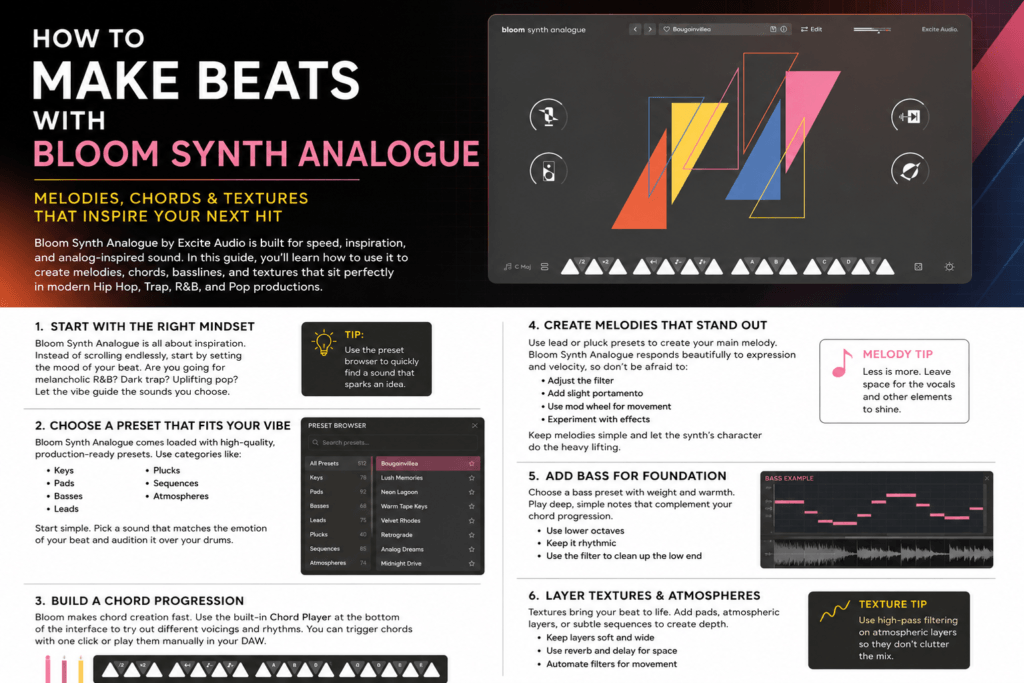
 How to Make Beats with Bloom Synth Analogue: A Producer’s Guide
Finding the right sound is often the hardest part of making a beat. You can have a great drum pattern and solid chord progression, but if your instruments lack character, the entire production can fall flat.
That’s where Bloom Synth Analogue by Excite Audio shines. Designed around warm analog-inspired sounds and a streamlined workflow, it’s a fantastic instrument for creating everything from lush chord progressions and catchy melodies to thick basslines and atmospheric textures.
Whether you’re producing Hip-Hop, Trap, R&B, Pop, Lo-fi, or Synthwave, this guide will show you how to use Bloom Synth Analogue to build a professional-sounding beat from scratch.
Step 1: Start with the Right Preset
One of Bloom Synth Analogue’s biggest strengths is its high-quality preset library.
Instead of scrolling endlessly through hundreds of patches, think about the mood you want your beat to create.
For example:
- Emotional R&B → Warm Keys
- Trap → Dark Plucks
- Hip-Hop → Vintage Synth Leads
- Pop → Bright Analog Chords
- Lo-fi → Soft Pads
- Synthwave → Retro Poly Synths
Choose a preset that immediately inspires you. Great beats usually begin with one sound that sparks an idea.
Step 2: Build Your Chord Progression
Once you’ve found a sound you love, create a simple four-bar chord progression.
Try keeping your chords simple at first.
Example progression in D Minor:
Dm9 – Bbmaj7 – Fmaj7 – Cadd9
The analog character of Bloom Synth Analogue adds warmth and movement to these chords, helping them feel fuller without requiring lots of processing.
Don’t worry about complexity—emotion matters more than the number of notes.
Step 3: Create a Memorable Melody
After your chords are in place, duplicate the instrument onto a new track and choose a lead or pluck preset.
Now write a melody that complements your chord progression.
A few tips:
- Leave space between phrases.
- Repeat melodic ideas.
- Use octave jumps sparingly.
- Add slight velocity changes to make the melody feel more natural.
Bloom Synth Analogue responds beautifully to expressive playing, making simple melodies sound more alive.
Step 4: Add an Analog Bassline
The bass is what gives your beat weight.
Choose one of Bloom Synth Analogue’s bass presets and follow the root notes of your chord progression.
For trap and hip-hop:
- Keep the rhythm simple.
- Let the kick and bass work together.
- Use lower octaves for added power.
If you’re already using an 808, consider layering a subtle analog bass from Bloom Synth Analogue to add warmth and harmonic richness without overpowering the low end.
Step 5: Layer Pads and Textures
Professional beats rarely rely on just one instrument.
Bloom Synth Analogue includes pads and atmospheric sounds that can fill out your mix while keeping the arrangement interesting.
Try adding:
- Soft background pads
- Analog strings
- Ambient textures
- Gentle motion presets
- Filtered synth layers
Keep these elements lower in volume so they support your main instruments instead of competing with them.
Step 6: Create Movement with Automation
Static sounds can make a beat feel repetitive.
One of the easiest ways to keep your production evolving is by automating key parameters throughout the arrangement.
Experiment with automating:
- Filter cutoff
- Resonance
- Volume
- Stereo width
- Effects sends
Small changes over time help your beat feel dynamic without requiring additional instruments.
Step 7: Build Your Arrangement
Once your core loop is finished, turn it into a complete beat.
A simple arrangement might look like this:
Intro (4 bars)
Pads and filtered chords
Verse (16 bars)
Drums, chords, bass, and melody
Hook (8 bars)
Full instrumentation with extra layers
Verse 2 (16 bars)
Remove one or two elements for variation
Bridge (8 bars)
Textures and filtered synths
Final Hook (8 bars)
Everything returns with maximum energy
Outro (4 bars)
Fade to pads or a simplified chord progression
Changing instruments every eight bars helps maintain listener interest.
Mixing Tips
To make Bloom Synth Analogue sit well in your mix:
- Roll off unnecessary low frequencies on pads and leads.
- Add gentle compression if needed.
- Use reverb to create depth, but avoid washing out the sound.
- Add subtle delay to melodies for extra width.
- Pan supporting layers to create space for vocals.
The plugin’s sounds are already polished, so you’ll often need less processing than expected.
Best Genres for Bloom Synth Analogue
Bloom Synth Analogue excels across a wide range of styles, including:
- Hip-Hop
- Trap
- R&B
- Trap Soul
- Pop
- Lo-fi
- Synthwave
- House
- Electronic
- Film Scoring
Its versatility makes it easy to incorporate into nearly any production.
Final Thoughts
Bloom Synth Analogue is more than just another virtual instrument—it’s a creative tool designed to help producers turn ideas into finished beats faster. Its analog-inspired sound, intuitive interface, and inspiring preset library make it easy to move from an empty project to a polished production.
Whether you’re creating emotional R&B, hard-hitting trap, modern pop, or cinematic soundscapes, Bloom Synth Analogue offers the warmth, flexibility, and workflow needed to bring your ideas to life.
If you’re looking for a synth that encourages creativity rather than slowing you down with endless programming, Bloom Synth Analogue deserves a spot in your plugin collection.