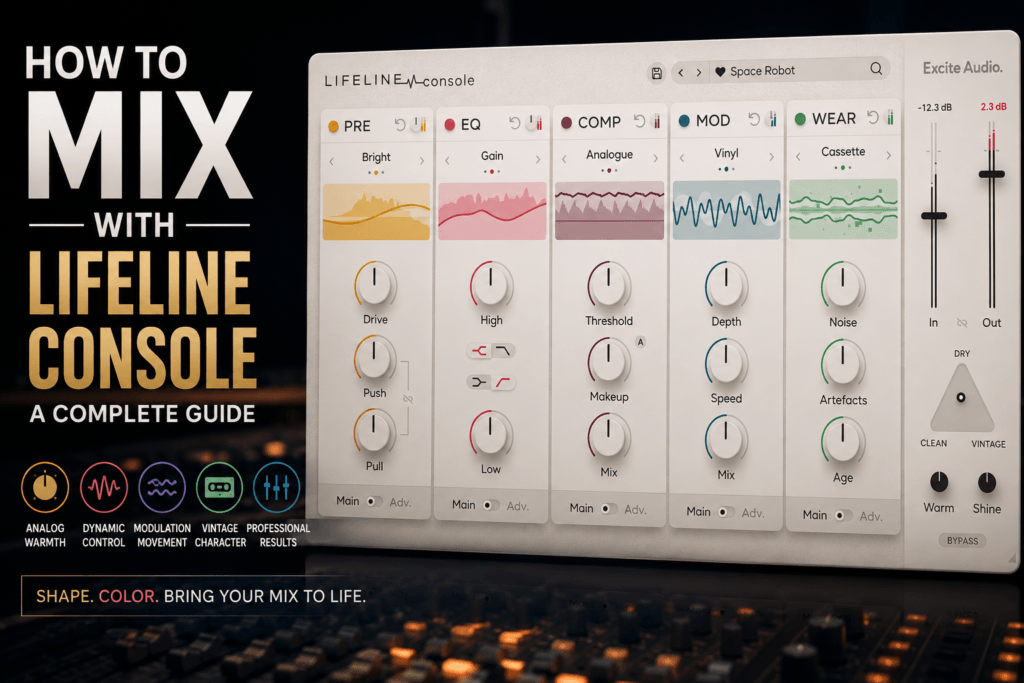
 How to Mix with Excite Audio Lifeline Console: A Complete Producer’s Guide
Mixing isn’t just about balancing levels—it’s about giving every instrument its own space while creating a cohesive, professional sound. One of the easiest ways to add warmth, punch, and analog character to your productions is with Excite Audio Lifeline Console.
Unlike traditional channel strips that lock you into a fixed signal chain, Lifeline Console gives you a modular workflow with five customizable processing modules: Preamp, EQ, Compressor, Modulation, and Wear. Whether you’re mixing hip-hop, R&B, pop, electronic music, or lo-fi beats, this plugin can help transform clean digital recordings into mixes with depth and personality.
In this guide, we’ll walk through practical ways to use Lifeline Console on different instruments and buses so you can get the most out of your mixes.
Why Use Lifeline Console?
Digital recordings can sometimes sound a little too clean or sterile. Lifeline Console helps bridge that gap by introducing analog-inspired color, subtle saturation, compression, and vintage character—all within a single plugin.
Instead of loading multiple processors across your session, you can shape tone, control dynamics, and add movement from one intuitive interface.
Understanding the Five Modules
Before diving into specific mixing techniques, it’s important to understand what each module does.
Preamp
The Preamp adds harmonic saturation and analog warmth. Increasing the Drive control introduces subtle harmonics, while the Push and Pull controls allow you to shape the character of the saturation.
Use it to:
- Warm up vocals
- Add punch to drums
- Thicken bass
- Enhance synths
Small adjustments often sound more natural than aggressive settings.
EQ
The EQ is designed for broad, musical tonal shaping rather than precise corrective work.
It’s perfect for:
- Brightening vocals
- Adding body to bass
- Opening up acoustic instruments
- Softening harsh synths
Think of it as a tone-enhancing EQ instead of a surgical equalizer.
Compressor
Compression helps control dynamics while making instruments feel more consistent.
Lifeline Console’s compressor excels at:
- Vocals
- Drum buses
- Bass guitars
- Piano
- Synth pads
Aim for gentle gain reduction to glue sounds together without sacrificing dynamics.
Modulation
The Modulation module introduces movement and width.
Use it to create:
- Stereo enhancement
- Vintage chorus
- Tape wobble
- Subtle motion
- Lo-fi textures
Be conservative on mix-critical elements and more adventurous on pads, guitars, or background textures.
Wear
Wear simulates the imperfections of aging analog equipment.
You can introduce:
- Tape noise
- Cassette artifacts
- Vinyl-style character
- Mechanical imperfections
- Vintage degradation
A small amount can make a track feel nostalgic, while heavier settings work well for lo-fi productions.
Mixing Drums
Drums benefit from analog color and transient control.
A good starting chain:
- Light Preamp saturation
- Gentle EQ boost for punch
- Moderate compression
- Very subtle modulation
- Minimal Wear
This combination helps kick drums feel thicker while giving snares and percussion additional energy.
For drum buses, experiment with placing the Compressor after the Preamp to enhance the harmonics before gluing the kit together.
Mixing Bass
Bass is one of Lifeline Console’s strongest applications.
Start by adding a touch of Preamp saturation to introduce harmonics that help the bass cut through smaller speakers.
Then:
- Add gentle compression for consistency.
- Use the EQ to enhance low-end weight or upper-mid definition.
- Skip heavy modulation unless you’re intentionally creating movement.
The result is a bass that feels fuller without becoming muddy.
Mixing Vocals
Vocals often benefit from subtle analog treatment.
Try this workflow:
- Add light Preamp Drive for warmth.
- Shape the tone with the EQ.
- Compress for even dynamics.
- Introduce a touch of Modulation for width.
- Add just enough Wear for vintage personality.
For modern pop and R&B vocals, keep the Wear settings subtle to preserve clarity while adding character.
Mixing Synths and Keys
Synths respond beautifully to Lifeline Console.
Experiment with:
- Saturation before EQ for richer harmonics.
- Modulation for stereo width.
- Wear for retro-inspired textures.
- Gentle compression to control dynamics.
Pads, electric pianos, and analog-style leads can all benefit from these enhancements.
Mixing Guitar
Whether you’re working with electric or acoustic guitars, Lifeline Console can help them sit more naturally in a mix.
Use the Preamp to add body, the EQ to shape brightness, and the Compressor to even out dynamics.
Adding a hint of Modulation can widen clean guitars, while a touch of Wear works well for vintage indie or lo-fi styles.
Using Lifeline Console on the Mix Bus
Lifeline Console isn’t limited to individual tracks—it can also add cohesion across your entire mix.
On the mix bus:
- Keep Preamp Drive low.
- Apply gentle compression.
- Make broad EQ adjustments.
- Avoid excessive Wear.
- Use Modulation sparingly.
The goal is to enhance the overall mix without making the processing obvious.
Experiment with Module Order
One of Lifeline Console’s standout features is the ability to rearrange the processing modules.
Try different combinations, such as:
- Preamp → EQ → Compressor
- Compressor → EQ → Wear
- Wear → Modulation → Compressor
- EQ → Preamp → Modulation
Changing the order can produce noticeably different results, so don’t be afraid to experiment until you find the sound that fits your production.
Tips for Beat Makers
If you primarily produce hip-hop, trap, or R&B, Lifeline Console can quickly become part of your default mixing workflow.
Here are a few ideas:
- Add analog warmth to sampled melodies.
- Give 808s more harmonic presence.
- Glue drum buses together with light compression.
- Add subtle movement to synth pads.
- Introduce vintage texture to intros and transitions.
- Use Wear creatively on ad-libs or background vocals.
These small touches can help your beats feel more polished and unique.
Final Thoughts
Excite Audio Lifeline Console strikes an excellent balance between analog character and modern workflow. Its modular design encourages experimentation, while the combination of saturation, EQ, compression, modulation, and vintage wear makes it a versatile tool for nearly every stage of the mixing process.
Whether you’re polishing vocals, adding punch to drums, thickening bass, or giving your entire mix a cohesive analog feel, Lifeline Console delivers professional results without slowing down your workflow. For producers who want to simplify their plugin chain while still achieving rich, musical mixes, it’s a powerful addition to any studio.
By learning how each module interacts with the others and experimenting with different signal chain orders, you’ll unlock the full creative potential of Lifeline Console—and bring more warmth, depth, and personality to every mix you create.