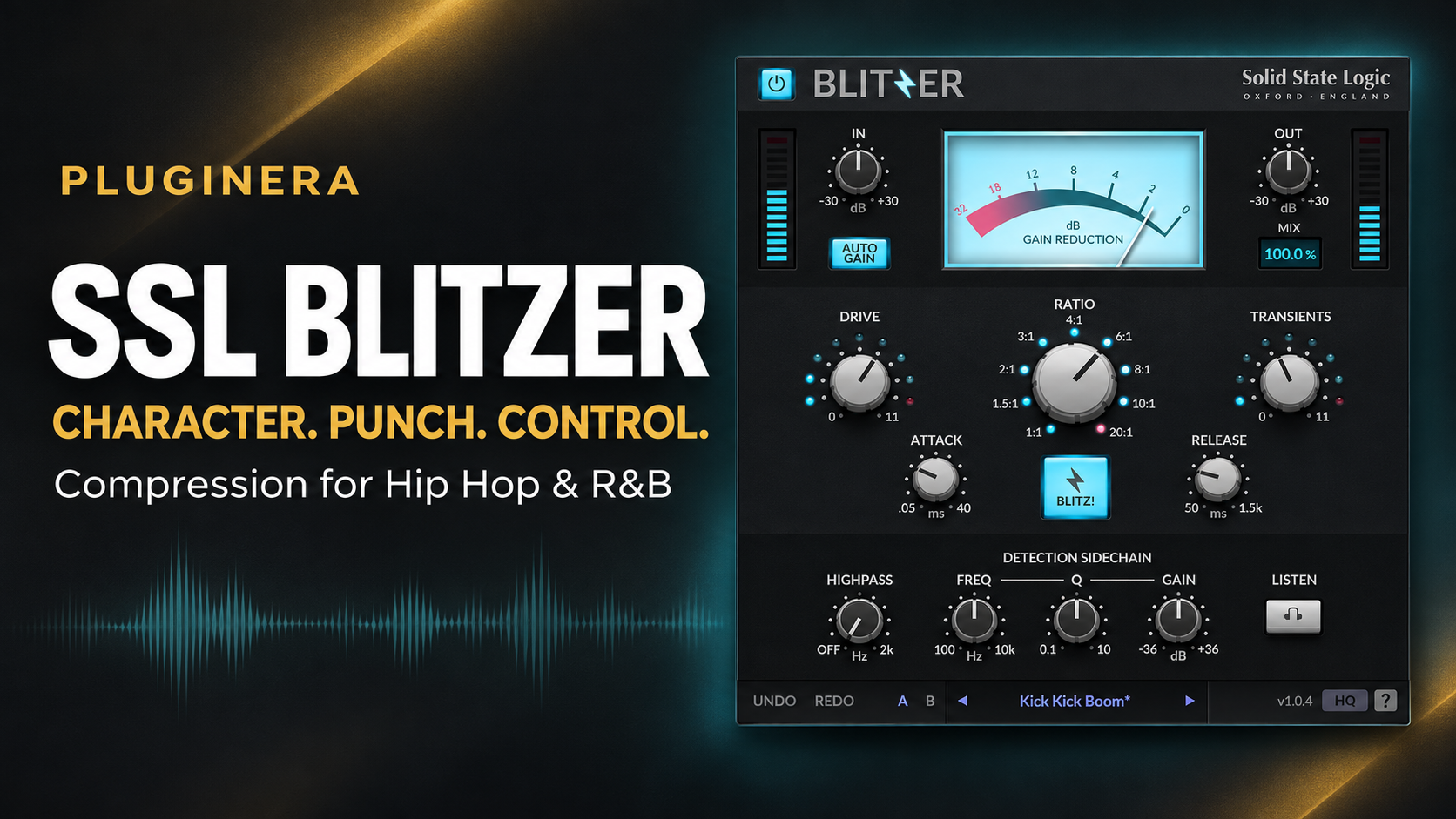
 SSL Blitzer: Is This $19.99 Compressor Worth It for Hip Hop and R&B?
A compressor earns its place in a session when it solves a problem—or gives a sound some personality worth keeping.
For Hip Hop and R&B producers, that could mean drums with more body, a vocal that stays present through a busy chorus, or a sample that feels a little less polished and a little more alive.
SSL Blitzer combines compression with tools for adding that kind of character. Its feature set includes harmonic drive, transient shaping, parallel processing, and several compression curves.
And at the time of writing, Plugin Boutique lists it for $19.99 instead of $99, with the promotion advertised through November 30, 2026. Prices and availability may change.
So where could Blitzer fit in a Hip Hop, R&B, or Trap Soul workflow—and when should you stick with the compressor you already own?
Editorial note: This is a feature-based buying guide using SSL’s documentation, with suggested mixing exercises. It does not claim hands-on listening tests.
Affiliate disclosure: This article may contain affiliate links. If you purchase through these links, Pluginera may earn a commission at no additional cost to you.
Check the current SSL Blitzer price at Plugin Boutique
What Is SSL Blitzer?
SSL Blitzer is an analog-inspired character compressor. SSL references classic hardware such as the 1176 and LA-2A as influences, while providing multiple compression responses within one interface.
Its main creative controls include:
- Drive: Introduces harmonic coloration.
- Mix: Blends processed and unprocessed audio.
- Transients: Modifies the compressor’s initial attack behavior.
- BLITZ!: Engages an aggressive “all-buttons-in” mode.
- Detection filters: Change which frequencies influence compression.
SSL also includes ten compression curves, attack and release controls, and automatic gain compensation.
The appeal is having several ways to shape a sound without immediately building a chain of separate processors.
Why Character Compression Matters for Hip Hop and R&B
Sometimes the issue is straightforward: a vocal has a few words that jump too far forward.
Other times, the levels are controlled, but the sound still lacks energy.
Those are different mixing decisions. Before adding a compressor, decide what you want to hear:
- A steadier vocal?
- More drum sustain?
- A sharper initial hit?
- Additional harmonic texture?
- An obvious pumping effect?
That decision should guide your settings. “Make it better” is a difficult target. “Bring out the snare’s body without losing its crack” gives you something specific to judge.
Three SSL Blitzer Features Worth Understanding
Different Ratios Also Change the Compression Character
According to SSL, Blitzer’s ratio settings introduce different curves and response characteristics. Changing the ratio therefore involves more than choosing how firmly to reduce peaks.
When auditioning ratios, compensate for changes in volume and compression depth. Otherwise, you may prefer one setting simply because it is louder.
Drive Can Be Used Without Compression
Blitzer’s 1:1 setting allows harmonic drive without gain reduction. That makes it possible to explore coloration separately from dynamic control.
Try that approach when the performance already sits well, but you want to experiment with texture.
The Sidechain Filter Does Not Remove Bass From Your Audio
Blitzer’s detection high-pass filter reduces low-frequency influence on the compressor’s detector. It does not function as a high-pass filter on the audible signal itself. SSL highlights this as useful for reducing kick-driven pumping on drum buses.
That distinction matters: filtering the detector changes how compression reacts, rather than directly thinning the drums.
How to Try SSL Blitzer on Hip Hop Drums
For a first drum-bus experiment, aim for more body while preserving the groove.
The following is a suggested starting exercise, not a tested preset.
- Loop a section containing your kick, snare, and hats.
- Leave Drive low while setting compression.
- Start around a 4:1 ratio.
- Adjust input gain until you see roughly 2–4 dB of gain reduction on stronger hits.
- Adjust attack while listening to the snare’s initial crack.
- Set release so the drums recover naturally between hits.
- Lower Mix toward approximately 25–40% for a parallel blend.
- Match the output level to bypass before judging.
Listen for whether the drums feel fuller without making the hats splashy or pushing the snare backward.
If each kick makes the whole drum group dip, experiment with the detector high-pass filter. Raise it gradually and listen to how the groove changes.
The check: Does the beat feel more convincing at the same listening volume?
If the answer is no, reduce the processing or bypass it.
How to Try SSL Blitzer on R&B Vocals
A vocal compressor should support the performance’s emotion.
For an intimate verse, heavy processing may bring breaths and mouth noises forward more than you want. A dense hook may tolerate a firmer approach.
Try this starting exercise:
- Choose a phrase containing both quiet and loud words.
- Begin around 3:1 or 4:1.
- Adjust input for approximately 2–3 dB of reduction on stronger phrases.
- Set attack while checking consonant clarity.
- Adjust release so the vocal recovers between phrases.
- Add Drive cautiously after the dynamics feel right.
- Compare in the full mix at a matched level.
These are audition points, not universal settings.
If individual words still disappear, use clip gain or automation before asking the compressor to work harder. One unusually loud syllable should not dictate the treatment of an entire verse.
The check: Can you follow the lyric more easily while the performance still feels expressive?
Adding Texture to Samples and Keys
For a sample, electric piano, or synth layer that already has controlled dynamics, start with Blitzer’s 1:1 setting.
Then try a simple comparison:
- Listen to the original in context.
- Increase Drive slowly.
- Reduce output as needed to maintain comparable volume.
- Check whether the part becomes easier to hear.
- Listen for unwanted roughness on chords and high notes.
Do this with the bass and drums playing. A texture that sounds exciting in solo may crowd the arrangement.
Also ask whether the source already has enough coloration. A vinyl sample with prominent noise and distortion may benefit more from careful balancing than additional saturation.
Using BLITZ! for a Parallel Effect
SSL positions BLITZ! as its aggressive limiting mode, including applications such as heavily compressed room microphones.
For programmed drums, treat it as a creative experiment:
- Begin with the Mix control very low.
- Engage BLITZ! and establish the exaggerated effect.
- Bring the processed blend up gradually.
- Check the kick, snare, and cymbal balance.
- Compare against a quieter blend before committing.
The useful amount may be surprisingly small.
Listen for extra excitement between hits, but watch for exaggerated cymbal tails and background noise.
Can You Use SSL Blitzer in Reason?
SSL lists VST3 among its current plug-in formats. For a Reason setup that supports VST3, that is the format to investigate. Confirm compatibility with your exact Reason or DAW version and operating system before purchasing; SSL recommends trying the demo when a host is outside its tested list.
A useful first Reason session would be a direct comparison on one drum bus:
- Build your best version with the processing you already own.
- Save that setup.
- Audition Blitzer on the same material.
- Match output volume.
- Decide which version supports the song.
You do not need to replace your existing workflow to find one useful application.
Who Should Consider SSL Blitzer?
Blitzer is worth investigating if you want to experiment with compression character, parallel drum processing, and harmonic drive from one interface.
It may be less valuable if you already have several compressors you understand well and cannot identify a particular sound or workflow you want to improve.
A discount lowers the price. It does not create a mixing need.
Before purchasing, ask:
- Can I name a track or bus where I would try this?
- Does the demo offer something I enjoy using?
- Would I reach for it again after the first session?
Those answers matter more than the percentage off.
Is SSL Blitzer Worth $19.99?
Its documented controls offer several avenues for experimentation, particularly on drums, vocals, and textured instruments. That makes it relevant to Hip Hop and R&B production, although its value ultimately depends on your material and existing tools.
The strongest reason to buy it is finding a sound or workflow you want to use again.
View SSL Blitzer and check the current offer at Plugin Boutique
Related Reading
Keep Building Your Sound
Want more practical ideas for producing and mixing R&B?
Join Pluginera Weekly and get the free R&B Mixing Playbook, plus production tips, plugin guides, and updates from Pluginera.
Better Music. Smarter Plugins. More Creativity.