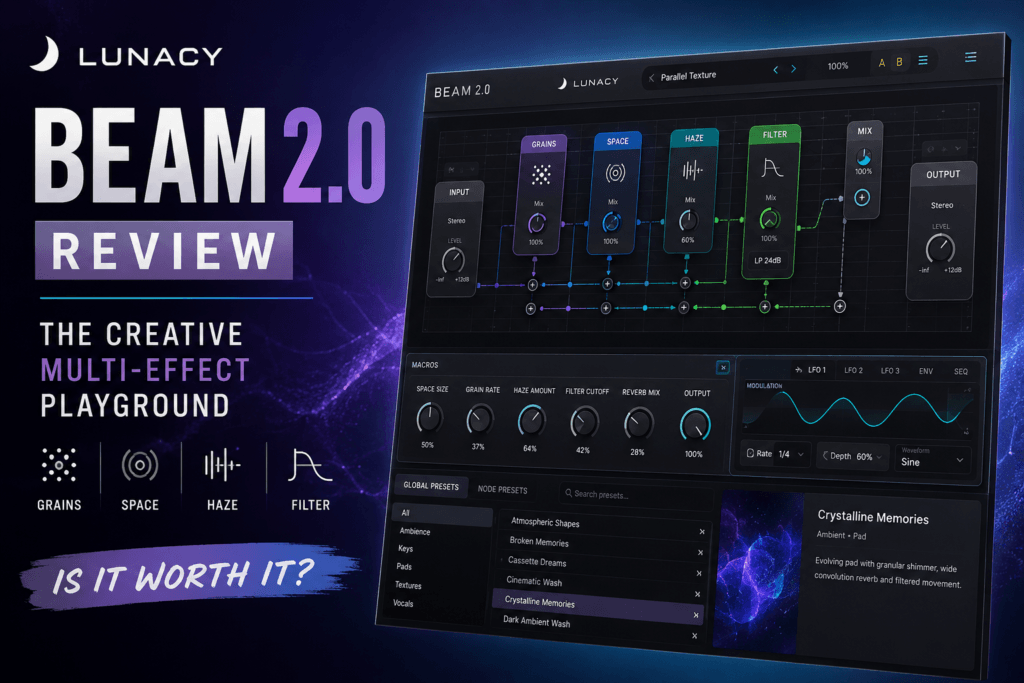
 Lunacy BEAM 2.0 Review: Is This Creative Multi-Effect Worth It?
Modern music production isn’t suffering from a shortage of effects plugins. Most producers already have more reverbs, delays, filters, modulation effects, and distortion plugins than they realistically need.
That makes a plugin like Lunacy BEAM 2.0 interesting.
Instead of simply giving you another collection of conventional effects, BEAM 2.0 is designed as a creative effects playground where effects, modulation, routing, granular processing, convolution, and sound design can work together to transform relatively ordinary sounds into something completely different.
For Hip Hop, R&B, Trap Soul, electronic music, ambient production, and other genres that rely heavily on interesting textures, that’s a compelling proposition.
But is BEAM 2.0 actually useful in a real production workflow, or is it the kind of plugin that’s fun to experiment with but difficult to incorporate into finished music?
In this Lunacy BEAM 2.0 review, we’ll take a closer look at what it offers, what’s changed in version 2.0, its core effects, its strengths and weaknesses, and whether it’s worth adding to your plugin collection.
What Is Lunacy BEAM 2.0?
BEAM 2.0 is a modular multi-effects plugin developed by Lunacy.
Rather than following the traditional multi-effects approach of simply placing several processors in a fixed chain, BEAM gives you an environment for building more elaborate effect patches.
You can combine effects, modulation and routing to create everything from subtle movement to dramatically transformed sounds.
The standard version of BEAM 2.0 includes four primary effects:
- Grains
- Space
- Filter
- Haze
BEAM also includes more than 300 global presets, 200+ impulse responses, and 150+ node presets.
One of the biggest changes in BEAM 2.0 is that its effects can now be loaded as standalone effect plugins. That means you don’t necessarily have to open the entire BEAM environment every time you want one particular processor.
For producers who enjoy experimentation but still want a fast everyday workflow, that’s an important improvement.
What’s New in BEAM 2.0?
BEAM 2.0 isn’t simply a cosmetic refresh.
Lunacy expanded both the creative capabilities and general workflow of the plugin.
Major additions include:
- Standalone versions of BEAM effects
- The new Haze effect
- 80 additional impulse responses
- 60 additional node presets
- New filter types
- Adjustable filter rolloff
- Updated LFO modulation
- Sidechain modulation
- Mid/side control on individual paths
- Performance optimizations
- UI improvements
- Default patch options
- Global Mix locking
- Preset searching by author
These improvements make version 2.0 considerably more flexible, especially for producers who want to move between experimental sound design and normal mixing tasks.
The BEAM 2.0 Workflow
BEAM’s biggest attraction is its modular workflow.
You aren’t limited to thinking:
Effect 1 → Effect 2 → Effect 3
Instead, sounds can be processed through different paths and combined in more interesting ways.
This allows you to create complex processing without stacking a huge number of separate plugins across your DAW.
Imagine taking an electric piano and processing part of it through granular effects while another path creates a large convolution reverb. You could then add filtering and modulation to introduce movement while blending the processed signal with the original.
That’s where BEAM starts becoming more than another multi-effect.
It’s essentially a sound-design environment inside an effects plugin.
For producers who frequently ask themselves, “How can I make this sound more interesting?”, BEAM gives you a lot of possibilities.
Grains
One of BEAM’s most interesting processors is Grains.
Grains is a real-time granular effect that breaks incoming audio into tiny pieces—or grains—and manipulates them to create completely new textures.
You can control characteristics such as:
- Grain density
- Grain size
- Pitch
- Arpeggiation
- Cloud delay
- Randomized movement
Granular processing can produce everything from subtle shimmering textures to glitchy rhythmic effects and huge atmospheric soundscapes.
This makes Grains particularly interesting for Hip Hop and R&B producers.
Try placing it on:
- Rhodes chords
- Electric piano
- Synth pads
- Vocal chops
- Guitar melodies
- Samples
- Background textures
A relatively basic four-chord electric piano loop, for example, can become an evolving atmospheric layer underneath the original chords.
That can be incredibly useful when you’re trying to make a loop feel less repetitive.
Space
Space handles convolution-based processing.
Convolution reverb traditionally uses impulse responses to recreate the acoustic characteristics of real spaces.
BEAM takes that idea much further.
Its impulse responses range from conventional spaces to unusual materials and synthetic textures. You aren’t restricted to making your instrument sound like it’s sitting inside a studio, hall, or room.
Instead, convolution becomes another sound-design tool.
BEAM includes more than 200 impulse responses, giving you plenty of starting points for experimentation.
Space can work especially well on:
- Pads
- Keys
- Synth leads
- Vocal chops
- Percussion
- Samples
For atmospheric R&B production, Space may become one of the most immediately useful parts of BEAM.
You can create huge backgrounds while keeping the dry instrument more focused toward the front of the mix.
Haze
Haze was introduced as part of BEAM 2.0 and adds another layer of modulation and atmosphere.
It combines elements of chorus, dispersion and reverb, making it particularly useful when you want to create width, movement or dreamy textures.
That makes it almost tailor-made for sounds commonly used in modern R&B and Trap Soul.
Imagine a dry synth pad.
Instead of simply adding chorus followed by reverb, Haze can transform that pad into something wider, softer and more atmospheric.
It can also work well for giving:
- Electric pianos more movement
- Pads additional width
- Vocal textures an ethereal character
- Synths a more washed-out sound
- Background melodies more depth
You don’t necessarily have to push Haze hard either. Subtle processing can provide just enough movement to make a static sound feel alive.
Filter
Filters might not sound as exciting as granular processing or unusual convolution effects, but they’re incredibly important for sound design.
BEAM 2.0 expands the filtering capabilities with additional filter types and rolloff control.
Filtering becomes even more useful when combined with BEAM’s modulation system.
Instead of leaving the filter cutoff stationary, you can modulate it over time.
That can turn a basic sustained pad into an evolving sound that slowly changes throughout the track.
This type of movement can be especially useful for minimal Hip Hop and R&B arrangements where individual sounds need to maintain the listener’s interest for relatively long periods.
Deep Modulation
Modulation is one of the areas where BEAM separates itself from simpler multi-effects plugins.
BEAM provides three LFOs plus Macro control, allowing parameters throughout a patch to move over time.
You can use modulation to create:
- Filter movement
- Rhythmic effects
- Pulsing textures
- Evolving reverbs
- Stereo movement
- Glitch effects
- Dynamic soundscapes
BEAM 2.0 also adds updated LFO capabilities and sidechain modulation.
This opens up interesting possibilities for rhythmic production.
For example, an atmospheric texture could react dynamically to your drums rather than remaining static throughout the entire beat.
Serial and Parallel Processing
Another major strength of BEAM is routing.
Traditional plugin chains usually operate serially.
Your sound goes through one effect and then into the next.
Parallel processing allows different versions of the same signal to be processed independently before they’re blended together.
That means you could maintain the clarity of your original instrument while creating an extreme processed version alongside it.
For Hip Hop and R&B, that’s extremely useful.
Suppose you have a Rhodes progression that’s already sitting nicely in the mix.
You don’t necessarily want to destroy the original sound.
Instead, you could create a processed layer featuring granular textures and a massive reverb, then blend a small amount underneath the original.
The result can sound much more detailed without losing the musical foundation.
The Preset System
A plugin this deep could easily become overwhelming.
Fortunately, BEAM provides a substantial preset library.
You get more than 300 global presets created with contributions from multiple sound designers, along with more than 150 node presets.
Presets are particularly valuable in a plugin like this because they’re not just finished sounds.
They can also teach you how BEAM works.
Load a preset you like and examine:
- Which effects are being used
- How they’re routed
- What’s being modulated
- How wet/dry levels are balanced
- How individual parameters interact
Over time, you can start creating your own patches using the same concepts.
Intelligent Preset Generator
BEAM also includes an interesting preset-generation system.
Instead of endlessly scrolling through presets hoping to find something inspiring, you can generate new patches using Lunacy’s probability-based preset system.
For sound-design sessions, this can be a great creativity tool.
Generate something.
Listen.
Tweak it.
Generate again.
Eventually, you might stumble across a texture that completely changes the direction of your beat.
For producers who sometimes struggle with starting from a blank slate, features like this can help get ideas moving quickly.
BEAM 2.0 for Hip Hop
BEAM can be especially useful in sample-heavy or atmospheric Hip Hop.
One of its best uses is transforming sounds you already have.
Instead of constantly searching for another sample, you could take an existing melody and create a completely different variation from it.
For example:
Original piano → BEAM → granular texture → bounce to audio
Now reverse it, pitch it, chop it or place it quietly behind your original piano.
You’ve effectively created another musical layer from the material already inside your beat.
BEAM can also work well for intros, transitions and breakdowns.
Process the melody heavily for four bars before allowing the clean version to enter when the drums drop.
Those kinds of production decisions can make an arrangement feel much more intentional.
BEAM 2.0 for R&B and Trap Soul
BEAM may be even more appealing for modern R&B.
Genres like Trap Soul rely heavily on space, texture and movement.
A simple Rhodes progression can sound completely different once you add granular particles, subtle modulation, stereo width and unusual reverb.
Try using BEAM on:
Electric Piano
Use Haze for width and movement, then introduce Space subtly for additional atmosphere.
Pads
Use filtering and LFO modulation so the pad evolves throughout the arrangement.
Vocal Chops
Combine Grains and Space to turn a simple vocal phrase into an atmospheric texture.
Guitars
Create a heavily processed parallel layer underneath the original guitar.
Synth Melodies
Use granular processing to generate variations of your original melody.
The key is restraint.
Not every sound needs to become an enormous evolving soundscape.
Often, blending 10–30% of an unusual effect behind the original sound is enough to give a beat more personality.
BEAM as an Arrangement Tool
One underrated use for BEAM is arrangement.
Many producers create great eight-bar loops and then struggle to turn them into full songs.
Creative effects can help.
Instead of adding another instrument every time the arrangement needs something different, change the processing.
For example:
Intro: heavily processed melody
Verse: mostly dry melody
Pre-Chorus: filtered version
Chorus: full melody with additional width and ambience
Bridge: granular variation
It’s still the same musical idea, but the changing processing creates progression.
That makes BEAM useful beyond traditional sound design.
It can actually help you develop arrangements from existing material.
Standalone Effects Make BEAM 2.0 More Practical
One of the smartest improvements in version 2.0 is the ability to use BEAM effects individually.
Sometimes you don’t need a complicated modular patch.
You might simply want Grains.
Or Space.
Or Haze.
Instead of loading the complete environment, you can use that processor directly as a standalone effect.
That makes BEAM more practical for normal production sessions while keeping the full modular environment available when you want deeper experimentation.
BEAM 2.0 Pros
Excellent for Creative Sound Design
BEAM excels at taking ordinary sounds and pushing them somewhere unexpected.
Great for Atmospheric Production
R&B, Trap Soul, ambient music, cinematic production and experimental Hip Hop can benefit heavily from its textural effects.
Flexible Routing
Serial and parallel processing allows you to build effects that would otherwise require complicated routing inside your DAW.
Strong Preset Library
With 300+ global presets and 150+ node presets, there’s plenty of material for both instant results and experimentation.
Standalone Effects
Being able to use individual BEAM processors independently makes version 2.0 considerably more practical.
Powerful Modulation
Three LFOs, macros and updated modulation capabilities allow you to create effects that continuously evolve.
Preset Generator
The preset generator can be a surprisingly useful source of inspiration when you’re experiencing creative block.
BEAM 2.0 Cons
It Can Be Overkill for Basic Mixing
If all you need is conventional EQ, compression and reverb, BEAM probably isn’t the first plugin you should reach for.
Its strength is creative processing.
There’s a Learning Curve
Preset browsing is easy, but creating complex patches from scratch requires understanding routing, modulation and how the different effects interact.
It’s Easy to Overprocess Sounds
BEAM can create enormous textures.
That’s both a strength and a weakness.
In dense arrangements, extreme processing can quickly consume too much frequency and stereo space.
The Ecosystem Can Get Expensive
The standard BEAM package includes plenty to work with, but Lunacy also offers additional effects and preset expansions.
If you eventually want the entire ecosystem, the total investment can become significantly larger than the price of the core plugin.
Who Is BEAM 2.0 For?
BEAM makes the most sense for producers who enjoy manipulating sounds.
I’d particularly recommend checking it out if you produce:
- Hip Hop
- R&B
- Trap Soul
- Lo-Fi
- Electronic music
- Ambient music
- Experimental music
- Cinematic music
It’s also an interesting option for producers who feel like their existing sounds are becoming predictable.
BEAM isn’t necessarily about giving you another instrument.
It’s about helping you extract more possibilities from the instruments and samples you already own.
Who Should Skip BEAM 2.0?
You may not need BEAM if you’re primarily looking for traditional mixing tools.
If your priority is surgical EQ, transparent compression, limiting or mastering, there are better specialized plugins for those jobs.
BEAM also might not appeal to producers who prefer extremely simple interfaces and rarely experiment with effects.
Its value comes from exploring.
If you’re never going to venture beyond factory presets, you may not take full advantage of what makes BEAM special.
BEAM 2.0 System Requirements
BEAM 2.0 supports modern macOS and Windows systems.
The current requirements include:
macOS
- macOS 10.15 or later
- AU, VST3 and AAX
- Apple Silicon recommended
Windows
- Windows 10 or later
- VST3 and AAX
- Intel i7-class processor or better is strongly recommended by Lunacy
Lunacy lists 8 GB of RAM as required and 16 GB as recommended, along with at least 250 MB of available storage.
An internet connection is also required for downloading and activating the software.
Is Lunacy BEAM 2.0 Worth It?
Yes — for the right producer.
BEAM 2.0 isn’t the kind of plugin I’d recommend because you need another reverb or another filter.
Its value comes from how those processes can interact.
Grains, convolution, filtering, modulation, routing and atmospheric processing can all become parts of a larger sound-design system.
That’s particularly valuable for Hip Hop and R&B producers because so much of modern production is built around taking relatively simple musical ideas and making them sound unique.
A four-chord Rhodes progression isn’t unusual.
But that same progression surrounded by subtle granular particles, evolving filtering and an unusual convolution texture can develop an identity of its own.
That’s where BEAM shines.
Final Verdict
Lunacy BEAM 2.0 is one of the more interesting creative multi-effects plugins for producers who enjoy sound design and experimentation.
The combination of modular routing, granular processing, convolution, modulation, filtering, presets and standalone effects gives you an enormous amount of room to manipulate sounds.
It’s particularly well suited to Hip Hop, R&B and Trap Soul producers looking to create atmospheric keys, evolving pads, unusual vocal textures, processed samples and transitions.
It isn’t necessarily something you’ll put on every channel.
And that’s probably not the point.
BEAM is the plugin you reach for when a sound is technically fine but you’re thinking:
“This needs something.”
Instead of immediately searching for another preset or another sample, BEAM gives you the tools to turn what you already have into something new.
For creative producers, that can make BEAM 2.0 a valuable addition to the toolbox.
Rating: 9/10
Best For
Creative sound design, atmospheric Hip Hop and R&B, Trap Soul textures, vocal processing, experimental effects, pads, keys and turning simple loops into more interesting arrangements.
Main Strength
The ability to combine multiple creative effects, routing, and modulation inside a single environment.
Main Weakness
Unlocking more of Lunacy’s expanding effects and preset ecosystem can increase the overall cost.
Bottom Line
If you want another conventional effects plugin, BEAM 2.0 probably isn’t necessary.
If you want a creative playground capable of transforming ordinary sounds into completely different textures, BEAM 2.0 is absolutely worth checking out.