 Modern music production gives us incredibly clean instruments, samples, and recordings. However, that digital perfection can sometimes leave a beat sounding sterile, flat, or disconnected from the vintage records that inspired it.
XLN Audio’s RC-20 Retro Color was designed to solve that problem.
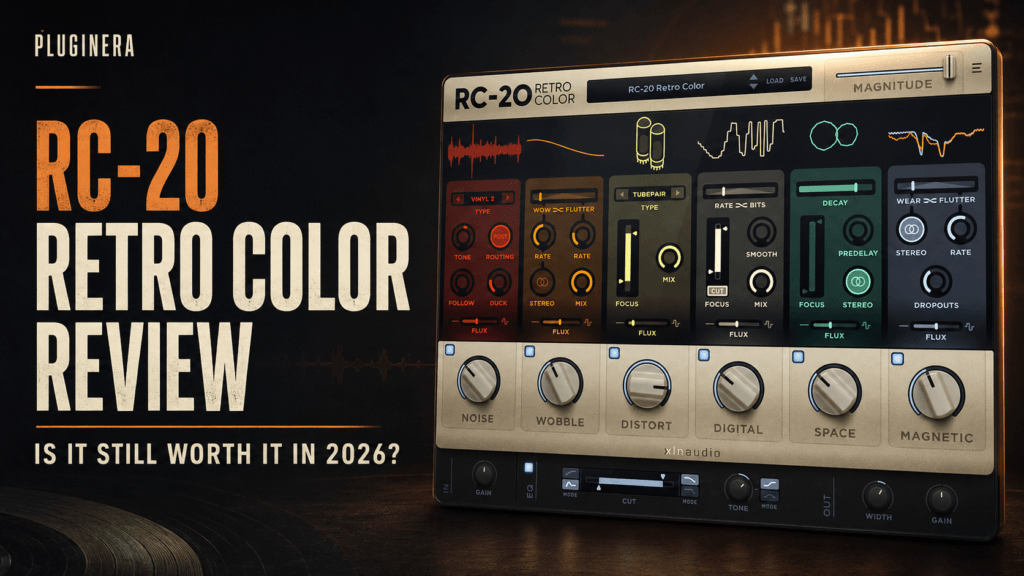
RC-20 combines noise, pitch instability, saturation, bit reduction, reverb, and volume fluctuations in one easy-to-use effects plugin. Producers can use it to transform polished digital sounds into warm, worn, sample-like textures within seconds.
The plugin has been available for several years, but its distinctive interface and straightforward workflow have helped it remain popular among Hip Hop, R&B, Trap Soul, lo-fi, and electronic music producers.
In this RC-20 Retro Color review, we’ll examine its six effect modules, workflow, strengths, limitations, and whether it is still worth adding to your collection in 2026.
What Is RC-20 Retro Color?
RC-20 Retro Color is a creative multi-effects plugin developed by XLN Audio. Although it is frequently placed in the saturation or lo-fi category, it offers considerably more than basic analog warmth.
The plugin is designed to reproduce the imperfections associated with vinyl records, tape machines, vintage samplers, aging electronics, and other older recording equipment.
RC-20 includes six primary effect modules:
- Noise
- Wobble
- Distort
- Digital
- Space
- Magnetic
Each module can be activated and adjusted independently. You can use one module for subtle coloration or combine all six to completely transform a sound.
This modular design allows RC-20 to work as a gentle finishing effect, a full lo-fi processing chain, or an experimental sound-design tool.
RC-20 Retro Color’s Six Effect Modules
Noise
The Noise module adds background texture to otherwise clean recordings.
Its available noise types include vinyl crackle, tape hiss, electrical hum, studio ambience, and mechanical noise. These textures can make a virtual instrument or clean sample feel as though it came from a physical recording.
The Follow control helps the noise respond to the level of the incoming signal. This can make the texture feel connected to the performance instead of sounding like an unrelated noise sample playing underneath it.
Noise works particularly well on:
- Electric pianos
- Sampled melodies
- Synth pads
- Guitar loops
- Intros and outros
- Lo-fi drum breaks
The module is effective, but restraint is important. Too much noise can distract from the music and occupy valuable space in the mix.
Wobble
Wobble recreates the pitch instability associated with worn tape machines and imperfect record players.
At subtle settings, it introduces gentle movement that can make sustained chords and pads feel more organic. At stronger settings, it creates obvious pitch fluctuations suitable for lo-fi effects and experimental transitions.
This module is especially useful for turning a clean software piano, electric piano, or synthesizer into something resembling an older sampled recording.
Small amounts usually produce the most convincing results. Excessive wobble can make chords sound out of tune, particularly when the processed instrument plays alongside clean basses or melodic layers.
Distort
The Distort module ranges from mild saturation to aggressive fuzz and distortion.
Subtle saturation can add harmonics, density, and perceived warmth to a sound. Heavier settings can reshape drums, basses, synths, and vocals into something much more aggressive.
This flexibility makes the module useful across several production styles. A producer could add gentle saturation to an R&B electric piano, more noticeable crunch to a Hip Hop drum break, or heavy distortion to a transition effect.
The Tone control helps shape the character of the distortion, while the module’s amount control determines how strongly the sound is affected.
Digital
The Digital module recreates the lower fidelity associated with vintage digital equipment and older samplers.
It can reduce the bit depth and sample rate, introducing the grainy artifacts often associated with early digital production hardware. This is particularly useful when clean modern drums or samples need an older, rougher character.
For Hip Hop production, the Digital module can help make drums feel sampled instead of freshly downloaded. It can also reduce the polished quality of software instruments and help them sit more naturally beside chopped samples.
Heavy processing can quickly make a sound harsh or thin, so this module is often most effective when blended conservatively.
Space
Space is RC-20’s built-in reverb module.
Rather than trying to replace a dedicated mixing reverb, Space helps push sounds backward and create the impression that they were captured in an older or less controlled environment.
It can add depth and width to keys, melodies, guitars, vocals, and percussion. It is also useful when creating distant intros or washed-out transitions.
Because the reverb is part of the same effects chain, it contributes to RC-20’s cohesive, processed character. However, producers seeking precise room simulation or detailed reverb controls will still want a separate reverb plugin.
Magnetic
Magnetic recreates the volume inconsistencies and dropouts associated with worn tape.
This module can make a perfectly stable recording feel aged and unpredictable. At low settings, it adds gentle movement. At higher settings, the volume drops become an obvious creative effect.
Magnetic is particularly useful for intros, breakdowns, transitional sections, and heavily processed melody loops. It can also create movement in sustained pads and chords without adding another rhythmic instrument.
Like Wobble, Magnetic is easy to overuse. Strong settings may interfere with the groove or make important musical elements disappear unexpectedly.
The Magnitude Control
One of RC-20’s most useful features is its large Magnitude slider.
Magnitude scales the overall intensity of the active effects without requiring you to readjust every module individually. Once you have created the desired combination of noise, wobble, distortion, degradation, reverb, and volume movement, Magnitude lets you control how strongly the complete chain affects the signal.
This makes it easy to dial back an overly dramatic preset or automate the effect during an arrangement.
For example, you could increase Magnitude during an eight-bar intro and then reduce it when the drums enter. You could also automate it during the final bar of a section to create a worn, filtered transition into the hook.
This single control makes RC-20 especially valuable for producers who want fast results without managing a long effects chain.
Presets and Workflow
RC-20 includes presets for drums, keys, guitars, bass, full mixes, and post-production applications.
The presets offer useful starting points, especially for producers who are new to saturation and lo-fi processing. You can load a preset, lower the Magnitude amount, and then adjust the individual modules to suit the source.
Some presets are deliberately dramatic. They are designed to demonstrate what the plugin can do, but they may be too intense for a finished mix.
A better workflow is to treat each preset as a starting point:
- Load a preset that matches the source.
- Reduce the Magnitude control.
- Disable any unnecessary modules.
- Adjust the remaining modules in context with the beat.
- Match the processed and unprocessed volume before comparing them.
This approach gives you the character of the preset without overwhelming the original sound.
The interface is clean and immediate. Each module follows a similar layout, so producers can understand the plugin without spending much time reading a manual.
Using RC-20 for Hip Hop and R&B
Making melodies sound sampled
Place RC-20 on an electric piano, guitar, synth, or melody bus. Add light wobble, subtle noise, gentle saturation, and a small amount of Digital processing.
This can make a newly recorded progression feel as though it was sampled from an older record.
Adding warmth to electric pianos
Clean electric piano plugins can occasionally sound too bright or polished. RC-20 can soften the sound, introduce gentle pitch movement, and add harmonic character.
For modern R&B or Trap Soul, try keeping the Noise and Wobble modules subtle while using Distort to introduce warmth.
Processing drum loops
RC-20 can give modern drum samples the roughness of an older breakbeat or sampler.
The Distort and Digital modules are particularly useful here. A small amount of noise can add atmosphere, while Magnetic can create occasional volume movement.
Be careful when processing the kick. Heavy degradation can weaken its low-end impact.
Creating transitions
Automating Magnitude is one of the easiest ways to create transitions.
Increase the effect at the end of a verse, during an intro, or before the hook. The melody can gradually become noisier, narrower, darker, or more unstable before returning to its original sound when the next section begins.
Processing vocals
RC-20 can give background vocals, vocal chops, and ad-libs a vintage or degraded quality. Space, Noise, and Digital can help push supporting vocals behind the lead.
It is generally better to use RC-20 cautiously on a main vocal unless an obvious lo-fi effect is desired.
Can You Use RC-20 on the Master Bus?
RC-20 can be used on a full mix, but subtlety is essential.
Noise, distortion, bit reduction, reverb, and pitch movement can affect every element in the production. Aggressive settings may weaken the kick and 808, blur the vocal, or reduce the clarity of the mix.
If you use RC-20 on the master bus, start with a low Magnitude setting and consider disabling the more destructive modules.
For Hip Hop and R&B, placing RC-20 on a melody bus, sample bus, or drum bus usually provides more control than processing the entire mix.
What Are RC-20’s Biggest Strengths?
RC-20’s greatest strength is speed.
You could recreate many of its effects using separate noise generators, saturation plugins, bitcrushers, reverbs, pitch modulators, and volume automation. However, building and adjusting that chain would take considerably longer.
RC-20 places all those tools inside one consistent interface.
Other advantages include:
- Six independently adjustable effect modules
- Excellent sound-design potential
- Fast preset-based workflow
- Useful global Magnitude control
- Easy automation for transitions
- Strong results on keys, drums, samples, guitars, and vocals
- Support for modern 64-bit plugin formats
- Native Apple Silicon support
RC-20 works with VST, AU, and AAX-compatible hosts. XLN Audio lists support for popular DAWs including Ableton Live, Logic Pro, Pro Tools, FL Studio, Reason, Reaper, and Cubase.
What Are RC-20’s Limitations?
RC-20 is easy to overuse.
Because the plugin can make an immediate and exciting difference, producers may apply it too heavily or place it on too many tracks. If every instrument has vinyl noise, pitch wobble, distortion, and degradation, the mix can quickly lose focus.
Other potential drawbacks include:
- Some presets are too extreme for immediate use.
- Heavy Digital processing can make sounds harsh.
- Wobble can create tuning problems.
- Noise can accumulate when multiple instances are used.
- Master-bus processing can reduce clarity and low-end impact.
- The regular price may feel high if you only need basic saturation.
RC-20 also has plenty of newer competition. Many plugins now offer tape emulation, vinyl texture, cassette processing, and lo-fi effects. However, few alternatives combine as many creative options with such a fast and recognizable workflow.
Is RC-20 Retro Color Worth It in 2026?
Its individual effects are not necessarily unique when considered separately. What makes RC-20 valuable is how effectively those effects work together.
You can turn a clean software instrument into a dusty sample, add warmth to an electric piano, roughen a drum loop, create an unstable intro, or transform a vocal chop—all from one interface.
Producers who already own several tape, vinyl, saturation, bitcrusher, and modulation plugins may be able to recreate similar results with their existing collection. RC-20’s advantage is convenience, speed, and consistency.
If you frequently find that your sounds are technically polished but lack personality, RC-20 can become one of the most useful creative effects in your plugin folder.
RC-20 Retro Color Pros and Cons
Pros
- Adds vintage character almost instantly
- Combines six useful effects in one plugin
- Excellent for Hip Hop, R&B, Trap Soul, and lo-fi
- Easy to learn
- Strong selection of presets
- Magnitude control makes blending and automation simple
- Useful for both subtle processing and extreme sound design
- Works on individual tracks, buses, and full mixes
Cons
- Easy to apply too aggressively
- Some presets require significant adjustment
- Noise can build up across a busy session
- Heavy processing can weaken transients and low frequencies
- Producers with several lo-fi plugins may already own similar tools
Final Verdict
RC-20 Retro Color remains one of the most approachable and versatile plugins for adding vintage character to modern productions.
Its combination of noise, pitch instability, saturation, digital degradation, reverb, and tape-style volume drops provides everything needed to make clean sounds feel older, warmer, and more distinctive.
The plugin is especially effective on melodies, electric pianos, synths, drum loops, vocal chops, and sample buses. Its Magnitude control also makes it a powerful arrangement tool for creating intros, breakdowns, and transitions.
RC-20 is not a substitute for careful sound selection, and it should not be placed heavily on every track. Used with restraint, however, it can give digital productions the texture and personality they are missing.
For Hip Hop and R&B producers who regularly chase warm, imperfect, sample-like sounds, RC-20 Retro Color remains an excellent creative tool in 2026.
Rating: 4.7 out of 5
Check the latest price for RC-20 Retro Color at Plugin Boutique
Disclosure: This article may contain affiliate links. If you purchase through one of these links, Pluginera may earn a commission at no additional cost to you.
Frequently Asked Questions
Is RC-20 only for lo-fi music?
No. Although RC-20 is strongly associated with lo-fi production, its saturation, modulation, noise, reverb, and degradation effects can be used in Hip Hop, R&B, Trap Soul, pop, electronic music, and sound design.
Is RC-20 good for Hip Hop?
Yes. RC-20 is particularly effective for making melodies sound sampled, aging drum loops, adding warmth to keys, processing vocal chops, and creating transitions.
Can RC-20 make a sound warmer without making it lo-fi?
Yes. You can disable the Noise, Digital, and Magnetic modules and use a small amount of Distort for subtle harmonic coloration. Lowering the Magnitude control can also keep the result polished.
Should I put RC-20 before or after EQ?
Both approaches can work. Placing EQ before RC-20 changes what enters the effects chain, while placing EQ afterward lets you clean up frequencies created or emphasized by the processing. For heavily textured sounds, an EQ after RC-20 is often helpful.
Is RC-20 suitable for mastering?
RC-20 can add subtle character to a complete mix, but it is primarily a creative effects plugin rather than a dedicated mastering processor. Use conservative settings and carefully monitor the low end, stereo image, and overall clarity.