 Modern producers rarely suffer from a shortage of effects. Most DAWs already include delays, reverbs, filters, distortion processors, modulation effects, and other creative tools. The real challenge is combining those effects quickly enough to capture an idea before the inspiration disappears.
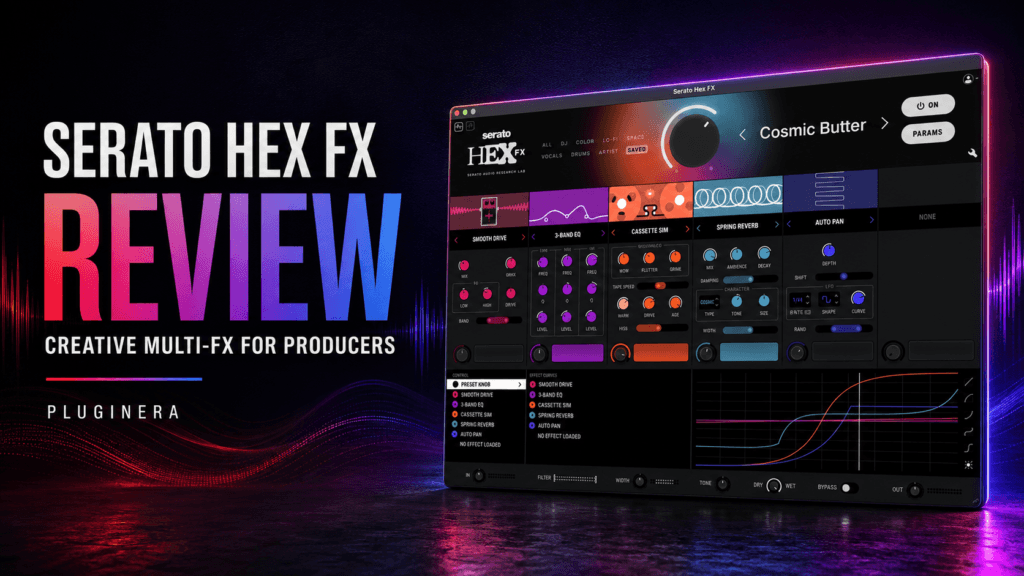
Serato Hex FX approaches that problem by placing more than 45 effects inside one customizable multi-effects plugin. Instead of loading several separate plugins and building a complicated effects chain, you can choose a preset, adjust its main controls, rearrange the processors, and automate performance effects from one interface.
With over 100 presets and contributions from producers such as Lord Finesse, Jake One, DECAP, Dibia$e, Amber Navran, and Guy Lawrence of Disclosure, Hex FX appears particularly promising for beatmakers and sample-based producers.
But does it offer enough to justify adding another effects plugin to your collection?
In this Serato Hex FX review, we’ll examine its effects, presets, workflow, performance features, sound quality, and overall value to determine whether it is worth buying in 2026.
What Is Serato Hex FX?
Serato Hex FX is an all-in-one multi-effects plugin created for music production, sound design, and live-style effects manipulation.
It includes more than 45 individual effects covering categories such as:
- Bit crushing
- Compression
- Delay
- Distortion
- Filtering
- Modulation
- Reverb
- Saturation
- Tremolo
- Time stretching
- Rhythmic effects
- Performance effects
These processors can be combined into customizable effects chains. Hex FX also includes over 100 professionally designed presets for drums, bass, samples, instruments, and the mix bus.
The plugin can handle subtle jobs such as adding warmth, width, or movement. However, its real strength is creative transformation. It can turn a clean melodic loop into a dusty sample, convert ordinary drums into a glitchy transition, or add a vinyl backspin before the hook.
That makes Hex FX less like a traditional mixing plugin and more like a complete sound-design environment.
Interface and Workflow
The easiest way to begin is through the preset browser. You can load a sound, open Hex FX, and audition complete effects chains until you find a direction that fits the track.
The presets cover a wide range of processing styles, including:
- Lo-fi degradation
- Vintage warmth
- Drum enhancement
- Atmospheric delays
- Rhythmic modulation
- Filtered transitions
- Bass processing
- Mix-bus coloration
- Extreme sound transformation
Once you find a suitable preset, you can adjust its controls to make the effect more subtle or dramatic.
The Parameter View provides access to individual effect settings, while the Preset Builder allows you to create and rearrange custom chains using the included processors.
This layered approach makes the plugin accessible to beginners without making it feel restrictive for experienced producers. You can obtain a useful result in seconds or spend additional time creating a unique effects chain.
One thing to watch is the output level. Some presets can make the processed signal louder, which may initially make it appear better. Level-match the processed and unprocessed signals before deciding whether the effect genuinely improves your track.
More Than 45 Chainable Effects
The number of included effects is impressive, but their integration is more important than the total.
Suppose you want to transform a melodic loop. You might normally load a filter, saturation plugin, delay, modulation effect, and reverb. That process involves opening several plugins, adjusting multiple windows, and saving the entire chain inside your DAW.
Hex FX allows you to perform those tasks from one interface.
You could begin by removing high frequencies with a filter, add saturation for character, introduce subtle pitch movement, and finish the chain with delay and reverb. The effects can then be reordered to produce a different result.
Placing distortion before reverb, for example, produces a different texture than distorting the reverb after it has been generated. The ability to experiment with effect order makes Hex FX particularly valuable for sound design.
It can also encourage producers to try combinations they might not have considered when using separate plugins.
Over 100 Multi-Effects Presets
Hex FX includes more than 100 presets designed to provide immediate starting points.
These are not limited to extreme sound-design treatments. The collection includes presets for subtle coloration, drum enhancement, ambience, lo-fi processing, modulation, bass effects, and more dramatic transformations.
Presets are particularly valuable when you know a sound needs something but cannot immediately identify what that something should be.
You can browse several options, discover an interesting direction, and customize the selected chain for your track. This is often faster than building an effects chain from scratch.
However, the presets should still be treated as starting points.
A chain created for one drum break, sample, or bass line may react differently to your material. After loading a preset, adjust its timing, intensity, filtering, and output level to fit the production.
Avoid settling for the first impressive sound. The best preset is not necessarily the most dramatic one—it is the one that serves the song.
Presets From Professional Producers
One of the most appealing aspects of Hex FX is its collection of signature presets from recognized artists and producers.
Contributors include:
- Lord Finesse
- Jake One
- DECAP
- Dibia$e
- Amber Navran of Moonchild
- Guy Lawrence of Disclosure
- DuckGirl
This lineup gives the plugin considerable credibility among hip-hop, R&B, sample-based, and electronic producers.
Lord Finesse, Jake One, and Dibia$e are especially relevant for producers interested in creative drum and sample processing. Amber Navran’s involvement should appeal to musicians working with soulful harmonies, vocals, and atmospheric R&B textures.
These presets can also have educational value. Because the chains can be customized, you can examine how different processors are combined and learn how effect order influences the finished sound.
Instead of treating an artist preset as a magic formula, use it as a foundation for developing your own processing style.
Performance Effects and Automation
Hex FX becomes especially interesting when used for movement and transitions.
Its performance-oriented processors include:
- Brakers
- Repeaters
- Halftime effects
- Vinyl Backspin
- DJ Transform
These tools can help turn a repetitive loop into a more complete arrangement.
For example, you could automate a halftime effect during the final measure before the chorus. A short Repeater effect could transform the last snare or vocal phrase before a new section. Vinyl Backspin could be used to transition into a breakdown or outro.
This makes Hex FX useful for producers who create strong four- or eight-bar loops but struggle to develop those ideas into complete tracks.
The effects allow you to introduce contrast without replacing the main instruments. One drum loop can become an intro, verse, breakdown, and transition simply by changing how it is processed.
The key is to use these effects selectively. A backspin or stutter can create excitement when it appears at the right moment, but repeating the same trick at every transition will quickly make it feel predictable.
Using Serato Hex FX on Drums
Drums are one of the best places to begin experimenting with Hex FX.
Saturation, compression, and shaping effects can add weight and character. Filters and bit crushers can create alternate drum textures, while Brakers and Repeaters can generate fills.
One effective technique is to duplicate your drum bus and process the duplicate heavily. You can then blend the affected version underneath the original drums.
This provides additional texture without sacrificing the punch and clarity of the clean signal.
You could also automate a lo-fi or filtered preset during the intro. When the full-frequency drums return for the verse, the beat will feel larger without requiring an entirely different drum pattern.
Another option is to bounce your drums to audio, process them with Hex FX, and chop the resulting file. The most interesting glitches, repeats, and degraded sections can become custom fills that are unique to your production.
Using Hex FX on Samples and Melodies
Samples, keys, synths, and melodic loops can benefit significantly from Hex FX.
A clean loop can be transformed into something that feels sampled from an older recording. Filtering, saturation, delay, modulation, and time-based processing can remove the polished character and introduce movement.
This is helpful when working with commercial loop libraries. Other producers may have access to the same original material, but a custom effects chain can make your version more distinctive.
For trap soul and R&B, subtle processing will usually work best. Try an atmospheric or vintage preset, reduce its intensity, and leave enough room for the vocal.
A warm, slightly degraded keyboard can provide emotion without overwhelming the production. A filtered delay may also fill the spaces between chord changes without requiring another instrument.
Sample-heavy hip-hop allows for more aggressive processing. You can print several heavily affected versions, reverse them, pitch them, and use small sections as transitions or background textures.
Using Hex FX on Vocals
Hex FX can also be used to create vocal effects, although it should not replace essential vocal-processing tools such as pitch correction, EQ, compression, or de-essing.
Its strength lies in creating vocal throws, ad-libs, transitions, and background textures.
Try placing Hex FX on an auxiliary channel and sending selected words or phrases to it. This allows you to create delay throws, distorted ad-libs, filtered echoes, and stutter effects without processing the entire lead vocal.
You could also duplicate a vocal phrase, process it aggressively, and place it quietly behind the original. This can add depth and character while keeping the main vocal clear.
Once again, automation is your friend. Hex FX will generally be more effective when it appears during selected moments than when it remains active throughout the entire song.
Can You Use Hex FX on the Mix Bus?
Serato positions Hex FX as a plugin that can also process the mix bus. It can work in that role, but you should proceed carefully.
Subtle coloration, filtering, or modulation could enhance an intro, breakdown, or transition. Automating a temporary effect across the entire mix can create a convincing DJ-style moment before the beat drops.
However, heavy distortion, time stretching, delay, or stereo processing can quickly damage the low end and reduce vocal clarity.
For most productions, Hex FX will be safer and more flexible on individual tracks, group buses, or parallel channels.
If you use it on the mix bus, keep the processing subtle or automate it for a specific section. Always check the results on headphones, monitors, and smaller speakers before committing to the effect.
Sound Quality
Hex FX is capable of producing both polished processing and intentionally degraded textures.
It can add clean ambience, subtle warmth, and controlled movement. It can also produce gritty distortion, unstable modulation, digital artifacts, and extreme time-based effects.
The sound quality is good enough for professional music production, but the primary advantage is not that every included effect will replace a specialized plugin.
A dedicated reverb, compressor, or delay may provide deeper control for precision mixing. Hex FX instead gives you a collection of effects designed to work together quickly.
Its greatest strength is moving from a basic idea to an interesting texture without interrupting your workflow.
For producers who value experimentation and speed, that can be more useful than having the most detailed version of every individual processor.
System Requirements and Compatibility
Serato Hex FX is available in the following plugin formats:
- AAX
- AU
- VST
- VST3
Plugin Boutique currently lists support for Windows 10 and Windows 11. On Mac, Hex FX supports recent versions of macOS and compatible Intel and Apple Silicon computers.
One requirement deserves special attention: Serato lists at least 15 GB of available SSD storage.
That is unusually large for an effects plugin. Producers using laptops with limited internal storage should verify that enough space is available before installing it.
Activating Hex FX also requires a Serato account and the license code supplied after purchase.
Serato Hex FX Pros and Cons
Pros
- More than 45 effects in one plugin
- Over 100 multi-effects presets
- Customizable and rearrangeable effects chains
- Easy enough for beginners to start using quickly
- Detailed parameter editing for experienced producers
- Excellent tools for drums, samples, and transitions
- Useful performance effects for developing arrangements
- Presets from respected hip-hop, R&B, and electronic producers
- Strong potential for resampling and sound design
Cons
- May overlap with effects you already own
- Dramatic presets can be overused easily
- Dedicated plugins may provide deeper precision controls
- The 15 GB storage requirement is unusually large
- Producers focused exclusively on traditional mixing may not use its creative features regularly
Who Should Buy Serato Hex FX?
Hip-hop producers can use it to add grit to drums, reshape samples, and generate custom fills. Trap and R&B producers can use it for halftime moments, atmospheric textures, filtered transitions, and vocal effects.
It is also an excellent option for producers who want to create more movement in their arrangements without adding several new instruments.
Hex FX may be less essential if you already own a large effects collection, have established custom chains, and prefer building every treatment manually.
It is also not the first plugin a beginner should purchase if they still need fundamental mixing tools such as a dependable EQ, compressor, and limiter.
Is Serato Hex FX Worth It in 2026?
At its regular listed price of $99, Serato Hex FX provides a substantial collection of creative processing tools inside one streamlined interface.
Whether it is worth buying depends on how you prefer to work.
If you enjoy exploring presets, resampling audio, automating transitions, and transforming ordinary loops into unique textures, Hex FX offers real value. It can help you move beyond repetitive arrangements by creating alternate versions of sounds you already have.
If you rarely use creative effects and already own specialized processors for every category, the plugin may feel less essential.
Hex FX is not valuable simply because it contains more than 45 effects. Its value comes from how quickly those effects can be combined, edited, and performed.
Final Verdict
Serato Hex FX is an inspiring multi-effects plugin that brings sound design, tonal coloration, and performance processing into one flexible environment.
Its combination of more than 45 effects, over 100 presets, customizable chains, and artist-created content provides enough variety to handle everything from subtle enhancement to complete sonic transformation.
Its most important feature is speed.
Hex FX reduces the distance between hearing an idea and creating it. You can turn a plain drum loop into a textured intro, transform a clean melody into a dusty sample, or create a transition without opening a long list of separate plugins.
It will not replace every dedicated effect in a well-equipped studio, and it does not need to. Hex FX succeeds as a creative hub that can make familiar sounds feel fresh again.
For hip-hop, R&B, trap, and electronic producers who enjoy experimenting with drums, samples, and arrangements, Serato Hex FX is worth considering in 2026.
Serato Hex FX Rating
| Category | Rating |
|---|---|
| Sound Quality | 4.5/5 |
| Features | 4.8/5 |
| Presets | 4.7/5 |
| Workflow | 4.6/5 |
| Value | 4.4/5 |
| Overall Rating | 4.6/5 |
Recommended for: Beatmakers, sample-based producers, sound designers, and electronic musicians.
Best feature: Fast, customizable multi-effects chains for creative sound transformation.
Main drawback: The large storage requirement and potential overlap with effects you may already own.