 SSL X-Limit Review: Is It Worth It for Hip Hop & R&B?
Getting a mix loud is easy.
Getting it loud without destroying the punch, low end, transients, and overall feel of the record is where things get difficult.
That is especially true when producing Hip Hop and R&B. Between hard-hitting kicks, deep 808s, punchy snares, smooth vocals, and dynamic instrumentation, pushing a mix into a limiter can quickly make everything sound smaller instead of bigger.
SSL X-Limit from Solid State Logic is designed to solve that problem.
Rather than giving you one limiting algorithm and expecting you to make it work for everything, X-Limit provides several different limiting characteristics, True Peak processing, Lookahead, Auto Release, stereo-image monitoring, and a highly visual interface.
But is SSL X-Limit actually worth adding to your plugin collection?
In this SSL X-Limit review, we’ll look at what the plugin does, its major features, how it can be used for Hip Hop and R&B, and whether it deserves a place in your mixing and mastering workflow.
What Is SSL X-Limit?
SSL X-Limit is a limiter and loudness maximizer developed by Solid State Logic, one of the most recognizable names in professional audio.
The basic job of X-Limit is simple: control peaks while allowing you to increase the perceived loudness of your audio.
However, SSL designed X-Limit to work on much more than just finished masters.
You can use it on:
- Individual instruments
- Vocals
- Drum buses
- 808s and bass
- Instrument buses
- Mix buses
- Masters
That versatility is one of the plugin’s biggest strengths.
X-Limit can behave like a relatively transparent peak controller when you want to preserve the original sound, or you can deliberately push it harder when you want additional punch, glue, or character.
For Hip Hop and R&B producers, that makes X-Limit useful throughout the production process rather than something you only insert at the end of the mastering chain.
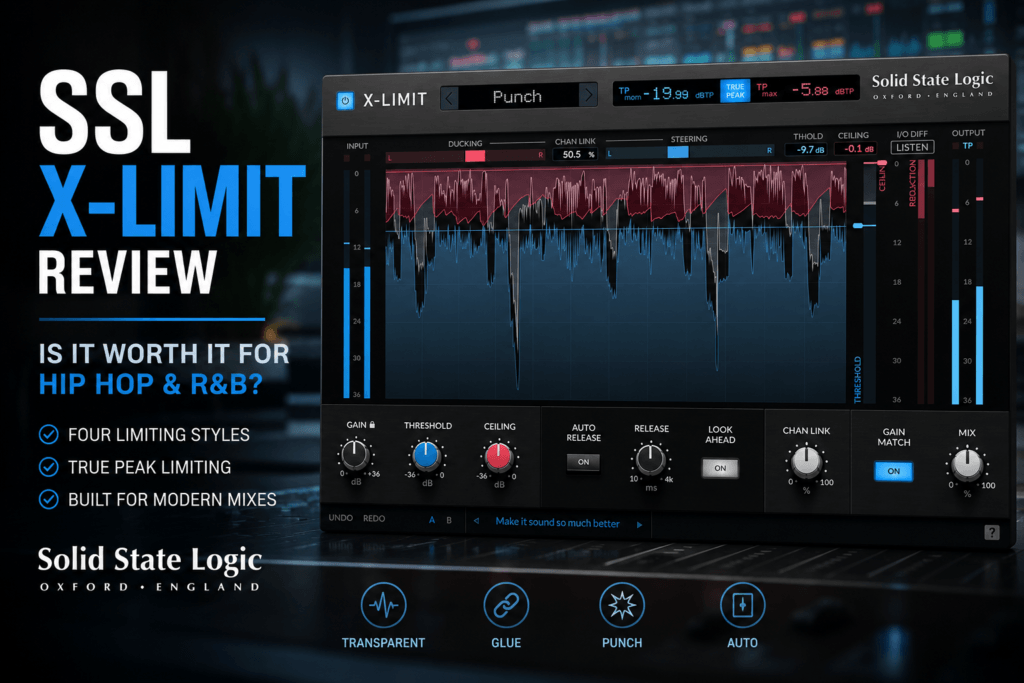
SSL X-Limit Interface
One of the first things you’ll notice about X-Limit is how visual the plugin is.
Instead of relying exclusively on traditional meters, SSL provides a waveform display that lets you see the incoming signal in relation to your Threshold and Ceiling.
That makes understanding what the limiter is doing considerably easier.
You can quickly see when peaks are approaching the limiter and how aggressively you’re processing the signal.
The main controls include:
- Gain
- Threshold
- Ceiling
- Release
- Auto Release
- Lookahead
- Channel Link
- Gain Match
- Mix
There are also controls for selecting X-Limit’s different processing styles.
Despite having several advanced features, the interface remains relatively straightforward.
You don’t need to understand every technical aspect of limiting before you can start getting useful results.
The Four SSL X-Limit Styles
One of X-Limit’s most interesting features is its four different limiting characteristics.
These are:
Transparent
Transparent mode is designed to control peaks while staying as faithful as possible to the original signal.
This is probably where I’d start when mastering Hip Hop or R&B.
If your mix already sounds good and you simply need additional loudness, Transparent mode allows you to push the level without intentionally adding a lot of character.
It can also work extremely well on vocals.
For example, after using compression to shape a vocal’s overall dynamics, X-Limit can catch occasional peaks that still jump through the mix.
Instead of making the limiter obvious, the goal is simply to keep those peaks under control.
Glue
Glue mode is designed primarily for buses and groups.
This is where X-Limit becomes particularly interesting for Hip Hop and R&B production.
Imagine you’ve routed your kick, snare, percussion, and other drums into a single drum bus.
Adding X-Limit in Glue mode can help those individual elements feel more like one drum section.
You could also experiment with Glue on:
- Background vocal buses
- Instrument buses
- Drum buses
- Synth groups
- Mix buses
You don’t necessarily need much gain reduction.
Sometimes just allowing the loudest peaks to interact with the limiter can make a group feel slightly more cohesive.
Punch
Punch mode is where things get more aggressive.
SSL designed this mode to introduce additional pumping and flavor while keeping distortion under control.
For Hip Hop producers, this could be extremely useful on drums.
Put X-Limit on a drum bus, switch to Punch, and gradually lower the Threshold.
You may find that the drums begin to feel heavier and more energetic.
This can work particularly well for:
- Hard Hip Hop drums
- Trap drums
- Boom bap drum buses
- Percussion loops
- Drum breaks
You don’t always have to use a limiter transparently.
Sometimes the limiting itself can become part of the sound.
Auto
Auto mode is the more adaptive option.
Instead of using the same response regardless of the incoming material, Auto adjusts its behavior according to the transient content of the signal.
This can be useful when you’re working quickly or aren’t sure which style works best.
It’s also a good starting point for beginners.
You can load X-Limit, select Auto, adjust the Threshold and Ceiling, and then listen to how the limiter responds before experimenting with the other modes.
True Peak Limiting
True Peak limiting is an important feature when you’re using X-Limit for mastering.
Digital audio can create what’s known as inter-sample peaks.
Even when your regular peak meter suggests that your signal isn’t clipping, reconstruction during playback or conversion can potentially produce peaks above the measured sample values.
X-Limit includes SSL’s True Peak algorithm to help control these peaks.
When True Peak mode is enabled, the plugin provides both momentary and maximum True Peak readings.
This makes X-Limit particularly useful as the final limiter in a mastering chain.
For example, you might have a mastering chain consisting of:
EQ → Compression → Saturation → Clipping → SSL X-Limit
X-Limit can then serve as the final safety net while also helping you reach your desired loudness.
Auto Release
Release settings can dramatically affect how a limiter sounds.
Set the release too fast and you may hear distortion or excessive pumping.
Set it too slow and the limiter may hold onto the signal for too long, reducing the energy and movement of your mix.
X-Limit includes Auto Release to simplify this process.
With Auto Release enabled, the limiter adapts its release behavior to the incoming signal.
Transient peaks can receive a shorter release while sustained material receives a longer release.
This can be particularly useful when mastering a Hip Hop or R&B song containing both aggressive drums and sustained musical elements.
Lookahead
X-Limit also includes Lookahead processing.
Lookahead essentially gives the limiter a small amount of advance knowledge about incoming peaks so that it can react more smoothly.
This can be helpful when dealing with sharp transients such as:
- Kicks
- Snares
- Claps
- Percussion
- Plucked instruments
If you’re trying to achieve cleaner peak control, Lookahead is worth experimenting with.
However, remember that transient control isn’t always about making things smoother.
If you’re deliberately using X-Limit for aggressive drum processing, compare the sound with Lookahead enabled and disabled.
Choose whichever version has the groove and punch you want.
Channel Link, Ducking, and Steering
This is one of the more unusual aspects of X-Limit.
Stereo limiting can potentially affect the stereo image because loud events occurring on one side of the mix may influence how the limiter reacts to the other channel.
X-Limit provides Ducking and Steering meters that give you visual feedback about what’s happening to the stereo image.
The Channel Link control then allows you to adjust the relationship between the left and right channels.
For producers who are just beginning to learn mastering, you don’t necessarily need to obsess over this immediately.
But as your ears and mastering skills improve, having this information available becomes extremely useful.
It gives you another way to evaluate whether achieving additional loudness is negatively affecting the width and stability of your mix.
Gain Match
Gain Match might not sound exciting, but it’s one of the features I appreciate most in dynamics processors.
Louder almost always sounds better during quick comparisons.
That creates a problem.
You might push X-Limit hard, hear the increased volume, and immediately assume you’ve improved the record.
But did it actually sound better?
Or did it just get louder?
Gain Match helps remove that bias by allowing you to compare the processed signal at a more comparable perceived level.
Use it.
You may discover that you don’t need nearly as much limiting as you initially thought.
Mix Control
X-Limit also includes a Mix control.
This means you can blend the processed and original signals together.
That’s particularly interesting when using X-Limit as a creative processor rather than purely as a final mastering limiter.
For example, try placing X-Limit on your drum bus.
Select Punch mode and push the limiter harder than you normally would.
Then reduce the Mix control to blend some of the original drums back into the signal.
Now you’re essentially using aggressive limiting as a form of parallel processing.
You can retain some of the natural transient response while blending in the density and attitude created by X-Limit.
One important consideration: SSL notes that blending the original signal back in can cause the resulting output to exceed your selected Ceiling. Because of that, I’d be cautious with the Mix control when X-Limit is acting as your final mastering limiter.
Using SSL X-Limit on Hip Hop Drums
This might be one of my favorite potential applications for X-Limit.
Hip Hop drums need impact.
Suppose you’ve created a drum bus containing:
- Kick
- Snare
- Claps
- Hi-hats
- Percussion
Insert X-Limit on the bus and start with Punch.
Rather than immediately crushing the signal, lower the Threshold gradually until you begin hearing the drums become denser.
Pay close attention to the kick and snare.
You want additional energy without completely flattening their transients.
If Punch becomes too aggressive, switch to Glue.
Glue can be a better choice when you want the drums to feel cohesive without making the limiting effect as obvious.
Using SSL X-Limit on 808s
808s can create enormous peaks.
Sometimes the low end sounds perfect, but those peaks eat up so much headroom that you can’t get the overall mix as loud as you’d like.
A limiter can help.
Place X-Limit after any EQ, saturation, or compression you’re already using on the 808.
Start with Transparent mode and allow X-Limit to catch only the loudest peaks.
The objective isn’t necessarily to squash the 808.
You’re trying to reduce excessive peak information while maintaining the weight and movement of the bass.
That can make the entire mix easier to master later.
Using SSL X-Limit on Vocals
X-Limit can also be useful near the end of a vocal chain.
A typical R&B vocal chain might include:
EQ → Compression → De-essing → Saturation → SSL X-Limit
Your compressor handles the broader dynamic movement.
X-Limit then catches occasional peaks that still get through.
Transparent mode makes the most sense as a starting point.
Use relatively light gain reduction.
The goal is simply to make the vocal slightly easier to keep forward and consistent in the mix.
This can be especially useful for modern R&B vocals that need to remain intimate and present even when the instrumental becomes dense.
Using SSL X-Limit on the Master Bus
This is where many producers will probably use X-Limit most often.
Place it toward the end of your mastering chain and start with Transparent mode.
Enable True Peak processing and set your Ceiling according to your delivery needs.
Then gradually increase Gain or lower the Threshold while watching the gain reduction and, more importantly, listening.
Don’t chase loudness simply because the plugin lets you.
Listen to what happens to:
- Kick transients
- Snare punch
- 808 weight
- Vocal clarity
- Stereo width
- High-frequency harshness
If your record gets louder but simultaneously becomes smaller, harsher, or less exciting, you’ve gone too far.
Back the limiter off.
A great limiter should help you reach competitive loudness while preserving the qualities that made your mix good in the first place.
SSL X-Limit for R&B
R&B presents a slightly different challenge than aggressive Hip Hop.
You often want loudness while maintaining dynamics, warmth, vocal intimacy, and musical movement.
That makes Transparent and Glue particularly useful.
Transparent can work well as your final mastering limiter, while Glue can be experimented with on background vocals, instruments, drums, or other subgroups.
The ability to move between transparent and character-based limiting without loading another plugin is one of X-Limit’s biggest advantages.
What I Like About SSL X-Limit
The biggest strength of X-Limit is its versatility.
You’re essentially getting several different approaches to limiting inside one interface.
The four processing styles mean you can use the same limiter for transparent mastering, drum processing, vocal peak control, and bus processing.
The visual interface is another major advantage.
Limiting can be confusing when you’re learning mixing and mastering because you don’t always understand exactly what you’re hearing.
X-Limit provides enough visual information to help you connect what you’re hearing with what the limiter is doing.
True Peak processing, Auto Release, Lookahead, Gain Match, Channel Link, and the Mix control make the plugin considerably deeper than its relatively simple interface initially suggests.
Potential Downsides
X-Limit won’t magically fix a bad mix.
If your kick and 808 are fighting each other, the limiter won’t solve the underlying frequency problem.
If your drums lack punch before mastering, simply pushing them harder into X-Limit isn’t necessarily going to fix them.
And if you’re looking for an extremely detailed mastering suite with extensive loudness metering and dozens of algorithms, you may still want additional mastering tools alongside X-Limit.
But that’s also part of the appeal.
X-Limit doesn’t try to turn limiting into rocket science.
It gives you enough control to shape the result while remaining fast and approachable.
Is SSL X-Limit Good for Beginners?
Yes.
In fact, I think the visual workflow makes X-Limit particularly approachable for producers learning how limiting works.
Start with Auto or Transparent mode.
Set your Ceiling.
Gradually lower the Threshold or increase the incoming Gain.
Listen to what happens.
Then use Gain Match to compare the processed and unprocessed versions fairly.
As you become more comfortable, start experimenting with Release, Lookahead, Channel Link, and the other processing styles.
That creates a natural learning curve instead of confronting you with dozens of advanced parameters immediately.
Is SSL X-Limit Worth It?
For Hip Hop and R&B producers, SSL X-Limit is absolutely worth considering.
Its biggest advantage isn’t simply that it can make a record louder.
There are plenty of plugins capable of doing that.
The real strength is how many different roles X-Limit can fill.
It can be a transparent mastering limiter.
It can catch vocal peaks.
It can control an 808.
It can glue an instrument bus together.
And when you switch into Punch mode, it can become a creative dynamics processor for drums and other aggressive material.
Combine that versatility with True Peak limiting, Auto Release, Lookahead, Gain Match, Channel Link, stereo-image feedback, and the Mix control, and you have a limiter that can stay useful as your mixing and mastering skills improve.
Final Verdict
SSL X-Limit strikes a nice balance between simplicity, flexibility, and professional-level control.
Beginners can load it, choose a style, adjust the Threshold and Ceiling, and start learning how limiting affects their music.
More experienced producers can dig into True Peak processing, Release, Lookahead, Channel Link, parallel processing, and the different limiting characteristics.
For Hip Hop and R&B specifically, the combination of Transparent, Glue, and Punch makes X-Limit particularly attractive.
Transparent can handle mastering and vocals.
Glue can help groups and buses feel more cohesive.
Punch can bring additional attitude to drums.
That makes SSL X-Limit much more than something you only load during mastering.
It’s a versatile dynamics tool that can become part of the mixing process as well.
If you’re looking for a limiter that can move between clean loudness control and creative processing without making the workflow unnecessarily complicated, SSL X-Limit deserves a serious look.
Rating: 9/10
Best for: Hip Hop and R&B producers, beatmakers, mixing engineers, home-studio producers, drum-bus processing, and mastering.
Standout features: Transparent/Glue/Punch/Auto styles, True Peak limiting, visual workflow, Auto Release, Lookahead, Gain Match, Channel Link, and parallel Mix control.
Bottom line: SSL X-Limit offers enough simplicity for beginners while providing enough flexibility to remain useful as you become a better mixer and mastering engineer.