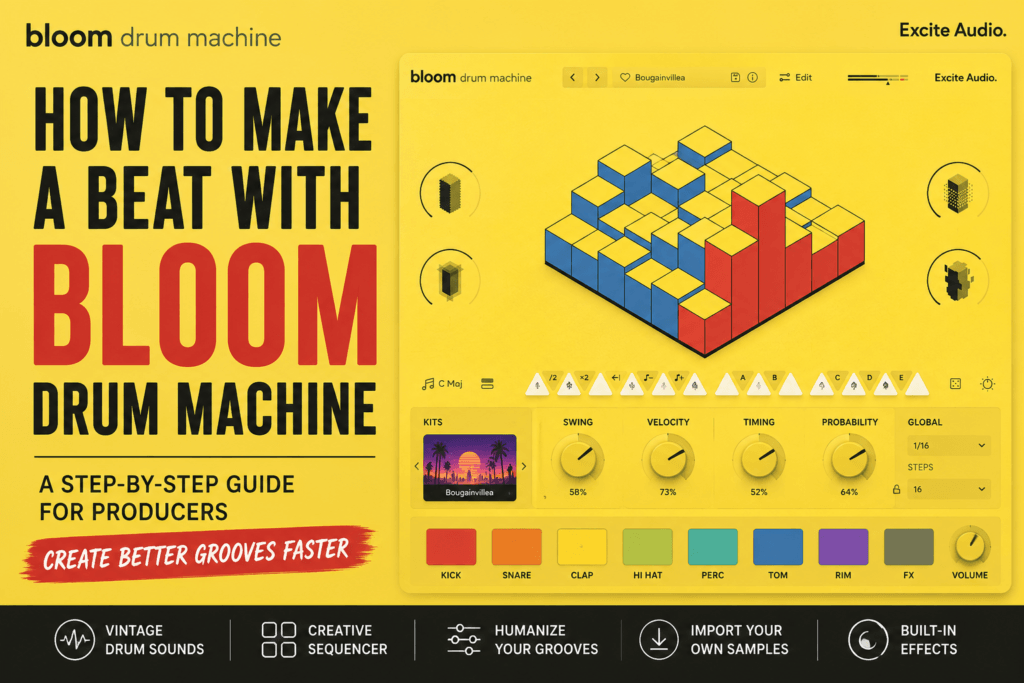
 How to Make a Beat with Bloom Drum Machine: A Step-by-Step Guide for Producers
Creating great drum grooves doesn’t have to mean spending hours programming every hit manually. Bloom Drum Machine by Excite Audio was designed to help producers build inspiring beats quickly using vintage drum sounds, intelligent sequencing, and creative performance tools.
Whether you’re producing hip-hop, trap, lo-fi, pop, or electronic music, Bloom Drum Machine can dramatically speed up your workflow while keeping your drum patterns feeling fresh and musical.
In this guide, you’ll learn exactly how to make a beat using Bloom Drum Machine, from choosing a drum kit to building a complete groove that serves as the foundation of your next track.
Why Use Bloom Drum Machine?
Many drum plugins offer thousands of samples but require extensive setup before you can start creating music. Bloom Drum Machine takes a different approach by emphasizing creativity first.
Instead of spending your time browsing endless folders, you can quickly load a preset, tweak a few parameters, and have a polished groove ready in minutes.
Some of its standout features include:
- Vintage-inspired drum machine sounds
- Creative step sequencer
- Swing and probability controls
- Built-in effects
- Drag-and-drop sample importing
- Lightweight CPU performance
For producers who want to stay in a creative flow, this streamlined workflow is one of Bloom Drum Machine’s biggest strengths.
Step 1: Choose a Drum Kit That Matches Your Style
Every great beat starts with the right sounds.
Open Bloom Drum Machine and spend a few minutes browsing the included drum kits. Each kit has its own personality, ranging from vintage drum machine tones to modern electronic textures.
Ask yourself:
- Am I making a trap beat?
- Is this an R&B groove?
- Do I want a lo-fi vibe?
- Should the drums sound clean or gritty?
Don’t overthink this stage.
Pick a kit that immediately inspires you.
Remember, you can always swap sounds later if your production evolves in a different direction.
Step 2: Program Your Core Drum Groove
Once you’ve selected a kit, it’s time to build your foundation.
Start simple.
A basic groove often sounds stronger than one overloaded with percussion.
For a hip-hop or trap beat, try this structure:
Kick
Keep the kick pattern simple and punchy. Focus on creating a groove that supports the rhythm instead of filling every beat.
Snare
Place the snare on beats 2 and 4 if you’re working in a traditional groove, or experiment with alternative placements for a more modern feel.
Hi-Hats
Begin with straightforward eighth or sixteenth notes.
You can always add rolls and variations later.
Percussion
Don’t worry about extra percussion yet.
Build a solid foundation before adding complexity.
Step 3: Humanize Your Beat
This is where Bloom Drum Machine starts to separate itself from traditional drum plugins.
Instead of every note sounding identical, use the built-in performance controls.
Swing
A small amount of swing can instantly make your groove feel more natural.
Too much swing, however, can make the rhythm feel sluggish.
A subtle adjustment usually produces the best results.
Velocity
Real drummers never strike every drum with the exact same force.
Lower the velocity on some hi-hats and percussion hits to create movement.
Timing
Move certain notes slightly ahead or behind the beat.
These tiny timing differences make programmed drums feel more alive.
Probability
One of Bloom Drum Machine’s most creative features is Probability.
Instead of every note playing every time, Probability allows certain hits to trigger only occasionally.
This creates subtle variations every time your pattern loops.
The result feels much closer to a live performance.
Step 4: Build Multiple Drum Patterns
Professional beats rarely repeat the exact same loop for three minutes.
Instead, create several pattern variations.
For example:
- Pattern A – Main Groove
- Pattern B – Chorus Energy
- Pattern C – Breakdown
- Pattern D – Drum Fill
Even changing one or two drum hits every eight bars keeps listeners engaged.
Small changes make a huge difference.
Step 5: Layer Additional Percussion
Once your main groove feels solid, begin adding texture.
Consider layering:
- Claps
- Rimshots
- Shakers
- Tambourines
- FX percussion
- Reverse cymbals
The goal isn’t to add more sounds.
The goal is to make the groove feel wider and more interesting.
Every additional layer should support the rhythm rather than compete with it.
Step 6: Shape Your Drums with Built-In Effects
Bloom Drum Machine includes several useful effects that let you polish your drums without opening additional plugins.
Reverb
A little reverb helps create space.
Keep it subtle for hip-hop.
Increase it for ambient or lo-fi productions.
Dynamics
Use compression carefully to tighten your groove and make your drums feel more consistent.
Bitcrusher
If you’re after vintage textures or gritty character, Bitcrusher can completely transform your drum kit.
A small amount often adds personality without destroying clarity.
Step 7: Import Your Own Drum Samples
One of Bloom Drum Machine’s best features is the ability to use your own sounds.
Try combining:
- Your favorite 808 kick
- Custom clap samples
- Layered snares
- Unique percussion
- One-shot FX
This lets you enjoy Bloom Drum Machine’s sequencing tools while maintaining your own signature sound.
Many professional producers build custom kits this way.
Step 8: Build the Rest of the Beat
Once your drums are finished, they’re ready to support the rest of your production.
Next, begin adding:
Bass
Create an 808 pattern that locks in with your kick.
Leave space between notes so both elements can breathe.
Chords
Warm pads, pianos, or synths provide the harmonic foundation.
Bloom Drum Machine works particularly well with vintage keyboards and analog-style synths.
Melody
Add a lead melody that complements your drum groove.
Simple melodies often work better than complicated ones.
Counter Melody
If the beat feels empty, introduce a secondary melodic element that answers the main melody without overpowering it.
Arrange Your Beat Into a Full Song
Don’t stop at a four-bar loop.
Expand your idea into a complete arrangement.
A simple structure might look like this:
- Intro (8 bars)
- Verse (16 bars)
- Hook (8 bars)
- Verse (16 bars)
- Hook (8 bars)
- Bridge (8 bars)
- Final Hook (16 bars)
- Outro (8 bars)
Mute and unmute different drum elements throughout the arrangement to create energy and contrast.
Tips for Hip-Hop and Trap Producers
If you’re making modern hip-hop or trap beats, keep these ideas in mind:
- Leave room for the artist’s vocals.
- Use Probability sparingly to create subtle variation.
- Layer Bloom Drum Machine with your favorite 808 samples.
- Bounce interesting drum loops and resample them.
- Focus on groove before adding complexity.
- Don’t feel obligated to fill every space with percussion.
Often, the simplest beats are the hardest-hitting.
Common Mistakes to Avoid
Even with a creative plugin like Bloom Drum Machine, there are a few pitfalls to watch for:
Overcrowding the Groove
Too many percussion sounds can make your beat feel cluttered.
Overusing Swing
Excessive swing can throw off the rhythm instead of enhancing it.
Ignoring Velocity
Flat dynamics make programmed drums feel robotic.
Using Too Many Effects
Sometimes dry drums hit harder than heavily processed ones.
Never Changing the Pattern
Listeners appreciate subtle variation.
Even small changes every few bars can make your beat feel much more professional.
Final Thoughts
Bloom Drum Machine isn’t trying to replace every drum sampler on the market. Instead, it focuses on helping producers create inspiring grooves as quickly as possible.
Its combination of vintage drum sounds, creative sequencing tools, performance controls, and built-in effects makes it an excellent choice for beat makers who value speed without sacrificing creativity.
Whether you’re producing trap, R&B, hip-hop, lo-fi, or electronic music, Bloom Drum Machine provides a fun and efficient way to turn ideas into finished drum tracks.
If you’ve been looking for a drum plugin that encourages experimentation while keeping your workflow simple, Bloom Drum Machine deserves a place in your production toolkit.
Frequently Asked Questions
Is Bloom Drum Machine good for hip-hop?
Yes. Its vintage-inspired drum sounds, creative sequencer, and humanization features make it an excellent choice for hip-hop, trap, and R&B producers.
Can I import my own drum samples?
Absolutely. Bloom Drum Machine supports drag-and-drop sample importing, allowing you to combine your own sounds with its powerful sequencing engine.
Is Bloom Drum Machine beginner-friendly?
Yes. The clean interface and intuitive controls make it easy for beginners to start creating professional-sounding drum grooves quickly.
Does Bloom Drum Machine work for trap beats?
Definitely. While it’s versatile enough for many genres, its sequencing tools, swing controls, and probability features are especially useful for creating dynamic trap drum patterns.
Is Bloom Drum Machine worth it?
If you value a fast, inspiring workflow and enjoy experimenting with drum grooves, Bloom Drum Machine offers excellent value for producers at any experience level.