 How To Use Arturia Pure SUB: A Beginner’s Guide
If you make Hip Hop, R&B, Trap, or Trap Soul, you already know how important the low end is. A great melody and drum pattern can quickly lose their impact if the bass doesn’t have enough weight, character, or movement.
That’s where Arturia Pure SUB comes in.
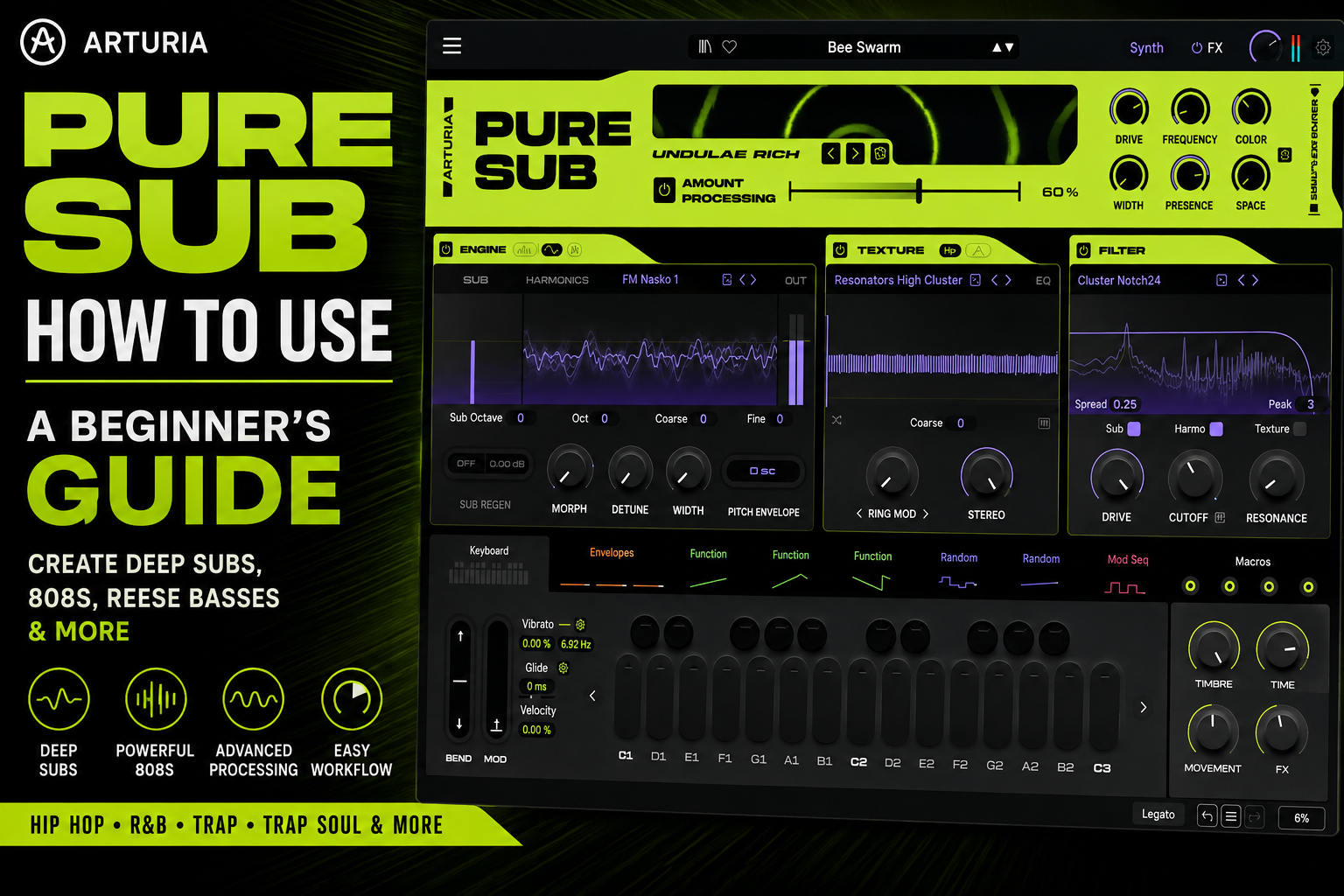
Pure SUB is a synthesizer designed specifically for creating bass sounds. Instead of giving you a massive traditional synthesizer and expecting you to build everything from scratch, Arturia gives you dedicated tools for controlling the Sub, Harmonics, Texture, filtering, processing, modulation, and effects of your bass.
That makes Pure SUB capable of creating everything from clean R&B sub basses to hard-hitting Trap 808s and aggressive Reese basses.
If you’ve just installed the plugin and aren’t sure where to begin, this guide will show you how to use Arturia Pure SUB and give you a practical workflow you can use when making beats.
What Is Arturia Pure SUB?
Arturia Pure SUB is a bass-focused software synthesizer built around one main idea: giving producers detailed control over the different layers that make up a bass sound.
Instead of treating your bass as one single signal, Pure SUB allows you to think about it in several components.
The three most important are:
- Sub
- Harmonics
- Texture
The Sub provides the deep fundamental frequencies.
The Harmonics give your bass additional tone, character, and presence.
The Texture section introduces additional sonic detail and movement.
From there, you can shape everything using filtering, processing, modulation, effects, and output controls.
Understanding those three layers is one of the biggest keys to learning Pure SUB.
Start With the Pure SUB Presets
Before trying to create your first sound from scratch, spend some time browsing Pure SUB’s preset library.
Pure SUB includes hundreds of presets covering several different styles of bass.
You’ll find sounds suitable for:
- 808s
- Sub bass
- Reese bass
- Hip Hop
- Trap
- R&B
- Electronic music
- Aggressive bass
- Experimental bass sounds
Presets aren’t just useful for finding sounds quickly.
They’re also one of the best ways to learn the plugin.
Load a preset you like and start changing individual parameters.
Turn down the Texture.
Change the Harmonics.
Adjust the filter.
Reduce the processing.
Listen carefully to how each change affects the sound.
This will teach you how Pure SUB works much faster than randomly turning every knob on the interface.
Step 1: Start With the Sub
When designing your own sound, I recommend starting with the Sub section.
This is the foundation of your bass.
The Sub provides the low-frequency energy that gives your track its weight.
When making Hip Hop or R&B, don’t immediately try to make the bass sound huge.
Start simple.
Play your chord progression and use the root notes to create a basic bassline.
Listen to how the Sub interacts with your kick drum.
You want the bass to feel powerful without completely overwhelming the rest of your beat.
Find the Right Octave
One of the easiest mistakes to make with bass is playing too low.
Lower doesn’t always mean better.
If your bass goes too low, you may have difficulty hearing the fundamental on normal speakers.
Move your bassline between octaves and find the range where it still feels deep but remains clearly defined.
For many beats, moving a few notes up an octave can actually make the bass sound bigger because the listener can hear it more clearly.
Step 2: Add Harmonics
Once your Sub sounds good, move to the Harmonics section.
Harmonics are extremely important because they give your bass character.
They’re also one of the secrets to getting bass to translate onto smaller speakers.
A phone or laptop speaker may not reproduce the deepest frequencies of your bass, but it can reproduce some of the harmonics above them.
Those harmonics help the listener perceive the bass even when the actual fundamental isn’t being reproduced.
Pure SUB gives you different harmonic engines that can dramatically change the personality of your sound.
Pressure
Pressure is a good place to start when creating bass sounds for Hip Hop and R&B.
You can use it to add harmonic information while keeping your bass relatively controlled.
Try adding just enough Harmonics to make the bass more noticeable.
You don’t necessarily want the Harmonics to dominate the sound.
For smooth R&B bass, subtlety usually works extremely well.
Reese
The Reese engine can take you into much more aggressive territory.
Reese-style bass sounds typically contain additional width, movement, and harmonic complexity.
This makes Reese useful for:
- Dark Hip Hop
- Electronic music
- Cinematic production
- Aggressive Trap
- Experimental R&B
- Reese basslines
Try holding a long bass note and experimenting with controls such as Morph and Detune.
You’ll hear the bass become increasingly animated.
Step 3: Experiment With Morph
The Morph control allows you to change the harmonic character of your sound.
This can completely change the personality of a bass patch without requiring you to start over.
Start with Morph in one position and slowly move it while holding a note.
Listen for the point where the bass fits your beat.
You can also use modulation later to make Morph move automatically.
This is an easy way to create bass sounds that evolve throughout a track.
Step 4: Use the Pitch Envelope
The Pitch Envelope is especially useful when creating 808s.
A traditional 808-style bass often begins slightly higher in pitch before quickly dropping into its fundamental note.
That creates the familiar punch at the beginning of the sound.
Think of it like:
Attack → Pitch Drop → Sub
You don’t need an extreme pitch envelope.
A short, quick pitch movement can give your 808 enough attack to cut through your drums.
This is especially useful if you want your 808 to have some of the impact normally associated with a kick drum.
Step 5: Add Texture
Once you’ve created your Sub and Harmonics, experiment with the Texture section.
Texture allows you to introduce additional sonic detail.
Depending on the sound you’re designing, this can add:
- Grit
- Noise
- Movement
- Distortion
- Metallic character
- Additional high-frequency information
For R&B and Trap Soul, I recommend starting with very little Texture.
You may only need enough to make the bass feel slightly less clean.
For Trap or experimental Hip Hop, you can push Texture considerably harder.
The important thing is remembering that Texture doesn’t necessarily need to become the main part of your bass.
Think of it as seasoning.
The Sub should still provide your foundation.
Step 6: Shape Your Bass With the Filter
After building the basic sound, move to the Filter section.
Filtering allows you to control which frequencies remain in your bass.
For example, you can use a low-pass filter to remove some of the brighter frequencies from your Harmonics and Texture.
This can turn an aggressive bass into something much darker.
That’s particularly useful for R&B and Trap Soul.
One of the interesting aspects of Pure SUB is the ability to control how different components of the sound interact with filtering.
That means you can aggressively shape the character of your bass while maintaining a strong low-frequency foundation.
A useful approach is:
Clean Sub + Processed Harmonics + Processed Texture
This gives you stability at the bottom while still allowing the upper portion of your bass to have character.
Step 7: Add Filter Drive
The Drive control can introduce additional harmonic character.
If your bass sounds too clean, try gradually increasing Drive.
For smooth R&B bass, you may only need a small amount.
For Trap, you can push it harder.
For aggressive bass sounds, you can experiment with much higher settings.
Don’t automatically assume more Drive will make the sound better.
Add it while listening to the bass inside the entire beat.
That’s important.
A bass that sounds incredible by itself can easily become too aggressive once the drums, melodies, and vocals are playing.
Step 8: Use Sub Regen
Sub Regen is one of the most interesting features inside Pure SUB.
Heavy distortion and processing can sometimes make the fundamental frequencies of a bass unstable.
That’s a problem because those frequencies are responsible for much of the weight of the sound.
Sub Regen helps you maintain a cleaner fundamental while still allowing you to heavily process the rest of your bass.
This can be extremely useful for 808s.
Imagine creating a heavily distorted Trap 808.
You want:
Dirty Harmonics
but also:
Clean Low End
Sub Regen gives you another way to achieve that balance.
This means you can make the upper portion of the 808 aggressive without completely destroying the foundation underneath it.
Step 9: Explore the Sub Processor
The Sub Processor is where Pure SUB can really start transforming your sounds.
You can use its different processing modes to introduce additional distortion, saturation, texture, and tonal changes.
Start by choosing a processing mode.
Then gradually increase the Amount Processing control.
Don’t immediately turn it to 100%.
Instead, increase the processing until you clearly hear what it’s doing.
Then try backing it down slightly.
This often gives you enough character without completely overpowering the original sound.
For Hip Hop and R&B, this approach works particularly well.
You usually don’t need your bass to sound completely destroyed.
You just need enough processing to give it personality.
Step 10: Use the Main Sound Controls
At the top of the Pure SUB interface, you’ll find several important controls that can quickly change the overall character of your bass.
These include controls such as:
- Drive
- Frequency
- Color
- Width
- Presence
- Space
These are great for making broader adjustments after you’ve created the foundation of your sound.
Drive
Use Drive when you want additional aggression or saturation.
Frequency
Use Frequency to change the tonal emphasis of the sound.
Color
Color can help change the overall character of the bass.
Width
Width determines how wide your bass feels.
Be careful when widening extremely low frequencies.
Keeping the deepest part of your bass relatively centered can help maintain a strong mix.
Presence
Presence can help your bass become more noticeable.
This can be particularly useful when the Sub sounds great but the bass disappears on smaller speakers.
Space
Space can introduce additional dimension.
Use it carefully with bass.
Too much spatial processing can make your low end less focused.
Step 11: Add Effects
Pure SUB also includes built-in effects for taking your bass further.
This means you don’t necessarily have to build a huge external processing chain inside your DAW.
Depending on the sound, you may want to use processing such as:
EQ → Compression → Saturation → Maximization
But don’t feel like you have to use every available effect.
If the bass already sounds good, leave it alone.
One of the biggest lessons in music production is knowing when to stop processing.
Step 12: Add Movement With Modulation
Once you’re comfortable designing basic sounds, start experimenting with modulation.
This is where Pure SUB becomes considerably more powerful.
You can use modulation to automatically change different parameters over time.
Try modulating:
- Filter Cutoff
- Morph
- Texture
- Harmonics
- Processing
- Timbre
Start with extremely small amounts.
You don’t always want the listener to hear obvious modulation.
Sometimes subtle movement is enough to make a bass feel alive.
This is particularly effective with sustained bass notes.
Instead of hearing the exact same tone for several seconds, the sound can slowly evolve.
Step 13: Use Glide for Sliding 808s
If you’re making Trap or Trap Soul, you’ll definitely want to experiment with Glide.
Glide allows the pitch to slide between notes.
This creates the familiar sliding 808 effect heard throughout modern Hip Hop.
Start with a relatively short Glide setting.
Then play overlapping MIDI notes.
You’ll hear the pitch transition between them.
Gradually increase the Glide time until the slide matches the rhythm of your beat.
The key is using slides strategically.
You don’t need every note to glide.
A few carefully placed slides can make a simple 808 pattern sound much more interesting.
How To Make an R&B Bass With Pure SUB
For smooth R&B, I’d keep the sound relatively simple.
Start with:
Clean Sub
Then add:
Small amount of Pressure Harmonics
Follow that with:
Subtle Texture
Then use:
Gentle filtering
Add a small amount of processing for additional character.
Keep Width under control and use Presence if you need the bass to translate better.
The final sound should feel deep and warm without dominating the production.
Then concentrate on actually playing the bass.
Try using:
- Root notes
- Octaves
- Passing tones
- Short rhythmic notes
- Slides
- Chord tones
A simple sound with a great bassline will usually beat a complicated sound playing nothing but sustained root notes.
How To Make a Trap Soul 808 With Pure SUB
For Trap Soul, you can push the sound slightly harder.
Try this basic workflow:
Sub
↓
Pressure Harmonics
↓
Pitch Envelope
↓
Small Amount of Texture
↓
Low-Pass Filter
↓
Filter Drive
↓
Sub Processor
↓
Sub Regen
↓
Glide
This should give you a bass that remains deep while having enough upper-frequency information to cut through the mix.
Then use Glide to create slides between selected notes.
Keep the pattern relatively simple and allow the 808 to work with your kick rather than constantly fighting against it.
How To Make a Hard Trap 808 With Pure SUB
For harder Trap production, you can become much more aggressive.
Start with a strong Sub foundation.
Add Harmonics so the bass translates onto smaller speakers.
Use the Pitch Envelope to create a stronger attack.
Introduce Texture.
Add Filter Drive.
Push the Sub Processor harder.
Use Sub Regen to help maintain your fundamental.
Then add additional saturation or maximization if necessary.
The result should give you:
Clean Low End + Aggressive Harmonics
That’s one of the most useful approaches to designing modern 808s.
Don’t Make Everything Huge
One of the biggest mistakes beginners make with Pure SUB will probably be using too much of everything.
You don’t necessarily need:
Huge Sub + Huge Harmonics + Huge Texture + Drive + Distortion + Width + Effects + Maximization
Sometimes your track only needs:
Sub + Harmonics
That’s it.
Think about Pure SUB’s controls as solutions to specific problems.
If the bass isn’t deep enough, adjust the Sub.
If it disappears on smaller speakers, add Harmonics.
If it’s too clean, add Texture.
If it lacks aggression, add Drive.
If you want additional processing, use the Sub Processor.
If heavy processing damages your fundamental, experiment with Sub Regen.
If the sound feels static, introduce modulation.
If you want sliding 808s, use Glide.
This approach makes Pure SUB much easier to understand.
A Simple Pure SUB Workflow for Beginners
If you’re opening Pure SUB for the first time, don’t try to master every feature.
Follow this workflow:
1. Create the Sub
Build the low-frequency foundation.
2. Add Harmonics
Give the bass character and improve translation.
3. Add Texture
Introduce additional grit or detail if needed.
4. Filter the Sound
Shape the overall tone.
5. Add Drive
Introduce saturation when necessary.
6. Use the Sub Processor
Add additional character or aggression.
7. Use Sub Regen
Maintain a strong fundamental when heavily processing the bass.
8. Add Effects
Polish the sound.
9. Add Modulation
Create movement.
10. Add Glide
Create slides for 808-style basslines.
This gives you a simple mental model:
Foundation → Character → Texture → Processing → Movement
Is Arturia Pure SUB Easy to Use?
Despite the amount of sound-design power available, Pure SUB is surprisingly approachable once you understand its basic architecture.
You don’t have to master every processor or modulation source before making music.
Start with the Sub.
Then add Harmonics.
Then add Texture.
Everything else can come later.
That’s what makes Pure SUB particularly useful for producers who want more control over their bass without having to become advanced synthesizer programmers.
Final Thoughts
Learning how to use Arturia Pure SUB comes down to understanding the different components that make up a great bass sound.
Your Sub provides the foundation.
Your Harmonics provide tone and help the bass translate.
Texture adds additional character.
The Filter and Drive help shape the sound.
The Sub Processor lets you push the bass into more aggressive territory.
Sub Regen can help maintain the fundamental when you’re processing heavily.
And modulation and Glide allow you to introduce movement and expression.
Once you understand those concepts, Pure SUB becomes much easier to navigate.
More importantly, you stop thinking about bass as something you simply select from an 808 sample folder.
Instead, you can design the bass around the beat you’re actually making.
For Hip Hop, R&B, Trap, and Trap Soul producers, that’s where Arturia Pure SUB can become an incredibly useful sound-design tool.