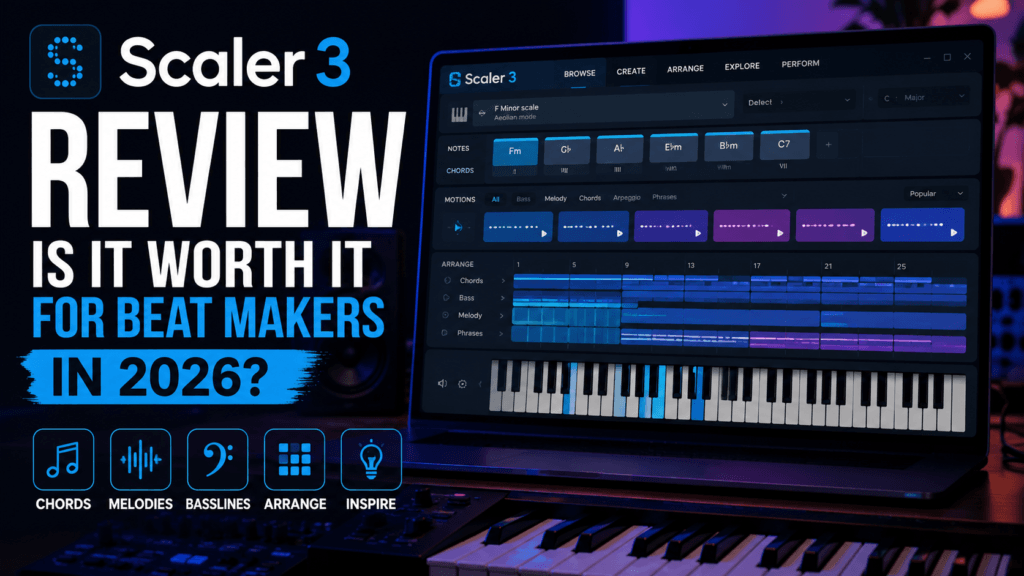
 Scaler 3 Review: Is It Worth It for Beat Makers in 2026?
Rating: ⭐⭐⭐⭐⭐ (9.8/10)
If you’ve ever stared at a blank piano roll wondering what chords to write next, you’re not alone. Every producer—whether you’re making trap, R&B, drill, pop, or cinematic music—eventually hits a creative wall. That’s exactly where Scaler 3 shines.
Originally known as one of the best music theory plugins available, Scaler has evolved into something much bigger. Version 3 isn’t just a chord generator anymore—it’s a complete songwriting and composition environment capable of helping you build chord progressions, melodies, basslines, and even full arrangements without leaving the plugin. It now includes a standalone mode, VST/AU hosting, a redesigned interface, timeline-based arranging, and hundreds of creative tools that make composing faster and more inspiring than ever.
Whether you’re an experienced producer or someone still learning music theory, Scaler 3 has quickly become one of the most valuable creative tools you can add to your workflow.
What Is Scaler 3?
Scaler 3 is an advanced music theory and composition plugin developed by Scaler Music. Rather than creating sounds itself, it helps you write better music by suggesting chords, scales, voicings, substitutions, progressions, melodies, basslines, and harmonic variations.
Think of it as having a music theory expert sitting beside you while you produce.
Instead of guessing which chord should come next, Scaler intelligently recommends options that fit your progression while also encouraging creative exploration beyond traditional theory.
For beat makers, that’s a huge advantage.
What’s New in Scaler 3?
While Scaler 2 was already considered one of the best songwriting plugins available, Scaler 3 feels like a complete redesign rather than a simple update.
Some of the biggest improvements include:
- Completely redesigned Browse, Create, and Arrange workflow
- Standalone desktop application
- VST and AU instrument/effect hosting directly inside Scaler
- Multi-lane arrangement timeline
- Expanded chord libraries
- New Explore page for harmonic discovery
- Colors page for advanced chord substitutions and voicings
- Hundreds of new Motions for melodies, basslines, arpeggios, and phrases
- Improved note editing
- Better search and filtering
- Continuous feature updates, including recent workflow enhancements such as Multi-Bind and expanded Motion flexibility.
These additions transform Scaler from a chord assistant into a full composition workstation.
Interface & Workflow
One of the first things you’ll notice is how polished the new interface feels.
Everything is organized into three primary sections:
Browse
This is where inspiration begins.
You can browse:
- Artist-inspired chord sets
- Genre collections
- Emotional progressions
- Scale suggestions
- Harmonic alternatives
Searching by mood such as “Dark,” “Emotional,” or “Bright” makes it incredibly easy to find progressions that match the vibe you’re chasing.
Create
Once you’ve found a progression, Create allows you to customize it.
You can:
- Change inversions
- Add extensions
- Substitute chords
- Experiment with voice leading
- Test alternate harmonic paths
The Colors page is especially impressive because it exposes dozens of harmonic alternatives without requiring advanced theory knowledge.
Arrange
This is arguably the biggest improvement in Scaler 3.
Instead of working with a simple sequence, Arrange introduces a timeline where separate lanes can hold:
- Chords
- Basslines
- Melodies
- Phrases
Everything stays synchronized while remaining independently editable.
For producers building complete songs, this feature is a massive workflow upgrade.
Why Beat Makers Will Love Scaler 3
Beat production often begins with harmony.
Scaler helps you build:
- Trap Soul progressions
- Neo Soul voicings
- Emotional R&B chords
- Lo-fi harmony
- Gospel-inspired movement
- Pop chord sequences
- Cinematic progressions
Instead of clicking random notes into your piano roll, you immediately have musical ideas that actually work together.
It dramatically reduces creative friction.
VST Hosting Changes Everything
One of Scaler 3’s standout additions is the ability to host third-party instruments and effects directly inside the plugin.
That means you can audition progressions using your favorite piano, synth, or pad without constantly switching between plugin windows.
For producers working quickly, this saves a surprising amount of time.
Standalone Mode
Another welcome addition is standalone mode.
You no longer need to open your DAW just to experiment with ideas.
You can sketch progressions, test harmonies, and build arrangements before exporting everything into your production software.
This makes Scaler useful even when inspiration strikes away from your normal studio workflow.
Music Theory Without the Frustration
Scaler never feels like homework.
Instead of overwhelming users with complicated theory terminology, it teaches through experimentation.
As you build progressions, you naturally begin learning:
- Major and minor scales
- Modal harmony
- Chord substitutions
- Secondary dominants
- Voice leading
- Borrowed chords
- Extended harmony
Over time you’ll notice yourself making better musical decisions—even when Scaler isn’t open.
Performance for Real-World Production
During everyday production, Scaler feels responsive and stable.
Its timeline workflow is intuitive, MIDI export is simple, and integrating it into existing sessions is straightforward.
The developers have also continued releasing meaningful updates after launch, adding workflow refinements, stability improvements, new creative features, and quality-of-life enhancements based on user feedback.
That continued development adds confidence that the plugin will remain relevant for years.
Pros
✅ Beautiful redesigned interface
✅ Outstanding chord suggestions
✅ Excellent voice leading
✅ Massive music theory library
✅ Standalone application
✅ VST hosting
✅ Timeline-based arrangement tools
✅ Great MIDI export
✅ Useful for beginners and professionals alike
✅ Regular feature updates
Cons
No plugin is perfect.
A few drawbacks include:
- Beginners may initially feel overwhelmed by the sheer number of options.
- The plugin focuses on composition rather than sound generation, so you’ll still need quality instruments to hear your ideas at their best.
- Some advanced workflows take a little time to learn, although the redesigned interface makes the learning curve much smoother than previous versions.
These are relatively minor trade-offs considering how much functionality Scaler 3 offers.
Who Should Buy Scaler 3?
Scaler 3 is an excellent investment for:
- Hip-Hop producers
- Trap producers
- Trap Soul creators
- R&B producers
- Pop songwriters
- Film composers
- Piano players
- Beginners learning theory
- Professionals looking to speed up their workflow
If you regularly build songs around chord progressions, you’ll likely get value from Scaler.
Final Verdict
Scaler 3 isn’t just another music theory plugin—it’s one of the most complete songwriting environments available today.
The redesigned workflow, standalone functionality, timeline-based arranging, VST hosting, intelligent chord suggestions, and deep harmonic tools make it one of the easiest plugins to recommend for modern producers.
For beat makers creating emotional R&B, trap soul, hip-hop, pop, or cinematic music, Scaler 3 can dramatically speed up the creative process while also helping you become a better musician over time.
Rather than replacing creativity, it removes the obstacles that often get in the way of it.
Final Score
| Category | Rating |
|---|---|
| Ease of Use | ⭐⭐⭐⭐⭐ |
| Features | ⭐⭐⭐⭐⭐ |
| Creativity | ⭐⭐⭐⭐⭐ |
| Workflow | ⭐⭐⭐⭐⭐ |
| Value | ⭐⭐⭐⭐⭐ |
Overall Rating: 9.8/10
Would we recommend it?
Absolutely.
If you’re serious about writing stronger chord progressions, discovering fresh harmonic ideas, and finishing more songs, Scaler 3 deserves a permanent place in your production toolkit.