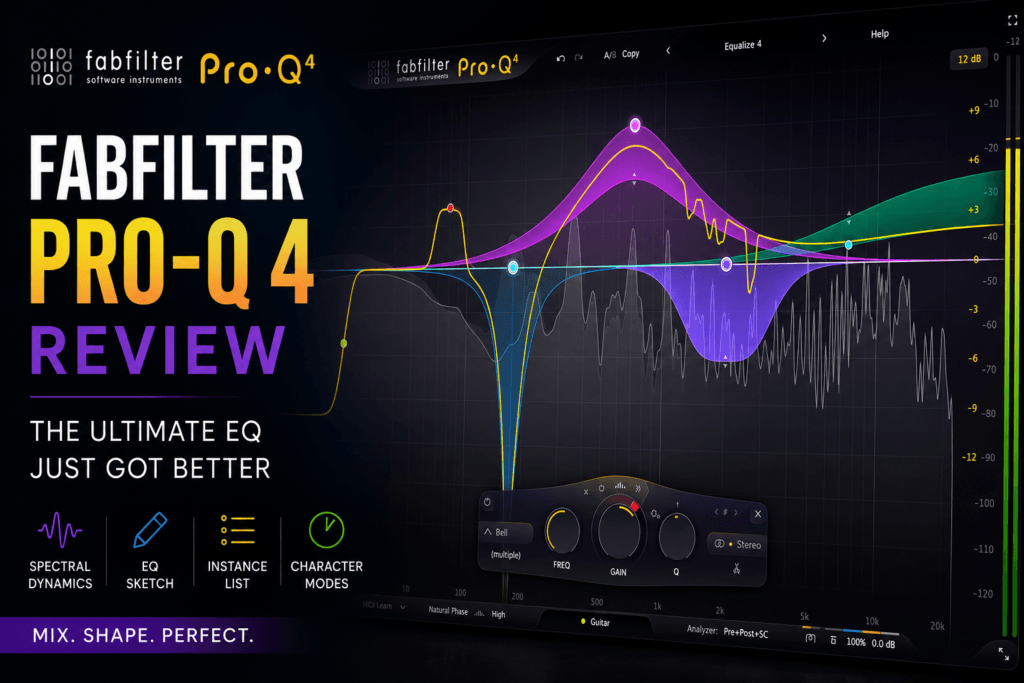
 FabFilter Pro-Q 4 Review (2026): The Best EQ Plugin Just Got Even Better
Rating: ⭐⭐⭐⭐⭐ (5/5)
When it comes to professional equalizers, one name consistently rises above the rest: FabFilter Pro-Q. For well over a decade, it has been the gold standard for mixing and mastering engineers, earning a reputation for pristine sound quality, lightning-fast workflow, and an interface that’s become the benchmark for modern EQ design.
Now, FabFilter Pro-Q 4 builds upon that legacy with one of the most significant updates the series has ever received. Instead of reinventing the wheel, FabFilter refined nearly every aspect of the plugin, introducing powerful new workflow tools like EQ Sketch, Spectral Dynamics, Character Modes, and an incredibly useful Instance List while preserving the intuitive interface producers already love.
But is it worth the upgrade? And more importantly, is it worth buying if you’re looking for your next professional EQ?
Let’s dive in.
What Is FabFilter Pro-Q 4?
FabFilter Pro-Q 4 is a professional 24-band parametric equalizer designed for:
- Mixing
- Mastering
- Sound Design
- Music Production
- Podcast Editing
- Film & TV Post Production
Unlike many EQ plugins that simply boost and cut frequencies, Pro-Q 4 combines surgical precision with advanced dynamic processing and modern workflow enhancements.
It supports:
- Zero Latency
- Natural Phase
- Linear Phase
- Dynamic EQ
- Mid/Side Processing
- Stereo, Left, Right, Mid and Side Bands
- Dolby Atmos support up to 9.1.6
- Up to 24 fully customizable EQ bands
What’s New in Pro-Q 4?
If you’re coming from Pro-Q 3, these are the biggest improvements.
Spectral Dynamics
This is arguably the headline feature.
Instead of applying dynamic EQ to an entire frequency band, Spectral Dynamics works on much smaller spectral components within that band, allowing the plugin to suppress harsh resonances and problem frequencies with greater precision.
Think of it as combining the transparency of an EQ with the intelligent behavior of resonance suppression tools.
This makes it excellent for:
- Harsh vocals
- Ringing snares
- Resonant acoustic guitars
- Bright synth leads
- Problematic cymbals
- Muddy 808 harmonics
EQ Sketch
One of the most creative additions.
Instead of creating one EQ band at a time, you simply draw the tonal shape you want, and Pro-Q 4 intelligently creates the necessary filter nodes automatically.
It’s surprisingly intuitive and speeds up rough mix work tremendously.
Instance List
Large sessions often contain dozens of EQ plugins.
With Instance List, every Pro-Q 4 instance in your project becomes accessible from a single window.
You can instantly jump between tracks without constantly opening and closing plugin windows.
For producers working on sessions with 60–100 tracks, this feature alone can save a significant amount of time.
Character Modes
Historically, Pro-Q has been famous for being extremely transparent.
Now users can choose between:
- Clean
- Subtle
- Warm
These Character Modes introduce tasteful analog-style saturation while still retaining the plugin’s precision.
If you’ve ever wished Pro-Q had just a little more personality, this is a welcome addition.
Features That Still Make Pro-Q 4 Great
Even without the new additions, Pro-Q remains one of the most complete EQ plugins available.
Highlights include:
- Dynamic EQ
- Spectrum Grab
- Auto Gain
- EQ Match
- Mid/Side Processing
- Full-screen editing
- Brickwall filters
- Up to 24 EQ bands
- Natural Phase processing
- GPU-accelerated interface
- Intelligent Solo Mode
- Unlimited Undo/Redo
- A/B comparisons
Sound Quality
This is where Pro-Q continues to dominate.
The plugin is incredibly transparent.
Boosts sound clean.
Cuts sound natural.
Linear Phase mode remains one of the smoothest implementations available, while Natural Phase continues to strike an excellent balance between transparency and low latency.
Even aggressive EQ moves rarely introduce harsh artifacts.
Simply put:
Pro-Q doesn’t sound like it’s working.
And that’s exactly what most engineers want.
Workflow
This is arguably Pro-Q’s greatest strength.
Everything feels effortless.
Adding bands is instant.
Dragging frequencies is fluid.
Mouse wheel adjustments are responsive.
The spectrum analyzer is one of the best in the industry.
Every control feels thoughtfully designed.
Many producers finish entire mixes using Pro-Q simply because it’s faster than almost every competing EQ.
Using Pro-Q 4 for Beat Making
Beat makers may not need every advanced mastering feature, but they’ll appreciate how quickly Pro-Q 4 solves common mixing issues.
808 Cleanup
Remove mud around 250 Hz while preserving low-end punch.
Kick vs Bass
Use dynamic EQ to carve out space only when needed.
Hi-Hats
Smooth harsh frequencies around 8–12 kHz without dulling the overall brightness.
Melodies
Create room for vocals using Mid/Side EQ.
Master Bus
Apply subtle tonal shaping while maintaining transparency.
Whether you produce Hip-Hop, Trap, R&B, Drill, House, or Pop, Pro-Q 4 fits naturally into nearly every project.
CPU Performance
Despite its feature set, Pro-Q remains remarkably efficient.
Zero Latency mode uses very little CPU, making it practical to run across an entire mix.
Linear Phase naturally requires more processing power, but performance remains well optimized for modern systems.
Pros
- Outstanding sound quality
- Industry-leading interface
- Spectral Dynamics is genuinely useful
- Excellent Dynamic EQ implementation
- EQ Sketch speeds up workflow
- Instance List is perfect for large sessions
- Mid/Side processing
- Exceptional analyzer
- Fantastic CPU optimization
- Great for beginners and professionals alike
Cons
- Premium price compared to many competitors
- Some advanced features may be more than casual users need
- Character Modes are subtle rather than dramatic, which may disappoint users seeking heavy analog coloration
Who Should Buy FabFilter Pro-Q 4?
Buy it if you:
- Mix professionally
- Master your own music
- Produce beats regularly
- Want a “buy once, use forever” EQ
- Need advanced Dynamic EQ
- Value workflow as much as sound quality
Skip it if:
- You only need a basic stock EQ
- You’re on a very tight budget
- You rarely mix your own productions
Final Verdict
FabFilter didn’t need to reinvent Pro-Q—they needed to refine it.
That’s exactly what they’ve done.
Pro-Q 4 takes what was already considered one of the best EQ plugins available and adds genuinely useful features that improve both workflow and sound. Spectral Dynamics, EQ Sketch, Character Modes, and the Instance List aren’t gimmicks—they solve real production problems while preserving the speed and transparency that made Pro-Q famous in the first place.
For producers, mixing engineers, and mastering professionals, it’s difficult to recommend another EQ more highly.
If you’re investing in one premium equalizer that can handle virtually every task in your studio, FabFilter Pro-Q 4 remains the benchmark.
Overall Rating
⭐⭐⭐⭐⭐ 5/5
Sound Quality: 10/10
Features: 10/10
Ease of Use: 10/10
Workflow: 10/10
Value: 9.5/10
PluginEra Verdict: Editor’s Choice 🏆