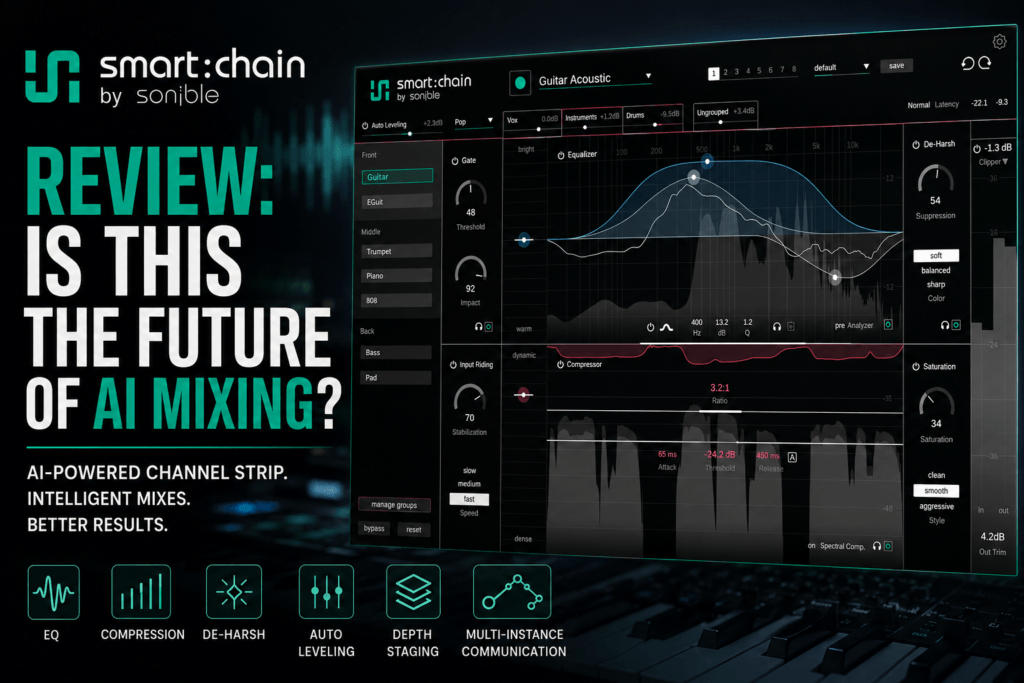
 Sonible Smart:Chain Review: Is This the Future of AI Mixing?
Mixing a song can quickly turn into a balancing act between dozens of plugins, individual track settings, gain levels, EQ decisions, compression settings, and constant adjustments.
What if your channel strips could actually communicate with each other?
That is the idea behind sonible smart:chain, an intelligent channel strip designed to combine traditional mixing tools with AI-assisted processing and session-wide control.
Instead of simply placing another EQ or compressor on a track, smart:chain analyzes your audio and creates intelligent starting points for several processors at once. Even more interestingly, multiple instances of smart:chain can communicate across your project.
That means the plugin isn’t only thinking about how a kick, vocal, bass, or synth sounds individually. It can help you approach those elements in the context of the entire mix.
For producers and engineers who spend significant amounts of time building plugin chains and rough balances, that could make smart:chain one of the more interesting mixing plugins released in 2026.
But does AI-assisted mixing actually make your mixes better?
And is sonible smart:chain worth buying?
Let’s take a closer look.
What Is sonible smart:chain?
sonible smart:chain is an AI-powered intelligent channel strip designed to handle several common mixing tasks from a single plugin.
The processing system includes tools for:
- EQ
- Compression
- De-harshing
- Gating
- Input riding
- Saturation
- Level control
Rather than treating these processors as completely independent modules, smart:chain uses a shared analysis of your audio to create optimized starting points throughout the processing chain.
This is an important distinction.
Most traditional channel strips give you several processors inside one interface, but you are still responsible for setting everything manually.
smart:chain attempts to perform some of that technical groundwork for you while still allowing you to change the resulting settings.
In other words, you’re not surrendering control of your mix to AI.
You’re getting a suggested starting point.
How Does sonible smart:chain Work?
The basic workflow starts by inserting smart:chain on a track and allowing the plugin to analyze the source.
Once smart:chain understands the audio, its intelligent processing can establish starting settings across the channel strip.
You can then adjust those settings just like you would with traditional mixing tools.
This creates a workflow that looks something like:
Analyze → Get a starting point → Listen → Adjust → Mix
That last part is important.
AI should not replace your ears.
If smart:chain suggests an EQ curve or compression setting that doesn’t fit your creative direction, you can change it.
The advantage is that you may not have to begin every processing decision from zero.
For producers who mix their own music, that can potentially save a considerable amount of time.
One Analysis Controls Multiple Processors
One of smart:chain’s biggest ideas is what sonible describes as shared intelligence.
Instead of having your EQ analyze the track, your compressor analyze it separately, and another processor make yet another independent decision, the processors inside smart:chain share an understanding of the source material.
That helps the plugin create a more connected signal chain.
Imagine you’re mixing a vocal.
Normally, you might load:
EQ → Compressor → Saturation → De-harshing → Leveling
You would then configure every processor individually.
With smart:chain, one analysis can establish intelligent starting points across the processing chain.
You can still tweak everything afterward, but you’re beginning with a chain that has already been adapted to your audio.
Intelligent EQ
EQ is one of the most important tools in any mix.
It is also one of the areas where inexperienced producers tend to over-process.
smart:chain’s intelligent processing can analyze the frequency characteristics of a source and help establish an appropriate tonal starting point.
From there, you can make your own decisions.
For example, if you’re mixing an R&B vocal, the analysis might help you identify areas that need attention before you start manually shaping the vocal for warmth, presence, or air.
The same principle applies to instruments such as:
- Piano
- Electric piano
- Synths
- Bass
- 808s
- Guitars
- Drums
- Percussion
Rather than blindly sweeping frequencies looking for problems, you have an informed starting point to work from.
Intelligent Compression
Compression can be even more confusing than EQ for newer producers.
Threshold, ratio, attack, release, and gain reduction all interact with each other.
More importantly, the “correct” compression settings depend heavily on the material being processed.
A snare shouldn’t necessarily be compressed like a pad.
A vocal shouldn’t necessarily be compressed like an 808.
smart:chain’s intelligent analysis helps establish compression based on the source.
Again, you remain in control of the processing.
This could make smart:chain particularly useful for producers who understand what compression does but aren’t always confident about where to start.
De-Harshing
Harsh frequencies can quickly make a modern mix sound unpleasant.
Bright synths, vocals, guitars, samples, cymbals, and percussion can accumulate energy in similar frequency ranges.
The result is often a mix that feels aggressive or tiring even when no individual track sounds particularly terrible by itself.
smart:chain includes de-harshing processing designed to help manage problematic energy.
This could be especially useful in dense Hip Hop and R&B productions where vocals, hi-hats, samples, synths, and other bright elements are competing for space.
Gating
A gate allows you to reduce unwanted audio when the desired signal isn’t present.
Traditionally, you’ll find gates used on sources such as:
- Vocals
- Recorded drums
- Guitars
- Percussion
- Live instruments
Gating can clean up recordings, but overly aggressive settings can also make performances sound unnatural.
Having gating available within the same intelligent processing environment further reduces the need to build large chains from separate plugins.
Input Riding
Consistent input levels can make downstream processing considerably easier.
If a signal constantly jumps between extremely quiet and loud sections, your compressor and other processors must react to those changes.
Input riding can help stabilize the incoming signal before additional processing occurs.
Vocals are an obvious example.
Instead of forcing a compressor to perform all the level management, input riding can help smooth the signal before compression.
That can potentially produce a more controlled and natural result.
Saturation
Sometimes technically clean isn’t musically exciting.
Saturation can introduce additional harmonics and character that help sounds feel richer or more energetic.
It can work especially well on:
- Drums
- Bass
- 808s
- Vocals
- Keys
- Samples
- Synths
Including saturation directly inside smart:chain makes it possible to move from corrective processing into creative tone shaping without immediately reaching for another plugin.
And that brings us to the feature that really separates smart:chain from an ordinary channel strip.
Multiple smart:chain Instances Can Communicate
Most channel strips only understand the track they’re inserted on.
When you place multiple instances throughout a session, the plugins can communicate with one another.
This gives smart:chain information about the relationship between different elements in your production.
That’s a potentially huge workflow advantage.
Mixing isn’t really about making every track sound incredible by itself.
It’s about making all the tracks sound good together.
Your kick might sound massive in solo but completely overpower your bass.
Your piano might sound beautifully full by itself but leave no room for the vocal.
A synth pad might sound incredibly wide but overwhelm everything behind it.
Mix decisions therefore need context.
smart:chain’s multi-instance system is designed around that idea.
Front, Middle and Back: Intelligent Depth Staging
One of the most interesting smart:chain features is intelligent depth staging.
Tracks can be organized into three perceptual layers:
Front
Middle
Back
The concept is remarkably intuitive.
Not every sound should feel equally prominent.
For example, imagine a modern R&B mix.
Front
You might place:
- Lead vocal
- Snare
- Important melodic hook
Middle
You might place:
- Electric piano
- Bass
- Supporting synth
- Background vocals
Back
You might place:
- Pads
- Atmospheric textures
- Ear candy
- Supporting percussion
smart:chain can adapt its processing to help establish separation and depth between these elements.
Instead of thinking purely in terms of volume, you’re beginning to think about the three-dimensional placement of the mix.
That could be extremely useful for producers who struggle with mixes that sound crowded or flat.
Project-Wide Auto Leveling
Here’s another feature that could dramatically speed up the beginning of a mix.
Auto Leveling can analyze learned tracks across your project and establish a genre-aware starting balance.
Anyone who mixes regularly knows how much time can disappear just creating the initial static mix.
Kick down.
Bass up.
Vocal up.
Keys down.
Snare slightly louder.
Bass back down.
Vocal up again.
And so on.
smart:chain can analyze the relationships between tracks and create an initial balance automatically.
You can then use dedicated trim controls to refine the levels without destroying those established relationships.
This doesn’t mean the plugin has magically completed your mix.
Think of it more like having an assistant engineer create your initial rough balance.
You walk into the session with something usable and then start making creative decisions.
Centralized Session Control
Once you’ve inserted plugins across dozens of tracks, navigating a mix can become tedious.
Open plugin.
Close plugin.
Select another track.
Open plugin.
Repeat.
smart:chain’s multi-instance system allows instances throughout your project to be accessed from a centralized environment.
You can navigate tracks, manage groups, and work with smart:chain instances without constantly bouncing between individual plugin windows.
For large sessions, this could become one of those workflow improvements that doesn’t sound exciting on paper but becomes difficult to give up once you’re accustomed to it.
Using sonible smart:chain for Hip Hop
smart:chain could be particularly interesting for Hip Hop producers because modern Hip Hop mixes often involve strong relationships between relatively few dominant elements.
Think:
Kick.
Snare.
Sample.
Vocals.
Percussion.
The kick and 808 relationship alone can require significant balancing.
You could use smart:chain across the drums, bass, melodic instruments, and vocals to establish an initial balance before making creative decisions.
Depth staging could then help prevent every melodic element from fighting for the front of the mix.
For example:
Front: vocal and snare
Middle: 808 and primary sample
Back: textures and supporting melodies
You aren’t required to use this exact structure, of course.
The point is to intentionally decide which sounds deserve attention.
Using sonible smart:chain for R&B
R&B might be an even better showcase for smart:chain.
Modern R&B arrangements frequently contain layers of:
- Lead vocals
- Vocal doubles
- Harmonies
- Electric piano
- Pads
- Synths
- Bass
- 808s
- Percussion
- Atmospheric textures
All those layers can sound beautiful individually but quickly create masking problems.
Depth staging gives you another way to organize the production.
Your lead vocal might occupy the Front while electric piano and bass sit in the Middle and atmospheric pads remain farther Back.
Combine that with intelligent EQ, compression, leveling, and de-harshing, and smart:chain could provide a very fast foundation for an R&B mix.
Is smart:chain Good for Beginners?
I think beginners are one of the most obvious audiences for smart:chain.
Mixing becomes overwhelming when you realize how many decisions are involved.
Should you EQ first?
How much compression?
Which frequencies should you cut?
How loud should the bass be?
Should the vocal be louder?
Does the synth need saturation?
AI-assisted starting points can reduce some of that initial uncertainty.
However, there’s an important warning here.
Don’t let smart:chain become a substitute for learning how to mix.
Look at what the plugin is doing.
Listen before and after processing.
Change the settings.
Bypass modules.
Ask yourself why the processed version sounds different.
Used that way, intelligent mixing tools can actually become useful learning tools rather than crutches.
Is smart:chain Good for Experienced Engineers?
Experienced engineers have a different reason to consider smart:chain.
Speed.
If you already know how to EQ, compress, gain-stage, saturate, and balance a mix, you probably don’t need AI to explain those concepts.
But you may appreciate something that eliminates repetitive setup.
Getting from a completely raw session to a workable starting balance faster leaves more time for the decisions that actually require taste.
That includes things like:
- Vocal character
- Drum punch
- Low-end weight
- Tonal balance
- Automation
- Effects
- Depth
- Emotion
AI can handle some groundwork.
You handle the art.
smart:chain Isn’t an Automatic Mix Button
This distinction is important.
smart:chain shouldn’t be viewed as:
Load plugin → Press button → Professional mix
Mixing doesn’t work that way.
Production style, arrangement, recording quality, sound selection, genre, and creative intent are too subjective.
Instead, smart:chain makes more sense as an intelligent mixing assistant.
It analyzes.
It suggests.
It organizes.
It creates starting points.
You decide whether those decisions actually serve the song.
That approach makes the technology considerably more useful than simply promising automatic professional mixes.
sonible smart:chain Pros and Cons
Pros
All-in-one mixing workflow
Having EQ, compression, gating, de-harshing, saturation, input riding, and leveling within one environment can reduce plugin clutter.
Intelligent starting points
The AI-assisted analysis can dramatically reduce setup time.
Multi-instance communication
This is arguably smart:chain’s biggest advantage over traditional channel strips.
Project-wide Auto Leveling
Creating a useful rough balance quickly could save significant time.
Depth staging
The Front, Middle, and Back workflow encourages producers to think about depth and hierarchy instead of simply making everything louder.
Centralized control
Being able to work with multiple instances from one place should make larger sessions easier to navigate.
Full manual control
You’re still free to modify the intelligent processing.
Cons
AI suggestions still require judgment
An intelligent recommendation isn’t automatically the right creative decision.
Beginners could become dependent on automatic processing
If you never investigate what smart:chain is doing, you may slow down your development as a mixer.
Experienced engineers may already have preferred tools
If you’ve spent years developing carefully chosen EQ, compression, saturation, and channel-strip workflows, replacing them may not be appealing.
Best value may require multiple instances
Some of smart:chain’s most interesting features make the most sense when the plugin is used throughout a session rather than on a single isolated track.
smart:chain System Requirements
According to sonible, smart:chain supports modern macOS and Windows systems.
Current plugin formats include:
Mac
- VST3
- AU
- AAX
Windows
- VST3
- AAX
The plugin supports sample rates from 44.1 kHz through 192 kHz and includes native Apple Silicon support.
Authorization can be machine-based or handled through iLok.
As always, check the latest compatibility information before purchasing, particularly if you’re using an older operating system or DAW.
How Much Does sonible smart:chain Cost?
smart:chain has a regular price of $179.
At the time of writing, however, the plugin is available for an introductory price of $99, with the promotion scheduled to run through September 28, 2026.
Owners of qualifying sonible smart:series products may also want to check whether they’re eligible for the separate crossgrade offer.
Because software promotions change frequently, check the current Plugin Boutique listing before purchasing.
Is sonible smart:chain Worth It?
If you’re looking for another basic EQ or compressor, smart:chain probably isn’t compelling because you likely already own plenty of those.
That’s not really what makes the plugin interesting.
The value comes from connecting those processors into a larger intelligent mixing workflow.
You have individual track processing.
Then shared processing intelligence.
Then multi-instance communication.
Then depth staging.
Then project-wide Auto Leveling.
Then centralized control.
Together, those features make smart:chain feel less like another channel-strip plugin and more like an attempt to rethink how producers interact with an entire mixing session.
For producers who mix their own music, especially those working quickly across Hip Hop, R&B, Pop, and electronic production, the workflow could be extremely useful.
Who Should Buy sonible smart:chain?
smart:chain makes the most sense for:
- Producers who mix their own music
- Beginner and intermediate mixing engineers
- Producers overwhelmed by large plugin chains
- Engineers who want faster starting points
- Hip Hop and R&B producers working with dense arrangements
- Songwriters who want to spend less time on technical setup
- Existing sonible users interested in a more integrated workflow
It may be less essential for engineers who already have a highly refined channel-strip workflow and prefer making every processing decision manually.
Final Verdict
sonible smart:chain is one of the more interesting approaches to AI-assisted mixing because it doesn’t stop at processing individual tracks.
Its biggest strength is the way it connects the entire workflow.
EQ, compression, de-harshing, gating, saturation, input riding, and leveling can work from a shared understanding of the audio.
Multiple instances can communicate.
Tracks can be organized into Front, Middle, and Back layers.
Auto Leveling can establish a starting balance across the session.
And you still have the ability to change the processing yourself.
That’s the right direction for AI in music production.
The goal shouldn’t be removing the producer or engineer from the process.
It should be removing repetitive work so the producer can spend more time making creative decisions.
smart:chain appears to be built around exactly that philosophy.
Pluginera Rating: 9/10
If you want an intelligent channel strip that can help you move from raw tracks to a workable mix faster while still giving you control over the final sound, sonible smart:chain is absolutely worth checking out.
Check Current smart: chain Pricing
Disclosure: This article may contain affiliate links. If you purchase through one of these links, Pluginera may earn a commission at no additional cost to you.
Frequently Asked Questions
What is sonible smart:chain?
sonible smart:chain is an intelligent channel-strip plugin combining AI-assisted EQ, compression, de-harshing, gating, input riding, saturation, leveling, and session-wide mixing features in one workflow.
Does smart:chain mix your song automatically?
Not exactly. smart:chain can analyze tracks, suggest processing settings, establish depth relationships, and create an initial level balance, but you retain control over the processing and final mix.
Can smart:chain instances communicate with each other?
Yes. Multiple smart:chain instances can communicate across a session, allowing the plugin to approach tracks within the context of the overall mix.
What is Auto Leveling in smart:chain?
Project-wide Auto Leveling analyzes learned tracks and establishes a genre-aware starting balance between them. You can then refine the resulting balance manually.
What are Front, Middle, and Back layers?
They are part of smart:chain’s depth-staging system. Tracks can be assigned different perceptual positions to help establish separation, hierarchy, clarity, and depth within a mix.
Is smart:chain good for Hip Hop and R&B?
Yes. Its leveling, depth-staging, EQ, compression, saturation, and multi-track workflow can be particularly useful for balancing vocals, drums, 808s, bass, keys, synths, and layered instrumentation common in Hip Hop and R&B.
Is sonible smart:chain good for beginners?
Yes, particularly as a way to establish sensible starting points. Beginners should still learn why EQ, compression, gain staging, saturation, and other processing techniques work rather than blindly accepting AI-generated settings.
Is smart:chain worth $179?
Its value depends on your workflow. If you’re interested primarily in individual EQ or compression, you may already own suitable alternatives. If you value its connected workflow, Auto Leveling, depth staging, multi-instance communication, and centralized control, the overall package becomes much more compelling.
Can I try smart:chain before buying?
Yes. sonible currently offers a fully functional 30-day demo, making it possible to test the workflow in your own sessions before purchasing.
The Bottom Line
sonible smart:chain represents a more practical vision of AI mixing: not replacing the engineer, but helping the engineer get to the creative part of mixing faster.
And that may ultimately be far more useful than an AI that simply promises to mix the song for you.