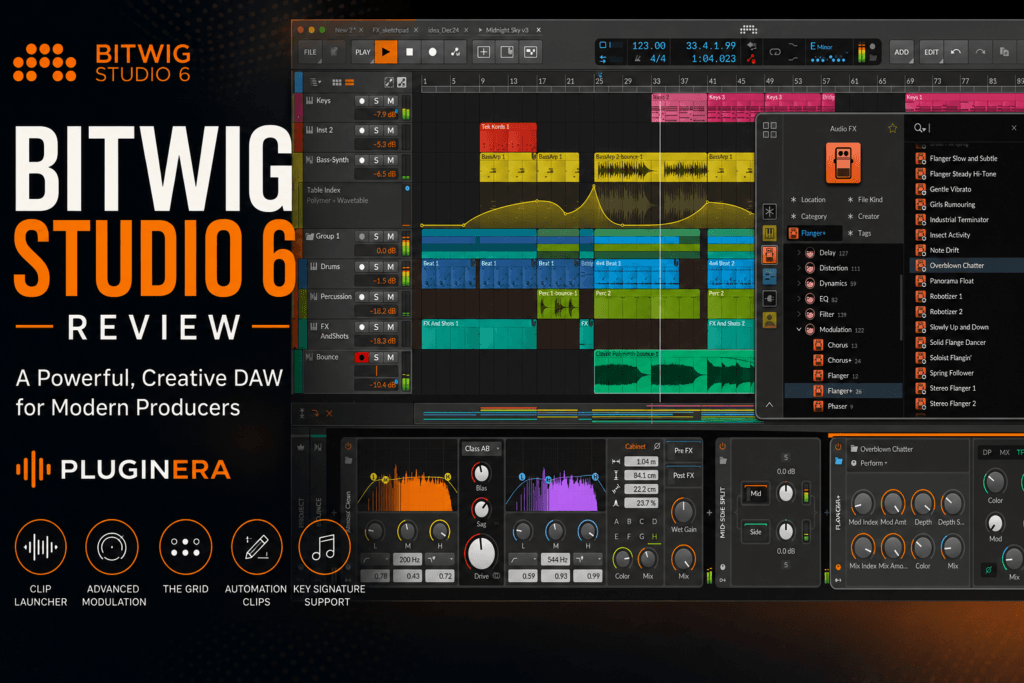
 Bitwig Studio has always been one of the more interesting alternatives to traditional DAWs. Instead of simply giving producers another timeline, mixer, and collection of virtual instruments, Bitwig has built its reputation around creative workflow, modulation, sound design, and experimentation.
With Bitwig Studio 6, that philosophy continues.
The latest version introduces workflow improvements designed to make arranging, editing, and automation faster while retaining the modular environment that has made Bitwig popular among electronic musicians and sound designers.
But where does Bitwig Studio 6 fit for beatmakers?
And with established DAWs like Ableton Live, FL Studio, Logic Pro, Reason, and Cubase already offering incredibly powerful production environments, is Bitwig Studio 6 worth buying in 2026?
Let’s take a closer look.
What Is Bitwig Studio 6?
Bitwig Studio 6 is a full-featured digital audio workstation for Windows, macOS, and Linux.
It combines several different approaches to music production into one environment.
You get a traditional linear arrangement workflow for building complete songs alongside Bitwig’s Clip Launcher, which allows producers to experiment with loops, patterns, variations, and ideas before committing them to an arrangement.
Bitwig also puts an unusually large emphasis on modulation.
Instead of modulation being something reserved for synthesizers, Bitwig allows parameters throughout your production environment to interact with modulators.
That opens the door to everything from subtle movement to extremely experimental sound design.
Then there’s The Grid, Bitwig’s modular sound-design environment for constructing instruments, effects, and signal-processing systems.
The result is a DAW that can function as both a conventional production studio and an enormous creative playground.
What’s New in Bitwig Studio 6?
Bitwig Studio 6 isn’t simply about adding more instruments.
Many of its improvements focus on the everyday workflow of actually creating and finishing music.
Clip Aliases
One of the biggest additions is clip aliases.
Aliases allow multiple clips to reference the same underlying musical material.
Edit the source material and the related aliases can reflect those changes.
This can be extremely useful when building beats.
Imagine creating an eight-bar drum pattern that appears throughout your track.
Instead of manually updating several copies whenever you change the hi-hat pattern or snare placement, aliases can help keep related sections synchronized.
You can then break an alias away when you want to create a variation.
For producers who struggle with repetitive editing while arranging beats, this could become one of Bitwig Studio 6’s most useful workflow improvements.
Project-Wide Key Signatures
Bitwig Studio 6 also introduces improved support for project-wide key signatures.
This gives the DAW more musical context when you’re working with notes.
For beatmakers producing melodic hip-hop, R&B, trap, pop, or electronic music, having the DAW understand the project’s key can make MIDI editing considerably more intuitive.
Instead of treating every MIDI note as completely independent, your editing environment can better reflect the harmonic framework of the song.
It’s a relatively simple idea that can make composing melodies, basslines, and chord progressions much easier.
Improved Note Editing
Bitwig has also refined its editors.
Editing MIDI is obviously one of the most important parts of modern beat production, and Studio 6 makes manipulating notes and musical ideas more fluid.
That matters when you’re programming:
- 808 patterns
- hi-hats
- chord progressions
- basslines
- melodies
- percussion
- synth sequences
Small workflow improvements can have a surprisingly large impact when you’re making music every day.
Automation Gets a Major Upgrade
Automation is one of the areas where Bitwig Studio 6 becomes particularly interesting.
Bitwig has significantly expanded its automation workflow, including the introduction of automation clips.
Rather than automation simply existing as information attached to a traditional timeline, automation clips make automation itself something you can work with more creatively.
For beatmakers, this is huge.
You could use automation clips for:
- filter sweeps
- reverb throws
- delay effects
- volume changes
- distortion movement
- synth modulation
- stereo movement
- breakdown effects
- transitions
This makes automation feel less like a technical mixing task and more like another compositional tool.
And that fits Bitwig perfectly.
The Clip Launcher Is Still One of Bitwig’s Biggest Strengths
If you’re used to producing entirely on a linear timeline, Bitwig’s Clip Launcher may change how you approach beat creation.
Instead of immediately constructing a song from beginning to end, you can build individual musical ideas first.
For example, you might create:
Clip 1: Main drum groove
Clip 2: Alternate drum groove
Clip 3: Chords
Clip 4: Bass
Clip 5: Main melody
Clip 6: Counter melody
You can then experiment with different combinations.
Maybe the chords sound better without drums.
Maybe removing the melody creates the perfect verse.
Maybe the alternate drum pattern works better during the hook.
Once you’ve discovered an arrangement you like, you can move those ideas toward a complete song structure.
For producers who frequently get stuck inside an eight-bar loop, this kind of workflow can be incredibly useful.
Bitwig Studio 6 for Hip-Hop and R&B Production
Bitwig sometimes gets associated primarily with experimental electronic music.
But there’s no reason you can’t use it for hip-hop, trap, R&B, trap soul, pop, or sample-based production.
In fact, its workflow can be excellent for those genres.
A typical hip-hop or R&B session could begin with a chord progression.
You could then layer a bass or 808 underneath it, program drums, add melodies, and create several variations inside the Clip Launcher.
Once the main groove is established, those clips can become the building blocks for the arrangement.
For example:
Intro: Chords + texture
Verse: Chords + drums + bass
Pre-Chorus: Chords + percussion + filtered melody
Hook: Full drums + bass + chords + main melody
Verse 2: Alternate drum pattern + simplified melody
Outro: Chords + effects
This approach encourages you to create variations before arrangement fatigue sets in.
Modulation Is Where Bitwig Becomes Different
Bitwig’s modulation system remains one of its defining features.
Almost anything can become more dynamic.
You might modulate a filter cutoff slightly so a synth pad never sounds completely static.
You could introduce subtle pitch movement.
You could make distortion respond dynamically.
You could create rhythmic effects that evolve with your track.
Or you could build complex modulation systems where several parameters interact.
The important thing is that modulation doesn’t have to mean extreme sound design.
For hip-hop and R&B, subtle modulation can create the kind of movement that makes simple sounds feel expensive.
A static pad can breathe.
A basic synth can slowly evolve.
A texture can drift across the stereo field.
A repetitive melody can change slightly over time.
Those small details can add considerable depth to a production.
The Grid
Then we have The Grid.
The Grid is Bitwig’s modular environment.
It allows you to connect different modules together to create custom instruments, synthesizers, effects, sequencers, and experimental processing systems.
If you’ve ever been interested in modular synthesis but found hardware modular systems intimidating or expensive, The Grid provides a much more accessible way to explore those concepts.
You don’t need The Grid to make beats in Bitwig Studio.
But once you become comfortable with the DAW, it gives you an enormous amount of room to grow.
You could eventually build custom:
- synthesizers
- bass instruments
- drum processors
- effects
- generative patches
- sequencers
- modulation systems
For producers interested in developing their own sound rather than relying entirely on presets, this is a major advantage.
Stock Instruments and Effects
Bitwig Studio includes a substantial collection of devices for creating and processing music.
That means you don’t necessarily need a massive third-party plugin collection to start producing.
Bitwig’s ecosystem covers areas including synthesis, sampling, drums, EQ, dynamics, distortion, modulation, delay, reverb, and creative effects.
And because these devices are designed around Bitwig’s modulation architecture, they can interact in ways that aren’t always possible with traditional plugin workflows.
Of course, you can still load your favorite third-party plugins.
So if you already own instruments like Serum, Pigments, Diva, Kontakt, or other VST instruments, they can become part of your Bitwig production environment.
Sound Design Potential
This might be Bitwig Studio 6’s biggest advantage.
Many DAWs give you tools for sound design.
Bitwig feels like the DAW itself is a sound-design tool.
Between device chains, modulation, The Grid, automation, instruments, effects, and routing, there are countless ways to transform sounds.
You could take a simple piano sample and turn it into an evolving atmospheric texture.
A basic synth chord could become a rhythmic pulsing pad.
A percussion sound could trigger modulation elsewhere in your effects chain.
An ordinary sample could become almost unrecognizable.
For producers trying to create their own sonic identity, this is extremely powerful.
Arrangement Workflow
Eventually, though, every beat needs to become a song.
And this is where some highly experimental production environments can become frustrating.
Bitwig manages to balance experimentation with traditional arrangement reasonably well.
Once you’ve created your core musical ideas, you can move into the Arranger and begin constructing a full track.
The combination of Clip Launcher, clip aliases, automation clips, and traditional arrangement tools gives you several ways to develop an idea.
That makes Bitwig especially attractive for producers who love creating loops but sometimes struggle with turning those loops into finished productions.
Mixing in Bitwig Studio 6
Bitwig isn’t just a beat-making environment.
You can mix complete productions inside it as well.
Standard mixing tasks like:
- volume balancing
- panning
- EQ
- compression
- saturation
- reverb
- delay
- automation
- bus processing
can all be handled within the DAW.
But once again, modulation gives Bitwig an additional dimension.
Instead of every effect remaining static, you can create processing that changes throughout the song.
For example, you could gradually increase saturation during a chorus.
You could subtly modulate reverb parameters.
You could create rhythmic filter movement.
You could automate delay throws during specific moments.
The result can be a mix that feels more alive without requiring dozens of manual automation moves.
Bitwig Studio 6 vs Ableton Live
This is probably the comparison most people will make.
Both DAWs combine clip-based production with traditional arrangement.
Ableton Live has a massive user base, enormous educational ecosystem, and years of workflow refinement.
Bitwig, however, often feels more focused on modulation, modularity, and deep sound-design experimentation.
If you’re already deeply invested in Ableton Live and happy with your workflow, Bitwig Studio 6 may not provide enough reason to switch.
But if you’re attracted to Ableton’s clip-based philosophy while wanting an even deeper modulation environment, Bitwig becomes extremely compelling.
Bitwig Studio 6 vs FL Studio
FL Studio remains one of the most popular environments for beatmakers, especially in hip-hop and trap.
Its piano roll and pattern-based workflow are major strengths.
Bitwig approaches production differently.
FL Studio often feels centered around quickly creating patterns and turning them into arrangements.
Bitwig places more emphasis on clips, modulation, device chains, and experimentation.
For straightforward trap beat production, many producers may still find FL Studio faster.
For experimental production and sound design, Bitwig has some significant advantages.
Bitwig Studio 6 vs Reason
Reason and Bitwig actually share an interesting philosophy.
Both encourage producers to think beyond simply inserting plugins onto tracks.
Reason uses its virtual Rack and extensive routing possibilities.
Bitwig uses devices, modulators, The Grid, and its flexible signal architecture.
If you love Reason because experimenting with routing and devices feels like part of making music, Bitwig may feel surprisingly familiar philosophically.
The interfaces are very different, but both DAWs reward curiosity.
Who Is Bitwig Studio 6 For?
Bitwig Studio 6 makes the most sense for producers who enjoy experimentation.
You should seriously consider it if you:
- love sound design
- use automation heavily
- enjoy modular synthesis
- want a clip-based production workflow
- create electronic music
- make experimental hip-hop
- produce R&B or trap with unusual textures
- enjoy building custom instruments and effects
- want a DAW that encourages experimentation
It can also be an excellent choice for producers who feel constrained by more conventional production environments.
Who Might Want to Skip It?
Bitwig Studio 6 won’t necessarily be the best choice for everyone.
If your workflow is already extremely fast in another DAW, switching may slow you down initially.
There’s also a learning curve.
Bitwig gives you a lot of possibilities, and that means there’s a lot to understand.
Producers who simply want to load an instrument, program drums, record vocals, and finish songs may not take advantage of many of Bitwig’s deeper capabilities.
And if you already own another full-featured DAW, you should consider whether Bitwig solves an actual problem in your workflow before buying another production environment.
Pros and Cons
Pros
Excellent modulation system
Bitwig makes modulation feel like a fundamental part of music production rather than an advanced feature.
Clip Launcher
Great for experimenting with arrangements and building variations.
Automation workflow
Studio 6’s expanded automation capabilities make movement and transitions easier to incorporate into productions.
The Grid
One of the deepest creative environments available inside a modern DAW.
Excellent sound-design potential
Bitwig encourages producers to manipulate sounds rather than simply browse presets.
Traditional and nonlinear workflows
You can experiment with clips and still arrange complete songs on a conventional timeline.
Cross-platform support
Bitwig supports Windows, macOS, and Linux.
Cons
Learning curve
The deeper you go into Bitwig, the more there is to learn.
Potentially overwhelming
Having nearly endless modulation and routing possibilities isn’t always beneficial when you’re simply trying to finish a beat.
Switching DAWs takes time
Experienced producers may initially work slower while learning Bitwig’s workflow.
Not every producer needs its advanced features
If you aren’t interested in modulation, modular synthesis, or experimental sound design, some of Bitwig’s biggest advantages may go unused.
Is Bitwig Studio 6 Good for Beginners?
Yes — with one qualification.
A beginner can absolutely learn music production using Bitwig Studio 6.
The fundamental concepts remain the same:
Choose sounds.
Write chords.
Create melodies.
Program drums.
Record audio.
Arrange your song.
Mix everything together.
However, beginners shouldn’t feel pressured to learn everything Bitwig can do immediately.
You don’t need to understand The Grid during your first week.
You don’t need complicated modulation systems.
You don’t need elaborate routing.
Start by learning the Arranger, Clip Launcher, piano roll, mixer, instruments, effects, and basic automation.
The deeper features can come later.
Is Bitwig Studio 6 Worth It in 2026?
For the right producer, absolutely.
Bitwig Studio 6 isn’t trying to be a clone of every other DAW.
Its biggest strength is the way it encourages you to interact with sound.
Modulation, automation, clips, device chains, routing, and modular synthesis aren’t isolated features. They work together as part of Bitwig’s overall production philosophy.
That’s what makes it special.
If your main goal is simply finding the fastest possible DAW for programming straightforward beats, there are other excellent options.
But if you want an environment where beat making, arrangement, sound design, and experimentation constantly overlap, Bitwig Studio 6 is one of the most interesting DAWs available.
Pluginera Verdict
Rating: 9/10
Bitwig Studio 6 is an impressive production environment that manages to feel both like a professional DAW and an enormous sound-design instrument.
The improved editing, clip aliases, project-wide key awareness, expanded automation workflow, Clip Launcher, modulation system, and The Grid make it particularly attractive for producers who want to go beyond conventional beat-making workflows.
Hip-hop and R&B producers shouldn’t dismiss Bitwig as something designed only for electronic music, either.
Its ability to quickly create variations, manipulate sounds, experiment with arrangements, and introduce subtle movement can be incredibly useful for modern production.
The biggest danger may actually be having too many possibilities.
But if you’re the type of producer who likes asking “What happens if I do this?” and then experimenting until you find something nobody else has, Bitwig Studio 6 gives you an incredible environment in which to do it.
Check out Bitwig Studio 6 on Plugin Boutique to see the latest pricing and available editions.