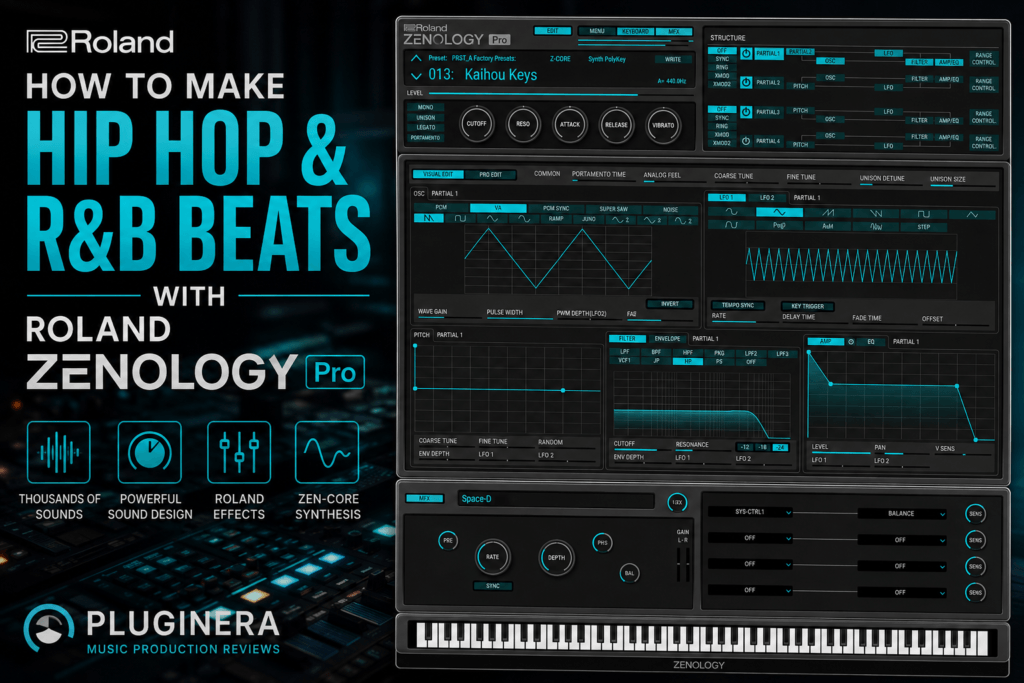
 How to Make Hip Hop & R&B Beats with Roland ZENOLOGY Pro
Roland sounds have been part of hip hop and R&B for decades.
From lush pads and digital keys to synth basses, bells, leads, strings, and atmospheric textures, the Roland sound fits naturally into genres built around memorable melodies and mood.
Roland ZENOLOGY Pro brings a massive collection of those sounds into one software instrument.
Powered by Roland’s ZEN-Core Synthesis System, ZENOLOGY Pro gives producers thousands of presets alongside deep sound-design capabilities. That makes it useful whether you prefer finding a great preset and immediately making music or building sounds from scratch.
But having thousands of sounds can also create a problem:
Where do you actually start when making a beat?
In this guide, we’ll build a practical workflow for making hip hop, R&B, and Trap Soul beats with Roland ZENOLOGY Pro, covering everything from choosing sounds and creating chords to bass, melodies, drums, arrangement, and mixing.
Why ZENOLOGY Pro Works So Well for Hip Hop & R&B
ZENOLOGY Pro isn’t specifically a hip hop or R&B plugin.
That’s actually part of its strength.
Its library covers an enormous range of sounds, including:
- Pads
- Keys
- Synth basses
- Bells
- Plucks
- Leads
- Strings
- Brass
- Digital synths
- Analog-style synths
- Atmospheric textures
- Drum kits
Instead of opening five different instruments while building a beat, you could potentially create most of your melodic arrangement inside ZENOLOGY Pro.
The combination of virtual analog synthesis and PCM-based sounds also gives it an interesting balance between vintage synth character and polished digital sounds.
That’s especially useful for modern R&B and hip hop.
Step 1: Start With the Mood
Before browsing presets, decide what kind of beat you’re trying to make.
This simple decision can save you a lot of time.
For example, you might want to make:
Dark Trap Soul
Try a tempo around 65–80 BPM with dark pads, bells, filtered keys, deep bass, and spacious textures.
Modern R&B
Try 75–100 BPM with lush chords, smooth keys, pads, bass, and subtle melodic layers.
Melodic Hip Hop
Try approximately 80–100 BPM, or work in double time around 140–160 BPM, using keys, plucks, synths, strings, and bass.
Classic-Inspired R&B
Try 80–110 BPM with electric-style keys, warm pads, synth bass, brass, strings, and vintage Roland-inspired synth sounds.
These aren’t rules.
They’re simply starting points.
The important thing is deciding on an emotional direction before scrolling through thousands of presets.
Step 2: Find Your Main Chord Sound
For R&B especially, I like starting with the chords.
Your first sound should establish the emotional character of the beat.
Inside ZENOLOGY Pro, look for sounds such as:
- Electric-style keys
- Soft synth keys
- Warm pads
- Digital keys
- Mellow polysynths
- Vintage synths
For a darker R&B track, you might start with a warm pad.
For brighter contemporary R&B, try a clean digital key.
For Trap Soul, look for something atmospheric with a soft attack.
The goal isn’t necessarily to find the most impressive preset.
You want a sound that leaves room for everything else.
Try This R&B Chord Progression
Let’s work in E minor.
Try:
Em9 – Cmaj7 – Gmaj7 – D6/9
The basic notes are:
Em9
E – G – B – D – F#
Cmaj7
C – E – G – B
Gmaj7
G – B – D – F#
D6/9
D – F# – A – B – E
Don’t feel like you need to play every note.
Try spreading the chord across multiple octaves.
You can also remove the root from your right-hand voicing and allow the bass to establish the chord.
That immediately gives the progression more space.
Step 3: Make the Chords Feel Like R&B
The notes matter, but voicing and rhythm matter just as much.
Instead of playing every chord in root position, experiment with inversions.
You can also use:
- Major 7ths
- Minor 7ths
- 9ths
- 11ths
- 13ths
- Add9 chords
- Sus2 chords
- Sus4 chords
Then change the rhythm.
Don’t necessarily hold every chord for exactly four beats.
Try:
Chord → space → chord → short chord → space
Those gaps create room for vocals, drums, and melodies.
Velocity is important too.
Lowering the velocity of certain notes can make MIDI chords feel considerably less mechanical.
Step 4: Customize the Preset
This is where ZENOLOGY Pro starts separating itself from a simple preset library.
Once you find a sound you like, change it.
You don’t have to completely redesign the patch.
Small changes are often enough.
Start with the filter.
If your chords sound too bright, lower the cutoff.
For darker R&B and Trap Soul, filtering some high-frequency content can instantly push the sound deeper into the mix.
Next, experiment with the amp envelope.
Increasing the attack can turn a sharp synth into a softer pad.
Increasing release can make chords blend together.
Then explore the effects.
A little:
- Chorus
- Reverb
- Delay
- Modulation
can completely change the atmosphere.
ZENOLOGY Pro includes Roland-inspired effects, making this one of the best places to add some of that classic Roland character.
Step 5: Layer the Chords
Once your main chord sound works, consider adding another layer.
ZENOLOGY Pro’s huge library makes this easy.
If your main sound is a digital key, try layering it with a pad.
For example:
Layer 1: Digital keys
Provides attack and definition.
Layer 2: Warm pad
Provides width and atmosphere.
You don’t necessarily want both layers at the same volume.
Turn the pad down until you almost don’t notice it.
Then mute it.
If the track suddenly feels smaller, the layer is doing its job.
Don’t Over-Layer
One of the easiest mistakes to make with a plugin containing thousands of sounds is adding too much.
You find a great pad.
Then another great pad.
Then strings.
Then a synth.
Then a texture.
Eventually the beat becomes crowded.
For many R&B tracks, you may only need:
Chords + bass + melody + drums + one atmospheric layer.
Let the sounds breathe.
Step 6: Create the Bass Line
Now add bass.
ZENOLOGY Pro includes plenty of synth bass sounds that can work for hip hop and R&B.
Your bass doesn’t need to be complicated.
Start by following the root notes of the progression.
For our example:
E – C – G – D
Then add passing notes where appropriate.
The bass can also play rhythmically around the kick instead of simply holding notes underneath every chord.
For smoother R&B, try a warm rounded synth bass.
For more aggressive hip hop, choose something with additional harmonics and attack.
For Trap Soul, you may decide to use an 808 instead of a traditional synth bass.
Step 7: Add a Simple Melody
Now we need something memorable.
Don’t immediately add another complex chord instrument.
Instead, look for a contrasting sound.
Good choices include:
- Bell
- Pluck
- Soft lead
- Synth flute
- Digital mallet
- Atmospheric synth
Since we’re working in E minor, start experimenting with notes from the E natural minor scale:
E – F# – G – A – B – C – D
Start with three or four notes.
For example:
B – G – E – F#
Play with the rhythm before adding more notes.
A simple four-note melody with an interesting rhythm can be much more memorable than a complicated 16-note phrase.
Step 8: Use Call and Response
One of the easiest ways to make melodies sound more musical is using call and response.
Your first melody might play:
B – G – E
Then leave space.
A second phrase answers:
F# – G – B
You could even use two different ZENOLOGY Pro sounds.
For example:
Call: Bell
Response: Soft synth lead
This creates conversation between the sounds.
It’s particularly effective in R&B because leaving space also creates room for the vocalist.
Step 9: Add Atmospheric Texture
ZENOLOGY Pro is excellent for atmosphere.
Look for:
- Evolving pads
- Airy synths
- Digital textures
- Motion patches
- Ambient sounds
Keep these layers quiet.
Atmospheric sounds usually shouldn’t dominate the track.
Instead, they should create a feeling that becomes noticeable when you remove them.
You can also filter them heavily so they occupy only a specific frequency range.
Step 10: Create Movement With ZENOLOGY Pro’s LFOs
This is where you can start exploring the deeper ZEN-Core engine.
Each partial provides LFO modulation, and a tone can contain up to four partials.
You can use LFOs to modulate parameters such as:
- Pitch
- Filter
- Amplitude
This can create subtle movement.
For example, try slowly modulating the filter cutoff on a pad.
Instead of the pad remaining static throughout the chord, the tone gradually changes.
This works beautifully for atmospheric R&B.
Keep the modulation subtle.
You often want listeners to feel the movement rather than consciously hear it.
Step 11: Experiment With the Step LFO
For more rhythmic sounds, explore ZENOLOGY Pro’s Step LFO.
The Step LFO can create repeating modulation patterns synchronized with your track.
Try it on:
- Plucks
- Pads
- Synths
- Bass
- Effects
You can create rhythmic filter movement that almost becomes another percussion element.
This can be particularly effective when making futuristic R&B or experimental hip hop.
Step 12: Add Drums
You can use ZENOLOGY Pro’s drum kits, your own drum samples, or a dedicated drum plugin.
For modern hip hop and R&B, I generally recommend choosing drums based on the genre rather than forcing yourself to use one instrument for everything.
A basic pattern might include:
- Kick
- Snare or clap
- Closed hi-hat
- Open hi-hat
- Percussion
- 808
Start simple.
Get the kick and snare working with the chords first.
Then add hi-hats.
Then percussion.
R&B Drum Approach
For contemporary R&B, avoid making every drum hit perfectly rigid.
Experiment with:
- Velocity changes
- Slight timing variations
- Percussion
- Ghost notes
- Syncopated kicks
- Open hi-hats
- Sparse drum programming
The groove should complement the chords instead of fighting them.
Hip Hop Drum Approach
For hip hop, the kick and snare can be more aggressive.
Let the drums provide contrast against the melodic ZENOLOGY sounds.
A soft pad paired with hard drums can create a great balance.
You don’t necessarily need aggressive synth sounds just because you’re making hip hop.
Sometimes the contrast is what makes the beat hit.
Step 13: Add an 808
If you’re making Trap Soul or modern hip hop, an 808 may make more sense than a traditional synth bass.
Tune your 808 to the song.
Then follow the chord progression initially.
Our progression gives us:
E – C – G – D
Once that works, add:
- Passing notes
- Octave jumps
- Slides
- Rhythmic variations
But don’t overdo it.
The 808 should interact with the kick and melody rather than constantly moving.
Step 14: Turn the Loop Into a Song
This is where a lot of good beats get stuck.
You create an excellent eight-bar loop.
Then you keep listening to it.
Instead, start arranging.
A simple R&B arrangement might look like:
Intro – 8 bars
Chords + atmosphere
Verse – 16 bars
Chords + bass + light drums
Pre-Chorus – 8 bars
Add pad or melodic layer
Chorus – 8 bars
Full drums + bass + chords + main melody
Verse 2 – 16 bars
Remove or change a melodic element
Chorus – 8 bars
Bring everything back
Bridge – 8 bars
Introduce a new sound or chord variation
Final Chorus – 8–16 bars
Full arrangement
Outro – 4–8 bars
Strip the beat back down
You don’t have to follow this exact structure.
The important thing is creating contrast between sections.
Step 15: Use ZENOLOGY Sounds to Create Transitions
Instead of relying entirely on risers and FX samples, use your instruments to create transitions.
For example, before the chorus:
Increase the filter cutoff on your pad.
Add more reverb.
Automate a delay.
Raise a melody an octave.
Remove the bass.
Then bring everything back on the first beat of the chorus.
Small changes can make sections feel dramatically different.
Step 16: Create Variation by Changing Presets
Here’s another useful trick.
Duplicate your chord MIDI onto another ZENOLOGY Pro instance.
Choose a different sound.
Use the original sound during the verse and the second sound during the chorus.
For example:
Verse: Soft digital keys
Chorus: Wide analog pad
The harmonic progression remains identical, but the emotional energy changes.
This is an easy way to build arrangements without writing entirely new parts.
Step 17: Mix ZENOLOGY Pro Sounds
ZENOLOGY Pro sounds can be rich and full.
That’s great when auditioning presets.
But once several sounds are playing together, they may compete for space.
Start by setting levels.
Don’t immediately reach for EQ and compression.
Get the basic volume balance working first.
Then use EQ to solve specific problems.
EQ
If your pad is competing with the bass, remove unnecessary low frequencies.
If your keys sound too bright behind a vocalist, reduce some upper-frequency energy.
If multiple melodic instruments occupy the same range, decide which one should be dominant.
You don’t need every sound to be huge.
Reverb
ZENOLOGY Pro includes excellent effects, but be careful with reverb.
Preset reverbs can sound impressive while browsing sounds but become excessive inside a full mix.
If the track starts sounding washed out, reduce the reverb.
You can also disable the internal reverb and use a shared send reverb inside your DAW.
That can help several instruments feel like they’re occupying the same space.
Delay
Delay is especially useful on bells, leads, plucks, and keys.
Try tempo-synchronized delays such as:
1/4 note
for obvious rhythmic repeats.
1/8 note
for faster movement.
Dotted 1/8
for more syncopated patterns.
Keep feedback under control.
You want the delay to enhance the melody rather than create another competing melody.
Stereo Width
Pads and atmospheric sounds can usually occupy more stereo space.
Bass should generally remain focused toward the center.
Lead melodies can sit somewhere between the two.
Think about your arrangement spatially:
Center: Kick, snare, bass
Mid-width: Keys, melody
Wide: Pads, textures, background layers
This creates room without requiring extreme EQ.
A Complete ZENOLOGY Pro R&B Beat Recipe
If you want a simple starting template, try this.
Tempo: 78 BPM
Key: E minor
Chord progression:
Em9 – Cmaj7 – Gmaj7 – D6/9
ZENOLOGY Pro Track 1
Warm keys playing the main chords.
ZENOLOGY Pro Track 2
Wide pad quietly layered underneath.
ZENOLOGY Pro Track 3
Bell playing a simple four-note melody.
ZENOLOGY Pro Track 4
Atmospheric texture with slow LFO movement.
Bass
Warm synth bass or tuned 808 following E – C – G – D.
Drums
Punchy kick, snare/clap, loose hi-hats, percussion, and occasional open hat.
That’s already enough material for a complete beat.
You don’t need 20 melodic tracks.
A ZENOLOGY Pro Hip Hop Beat Recipe
For something harder:
Tempo: 144 BPM
Key: F minor
Start with a dark ZENOLOGY Pro key or pad.
Create a simple minor progression.
Add a bell or digital pluck.
Pitch a secondary texture up an octave.
Add:
- Hard kick
- Snare
- Rolling hi-hats
- Percussion
- Tuned 808
Then use automation to filter the main melody during verses and open it back up during the hook.
The same plugin can sound completely different depending on your sound selection and arrangement.
Don’t Forget the Model Expansions
If you have access to compatible Roland Model Expansions, ZENOLOGY Pro can go even further.
Depending on your available Roland content, you may be able to explore sounds inspired by classic instruments such as:
- JUPITER-8
- JUNO-106
- JX-8P
- SH-101
- JD-800
These sounds can be especially useful when you’re trying to add vintage character to modern production.
For example, combine an old-school Roland-inspired pad with modern trap drums.
That contrast can create something that feels familiar without sounding completely retro.
The Biggest Mistake to Avoid
The biggest problem you’re likely to encounter with ZENOLOGY Pro isn’t a lack of sounds.
It’s having too many options.
Don’t spend an hour looking for the perfect pad.
Find something that fits the mood and start making music.
You can always change it later.
A useful rule is:
Choose → tweak → record → move on.
The goal isn’t to find the best preset in ZENOLOGY Pro.
The goal is to finish the beat.
Final Thoughts
Roland ZENOLOGY Pro is an extremely capable instrument for hip hop and R&B production.
Its biggest advantage is versatility.
You can use it for your:
- Chords
- Pads
- Bass
- Bells
- Plucks
- Leads
- Strings
- Atmospheric textures
- Drum sounds
But the real power appears when you stop treating ZENOLOGY Pro as just a preset library.
Start modifying filters.
Change envelopes.
Layer partials.
Experiment with LFOs.
Use Roland effects.
Create your own variations.
That’s how you can take a preset that thousands of other producers have access to and turn it into something that better fits your track.
For hip hop and R&B producers who love Roland sounds, ZENOLOGY Pro can easily become one of those plugins that appears in project after project.
And with thousands of sounds available, you probably won’t run out of inspiration anytime soon.
Check the latest Roland ZENOLOGY Pro price and availability at Plugin Boutique.