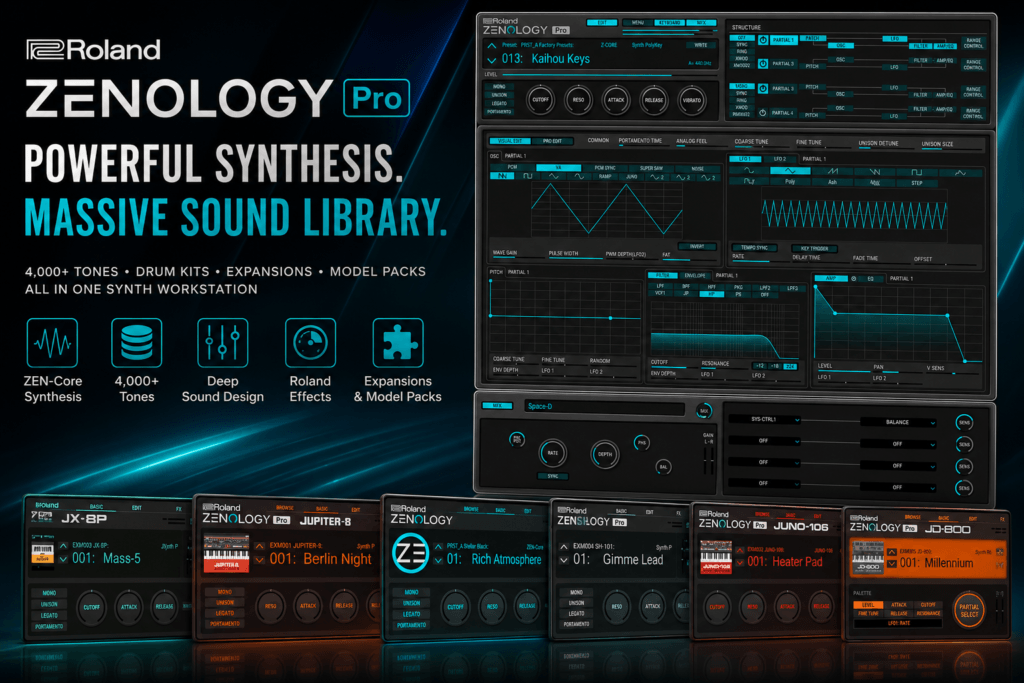
 Roland ZENOLOGY Pro Sound Libraries: A Complete Guide for Producers
One of the biggest reasons to use Roland ZENOLOGY Pro isn’t just its powerful ZEN-Core synthesis engine.
It’s the massive collection of sounds surrounding it.
ZENOLOGY Pro gives producers access to thousands of factory tones covering synths, keys, basses, pads, leads, drums, acoustic instruments, vintage sounds, and modern production textures. And once you start exploring Roland’s additional Sound Packs and Wave Expansions, the library can become significantly larger.
That makes ZENOLOGY Pro particularly interesting if you want a software instrument that can act as a central sound source for your productions.
But the different Roland ZENOLOGY Pro sound libraries can also be confusing.
What’s included with ZENOLOGY Pro?
What’s a ZENOLOGY Sound Pack?
What’s the difference between a Sound Pack and a Wave Expansion?
And which sounds actually make sense for hip hop, R&B, Trap Soul, pop, and other modern genres?
In this guide, we’ll break down the Roland ZENOLOGY Pro sound library ecosystem and look at how producers can get the most from it.
How Many Sounds Does ZENOLOGY Pro Include?
Let’s start with the factory library.
Roland currently lists:
4,106 tones
and
109 drum kits
for ZENOLOGY Pro.
That’s already a substantial sound collection before you start adding expansions.
The factory library covers a huge amount of sonic territory, including sounds such as:
- Synth pads
- Synth leads
- Plucks
- Bells
- Synth basses
- Keys
- Strings
- Brass
- Digital textures
- Analog-style synths
- Acoustic instruments
- Electronic sounds
- Drum kits
- Percussion
You could potentially create most of a track using ZENOLOGY Pro alone.
What Makes the ZENOLOGY Pro Sound Library Different?
The size of the library is impressive, but that’s only part of the story.
ZENOLOGY Pro is powered by Roland’s ZEN-Core Synthesis System.
That means you’re not simply loading static samples.
ZENOLOGY Pro provides deep editing capabilities that allow you to modify sounds using synthesis parameters including:
- Oscillators
- PCM waveforms
- Filters
- Envelopes
- LFOs
- Effects
- Modulation
- Multiple partials
A tone can contain as many as four partials, allowing multiple sound elements to be combined into a single patch.
This is important because it means the factory presets aren’t necessarily the final destination.
They’re starting points.
Find a sound that’s 80% of what you want, then customize the remaining 20%.
That can be much faster than designing every sound from scratch.
The Factory ZENOLOGY Pro Sound Library
Before downloading anything else, spend some time exploring the factory sounds.
With more than 4,000 tones available, there’s already enough material to cover a wide range of production styles.
The exact sounds you’ll gravitate toward will depend on the music you make, but several categories are especially useful.
Pads
Pads are one of ZENOLOGY Pro’s strongest areas.
Roland has decades of history creating synthesizers capable of producing lush atmospheric sounds, and that influence is easy to appreciate here.
Pads work particularly well for:
- R&B
- Trap Soul
- Synthwave
- Pop
- Ambient music
- Cinematic production
- Melodic hip hop
Try using pads underneath your main chord instrument.
Instead of making them loud, turn them down until they simply add width and atmosphere.
A subtle pad can make an otherwise basic chord progression sound much larger.
Keys
Keys are another category worth exploring.
Depending on the patch, you can find sounds ranging from polished digital keys to vintage-inspired synthesizer tones.
These can work extremely well as the foundation of an R&B or hip hop beat.
Try playing extended chords such as:
Minor 7ths
Major 7ths
9ths
11ths
13ths
Then customize the preset.
Reduce the filter cutoff for a darker tone.
Increase the attack for something softer.
Add chorus for width.
Add reverb for atmosphere.
A few adjustments can transform a factory preset into something that sits much better in your production.
Synth Bass
ZENOLOGY Pro also gives you plenty of bass options.
Synth bass can be useful for:
- R&B
- Funk
- Pop
- Synthwave
- Electronic music
- Hip hop
You can use a warmer rounded bass underneath R&B chords or choose something more aggressive for modern hip hop and electronic production.
And because you’re working inside ZEN-Core, you can modify the filter, envelope, oscillator behavior, and effects to shape the bass around your track.
Bells and Plucks
For modern hip hop and Trap Soul producers, this is an important category.
Bells and plucks can provide the main melodic hook without filling too much space.
Try combining:
Warm chords + simple bell melody + 808
or:
Dark pad + pluck + drums + bass
You don’t need complicated melodies.
Sometimes three or four carefully chosen notes are enough.
The key is finding a sound with the right character.
Leads
ZENOLOGY Pro also provides plenty of lead sounds.
These can work for:
- Melodic hooks
- Counter melodies
- Synth solos
- R&B melodies
- Pop production
- Electronic music
- Synthwave
Don’t assume a lead needs to be loud or aggressive.
A soft lead with reverb and delay can become an excellent atmospheric R&B melody.
Strings and Brass
This is another advantage of having a workstation-style library.
Sometimes your track needs something outside the traditional synth categories.
Strings can add emotion.
Brass can add power.
You can use them subtly in hip hop arrangements without turning the track into an orchestral production.
For example, try introducing strings only during the chorus.
The added layer can make the section feel bigger without requiring you to rewrite the chord progression.
Drum Kits
ZENOLOGY Pro isn’t limited to melodic sounds.
The factory library currently includes 109 drum kits.
This gives you another source for:
- Electronic drums
- Percussion
- Acoustic-style drums
- Roland-inspired drum sounds
- Layering material
You don’t necessarily have to replace your existing drum samples with ZENOLOGY.
Instead, think of the drum library as another source of sounds.
You might use your normal kick and snare samples while grabbing an unusual percussion sound from ZENOLOGY.
Layering sounds from different sources can help make your drum patterns less predictable.
What Are ZENOLOGY Sound Packs?
Once you’ve explored the factory library, things get even more interesting.
Roland offers additional ZENOLOGY Sound Packs.
These are curated collections created specifically for the ZENOLOGY software instruments.
Instead of simply giving you more random presets, individual packs can focus on particular sonic styles or production directions.
That makes them useful when you want to expand your library without searching through thousands of unrelated sounds.
Think of them as themed preset expansions.
How Much Can Sound Packs Expand ZENOLOGY?
Potentially quite a bit.
Roland offers a ZENOLOGY Sound Pack Bundle covering ZEZ001 through ZEZ030.
That bundle alone contains more than 1,000 additional tones and drum kits created by professional sound designers.
The sounds span multiple genres and styles.
That means a producer starting with ZENOLOGY’s already-large factory library can add another substantial collection without switching synthesizers.
ZENOLOGY Sound Packs vs. ZEN-Core Sound Packs
This distinction is important.
ZENOLOGY Sound Packs are designed specifically for the ZENOLOGY software family.
That includes:
- ZENOLOGY Pro
- ZENOLOGY
- ZENOLOGY Lite
ZEN-Core Sound Packs, on the other hand, are designed around the broader ZEN-Core ecosystem.
That distinction matters if you also own compatible Roland hardware.
If your goal is purely software production, ZENOLOGY-specific packs can be perfectly useful.
If you want sounds that can potentially move between software and supported Roland ZEN-Core hardware, pay closer attention to the ZEN-Core-compatible options.
What Are Wave Expansions?
Wave Expansions take things a step further.
Instead of simply providing new presets built from existing material, Wave Expansions add new sampled waveforms to the ZEN-Core environment.
That’s an important difference.
New waveforms give sound designers additional raw material for creating patches.
Wave Expansions generally focus on particular instruments, sound categories, or genres while also including ready-to-play tones.
For producers who enjoy sound design, this can dramatically increase the possibilities inside ZENOLOGY Pro.
Why Wave Expansions Matter
Think about the difference this way.
A preset pack gives you new recipes.
A Wave Expansion gives you new ingredients and recipes.
You get finished tones that can be used immediately, but the additional waveform material can also become part of your own custom sound-design process.
That’s where owning ZENOLOGY Pro becomes especially useful.
Because Pro gives you advanced editing capabilities, you can dig into these sounds and reshape them instead of only using their macro controls.
Studio Sounds
One example is Roland’s EXZ005 Studio Sounds Wave Expansion.
It’s designed as a versatile studio collection and contains:
128 instrument tones
12 drum kits
245 individual drum and percussion sounds
and
522 waveforms
This type of expansion makes sense if you want ZENOLOGY to function more like a general-purpose workstation.
Instead of specializing in one narrow genre, it expands the palette available for everyday production.
World Instruments
Another example is EXZ006 World Instruments.
This expansion adds:
407 tones
10 drum kits
478 percussion and SFX sounds
and
867 waveforms.
Collections like this can become extremely useful for hip hop producers looking for unusual melodic and percussive textures.
You don’t necessarily need to make “world music” to use these sounds.
A single unusual plucked instrument or percussion hit can become the defining element of a hip hop beat.
Dance Trax
Electronic and hip hop producers should also take a look at expansions built around Roland’s electronic-music heritage.
For example, EXZ012 Dance Trax contains:
361 tones
16 drum kits
and
829 waveforms.
Despite the “Dance Trax” name, Roland specifically connects the collection with styles including techno, house, trance, hip-hop, and trip-hop.
That makes this type of expansion worth exploring if you want more classic electronic Roland character in your productions.
Drum-Focused Wave Expansions
There are also Wave Expansions dedicated more heavily to drums.
For example, Roland’s Session Drums and Power Drums collections add complete drum kits alongside individual drum sounds and waveforms.
Even if you primarily use dedicated drum samples, these collections can be useful for layering.
Try layering:
ZENOLOGY percussion + sample-pack drums
or:
Roland electronic drum + acoustic-style layer
The goal isn’t necessarily to use an entire ZENOLOGY drum kit.
Sometimes a single layer is enough to give your existing drum sound additional character.
ZENOLOGY Pro Makes the Libraries More Powerful
This is something worth emphasizing.
The value of these sound libraries changes when you’re using ZENOLOGY Pro.
The regular and Lite versions of ZENOLOGY can give you access to sounds, but Pro provides the deeper editing capabilities.
That means you can open a preset and modify its underlying synthesis parameters.
You can change:
- Oscillator settings
- Partial combinations
- Filters
- Envelopes
- LFOs
- Effects
- Modulation
This turns an expansion pack into something more than a collection of presets.
It becomes a collection of sound-design starting points.
How to Customize ZENOLOGY Pro Library Sounds
You don’t have to become an expert sound designer.
Start with five simple adjustments.
1. Filter Cutoff
This is probably the easiest.
If a preset sounds too bright, lower the cutoff.
This works particularly well for dark R&B and Trap Soul.
2. Amp Attack
Increase attack to soften the beginning of a sound.
This can turn a sharp synth into something closer to a pad.
3. Release
Increase release to allow the sound to trail off after you release the keys.
This can create a smoother, more atmospheric feel.
4. Effects
Experiment with chorus, reverb, delay, and other built-in Roland effects.
Small effect changes can dramatically alter the personality of a preset.
5. LFO Movement
Use subtle LFO modulation to create movement.
Try slowly modulating the filter on a pad.
The effect doesn’t need to be obvious.
Subtle movement can keep sustained sounds from feeling static.
Best ZENOLOGY Sounds for Hip Hop
Hip hop producers should look for sounds such as:
- Dark keys
- Bells
- Plucks
- Strings
- Synth brass
- Atmospheric pads
- Vintage digital sounds
- Synth bass
- Percussion
- Experimental textures
One of the best approaches is combining vintage-sounding Roland patches with modern drums.
For example:
Vintage digital keys
Modern 808
Hard kick and snare
Atmospheric texture
That contrast can give the beat a familiar character without making it sound dated.
Best ZENOLOGY Sounds for R&B
R&B producers should spend plenty of time exploring:
- Warm pads
- Soft keys
- Digital keys
- Polysynths
- Synth bass
- Atmospheric textures
- Soft leads
- Strings
- Bells
- Plucks
Try keeping the arrangement simple.
For example:
Main keys
Quiet pad
Bass
Soft lead
Drums
You don’t need ten ZENOLOGY instances playing simultaneously just because thousands of sounds are available.
Best ZENOLOGY Sounds for Trap Soul
Trap Soul sits somewhere between atmospheric R&B and modern trap production.
That makes ZENOLOGY Pro a particularly interesting option.
Look for:
- Dark pads
- Bells
- Ambient keys
- Digital plucks
- Evolving textures
- Soft synth leads
- Atmospheric effects
Then combine them with:
- 808s
- Trap hats
- Punchy kicks
- Claps or snares
- Sparse percussion
The melodic side can come almost entirely from ZENOLOGY while your preferred drum samples handle the rhythm section.
Build Your Own Favorite Libraries
One problem with having thousands of sounds is preset overload.
You don’t want to search through 4,000+ tones every time you start a beat.
Instead, create your own favorites.
For example:
R&B Favorites
Save your favorite:
- Keys
- Pads
- Basses
- Leads
- Textures
Trap Favorites
Save:
- Bells
- Plucks
- Dark pads
- Aggressive synths
- Bass sounds
Hip Hop Favorites
Save:
- Keys
- Strings
- Brass
- Vintage synths
- Textures
- Percussion
Over time, you’ll essentially create your own personalized ZENOLOGY library.
That’s much faster than starting from zero during every production session.
Don’t Download Everything Immediately
When you discover the ZENOLOGY expansion ecosystem, it can be tempting to install as much as possible.
That isn’t always the best approach.
More sounds don’t automatically mean better music.
If you already struggle with preset browsing, adding thousands of additional options can actually slow you down.
Instead, expand intentionally.
Ask:
What sounds am I currently missing?
If you need more acoustic and studio sounds, look in that direction.
If you need unusual instruments, explore World Instruments.
If you want more electronic Roland sounds, explore electronic-focused expansions.
If you’re happy with your current library, make music.
You don’t need every expansion.
Sound Packs or Wave Expansions: Which Should You Choose?
It depends on what you’re looking for.
Choose Sound Packs If:
You primarily want new presets.
You want genre-focused inspiration.
You prefer finding sounds quickly.
You don’t necessarily want to build patches from scratch.
Choose Wave Expansions If:
You want additional PCM waveform material.
You enjoy sound design.
You want to expand the underlying sonic palette of ZEN-Core.
You use compatible ZEN-Core hardware and want to explore cross-compatible content where supported.
There’s nothing wrong with using both.
They simply serve slightly different purposes.
What About Model Expansions?
Model Expansions are another part of the broader ZENOLOGY ecosystem.
These are different from Sound Packs and Wave Expansions.
Instead of simply adding presets or waveform material, Model Expansions recreate the character and behavior of specific Roland synthesizers within the ZENOLOGY environment.
Depending on your Roland Cloud access and available content, this can give you another way to explore Roland’s synthesizer history from inside the ZENOLOGY ecosystem.
For producers who love vintage Roland sounds, Model Expansions can significantly increase the appeal of ZENOLOGY Pro.
Do You Need Roland Cloud to Get More Sounds?
This is where it’s important to check your specific purchase and membership situation.
Roland offers ZENOLOGY Pro through different access models, and additional content availability can vary.
Roland currently states that Pro and Ultimate Roland Cloud memberships provide access to ZENOLOGY Sound Packs, ZEN-Core Sound Packs, Wave Expansions, and Model Expansions through Roland Cloud Manager.
ZENOLOGY Pro can also be purchased with a Lifetime Key.
Before buying specifically for expansion content, check what is included with your purchase or membership rather than assuming every expansion comes with every version.
Are the ZENOLOGY Pro Sound Libraries Worth It?
For producers who like the Roland sound, absolutely.
The biggest advantage isn’t simply having thousands of presets.
It’s having one expandable sound ecosystem.
You can start with more than 4,000 factory tones and then expand into:
- ZENOLOGY Sound Packs
- ZEN-Core Sound Packs
- Wave Expansions
- Drum collections
- Additional waveform libraries
- Model Expansions
And because you’re using ZENOLOGY Pro, you can go beyond simply loading those sounds.
You can customize them.
That’s the part that gives the library long-term value.
Final Thoughts
The Roland ZENOLOGY Pro sound libraries are one of the biggest strengths of the entire platform.
The factory collection alone gives you more than enough sounds to make complete tracks across hip hop, R&B, Trap Soul, pop, synthwave, electronic music, and plenty of other genres.
But the ecosystem doesn’t stop there.
Sound Packs provide additional ready-to-play presets.
ZEN-Core Sound Packs can extend the broader ZEN-Core environment.
Wave Expansions introduce new sampled waveform material alongside additional tones.
Model Expansions can take you deeper into the character of classic Roland synthesizers.
That creates an ecosystem that can grow alongside your production needs.
But there’s an important lesson here:
Don’t confuse having more sounds with making better music.
Start with the factory library.
Build a collection of favorites.
Learn how to customize presets.
Then add expansions when you identify something your existing library doesn’t provide.
Approached that way, ZENOLOGY Pro can become much more than another synth plugin.
It can become one of the main sound libraries you reach for whenever you start a new production.
Check the latest Roland ZENOLOGY Pro price and availability at Plugin Boutique.