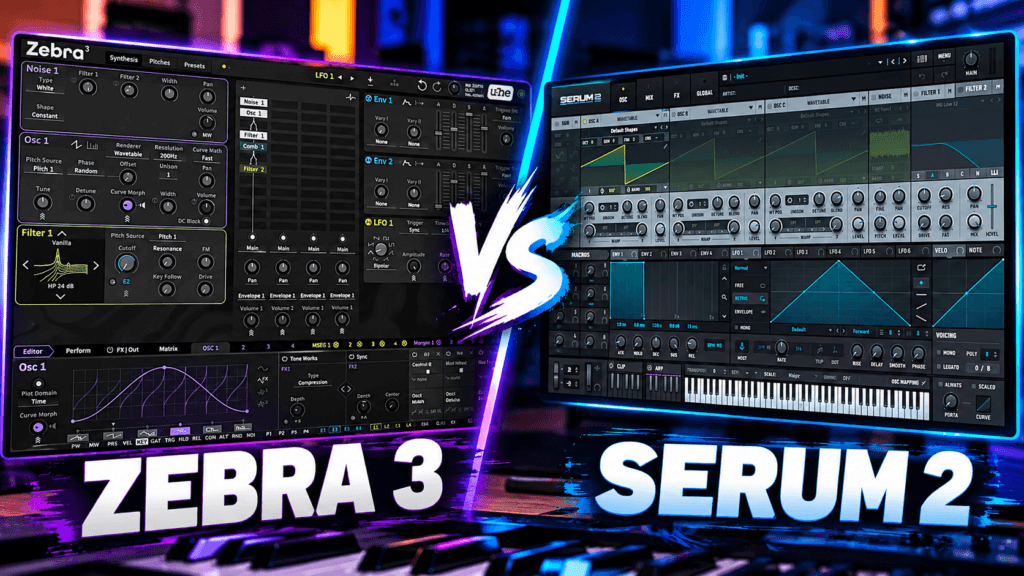
 If you’re looking for a powerful software synthesizer, Zebra 3 Vs Serum 2 is an interesting comparison.
Both synths are capable of creating everything from atmospheric pads and aggressive basses to plucks, leads, keys, sound effects, and evolving textures. But they approach sound design in noticeably different ways.
Zebra 3 is built around a flexible, modular approach to synthesis that gives you tremendous control over how sounds are constructed.
Serum 2 focuses heavily on visual sound design and combines multiple synthesis methods inside a workflow that’s relatively easy to understand.
So which one should you choose?
Let’s look at the differences between Zebra 3 and Serum 2 and figure out which synth might fit your production style.
Zebra 3 Vs Serum 2: What’s the Biggest Difference?
The biggest difference between Zebra 3 and Serum 2 isn’t necessarily sound quality.
It’s workflow.
Zebra 3 is particularly appealing if you enjoy constructing sophisticated patches, experimenting with modulation, and exploring modular-style sound design.
Serum 2 emphasizes immediacy and visual feedback while still providing enough depth to create extremely complicated sounds.
That’s important because specifications don’t tell the entire story.
A synthesizer can have hundreds of features, but those features aren’t particularly useful if you don’t enjoy using the instrument.
For producers, workflow matters.
What Is Zebra 3?
Zebra 3 is a powerful software synthesizer from u-he that builds upon the modular philosophy established by earlier versions of Zebra.
Rather than locking every sound into exactly the same signal path, Zebra gives sound designers considerable flexibility when constructing patches.
You can combine different sound-generation and processing modules, create complex modulation relationships, shape waveforms, and build patches that evolve dramatically over time.
This makes Zebra 3 particularly interesting if you’re the type of producer who opens a preset and immediately wonders:
“How did they make this sound?”
Instead of treating presets as finished products, Zebra encourages experimentation.
Start with a waveform.
Change its shape.
Add modulation.
Change the routing.
Introduce movement.
Add effects.
Keep experimenting until the original sound has transformed into something completely different.
That depth is one of Zebra 3’s biggest strengths.
What Is Serum 2?
Serum became famous primarily as a wavetable synthesizer, but Serum 2 has grown considerably beyond that original concept.
Serum 2 provides several approaches to generating and manipulating sound, including:
- Wavetable synthesis
- Sample playback
- Multisampling
- Granular synthesis
- Spectral synthesis
That makes Serum 2 more accurately described as a hybrid synthesizer than simply a wavetable synth.
You can start with a traditional wavetable and create a bass or lead.
You can load recorded material and manipulate it.
You can transform audio into evolving granular textures.
You can experiment with spectral processing.
And you can combine these techniques with Serum’s extensive modulation system.
For producers who like experimenting with different types of synthesis without constantly switching plugins, Serum 2 provides a lot of possibilities.
Zebra 3 Vs Serum 2: Workflow
Workflow might ultimately be the deciding factor between these two synths.
Serum has always been known for making synthesis extremely visual.
You can see your waveforms.
You can see modulation happening.
You can drag modulation sources onto parameters.
You can watch LFO shapes interact with different controls.
This visual feedback can make the relationship between what you’re hearing and what’s happening inside the synthesizer easier to understand.
That’s especially useful when you’re learning sound design.
Zebra 3 rewards a slightly different mentality.
Its modular approach encourages you to think more deeply about signal flow, modulation, routing, and patch architecture.
Neither approach is inherently better.
They’re simply different.
If you want to initialize a patch and quickly begin designing a sound, Serum 2’s visual workflow may feel more immediate.
If constructing the architecture behind a sound is part of what you enjoy about synthesis, Zebra 3 becomes extremely interesting.
Which Synth Is Better for Beginners?
For someone completely new to synthesis, Serum 2 may initially be easier to understand.
That doesn’t mean Serum 2 is a basic synthesizer.
Far from it.
Its advantage for beginners is that the interface provides plenty of visual feedback.
Assign an LFO, and you can see what’s happening.
Change a wavetable position, and you can watch the waveform transform.
Adjust an envelope, and you can visualize its shape.
That feedback can help connect the technical concepts of synthesis with what you’re actually hearing.
Zebra 3 may require more patience initially.
But that isn’t necessarily a disadvantage.
If your goal is to understand synthesis at a deeper level, Zebra’s architecture gives you tremendous room to grow.
You could potentially use either synthesizer for years without exploring everything it can do.
Zebra 3 Vs Serum 2 for Presets
Not everyone wants to build every sound from scratch.
Sometimes you just want to open your synth, find an inspiring preset, and start making music.
Both Zebra 3 and Serum 2 provide substantial preset libraries, and both can serve producers who prefer preset-based workflows.
But don’t make your decision based entirely on preset counts.
The number of presets isn’t nearly as important as whether those presets actually fit the music you make.
A synth containing 100 sounds you love is more useful than one containing 2,000 sounds you never use.
Also consider how easily you can modify presets.
This is where both Zebra 3 and Serum 2 become powerful.
You can start with an existing sound and change:
- Oscillators
- Filters
- Envelopes
- LFOs
- Effects
- Modulation
- Voicing
You don’t have to become an expert sound designer before customizing presets.
Start small.
Zebra 3 Vs Serum 2 for Hip Hop and R&B
This is where the comparison gets especially interesting for producers.
Both synths are capable of creating:
- Pads
- Plucks
- Keys
- Leads
- Basses
- Bells
- Atmospheric textures
- Arpeggios
- Sound effects
For modern R&B and Hip Hop, Serum 2’s sample and granular capabilities can be particularly interesting.
You could take a vocal texture or instrument sample, manipulate it through granular synthesis, add modulation, filter it, and transform it into something almost unrecognizable.
That opens the door to creating the atmospheric sounds commonly heard throughout modern R&B, Trap Soul, and melodic Hip Hop.
Zebra 3 takes a different approach.
Its modular architecture makes it particularly useful for creating evolving synthesized textures and highly customized patches.
For Trap Soul, atmospheric R&B, cinematic Hip Hop, Synthwave, or experimental production, Zebra 3 provides plenty of room to create unusual sounds.
Zebra 3 Vs Serum 2 for Sound Design
If sound design is one of your main priorities, this becomes a very close comparison.
Serum 2 gives you multiple synthesis engines combined with an extremely visual modulation system.
That makes experimentation fast.
You can create a simple sound and quickly transform it through modulation, filters, effects, granular processing, or spectral techniques.
Zebra 3 gives you a different kind of flexibility.
Its modular architecture encourages you to think about how the sound itself is constructed.
That means you aren’t simply adjusting parameters.
You’re building relationships between different components of the patch.
For serious sound designers, that can become incredibly addictive.
Modulation and Movement
Static sounds can become boring quickly.
Movement is one of the easiest ways to make synthesizer patches feel more interesting.
Both Zebra 3 and Serum 2 provide extensive modulation possibilities.
You can create:
- Moving pads
- Rhythmic textures
- Pulsating basses
- Evolving soundscapes
- Animated leads
- Changing filter patterns
- Complex atmospheric sounds
The difference again comes down to workflow.
Serum makes modulation feel immediate and visual.
Zebra encourages deeper patch construction and experimentation.
Both approaches can produce incredibly complex sounds.
Zebra 3 Vs Serum 2 for Making Beats
Here’s where producers should avoid overthinking things.
You don’t have to become a professional sound designer to use either synth effectively.
Sometimes you just need a good pad.
Or bass.
Or bell.
Or pluck.
Or weird texture sitting quietly behind the main melody.
For everyday beat-making, Serum 2’s visual workflow can make it extremely fast to modify an existing sound.
Find a preset that’s close.
Change the filter.
Adjust the envelope.
Modify the LFO.
Add effects.
Keep making the beat.
Zebra 3 can work exactly the same way, but its deeper architecture also gives you somewhere to go when you decide you want to explore sound design more seriously.
Serum 2 Has Become Extremely Versatile
One of Serum 2’s biggest strengths is how much territory it can cover inside a single plugin.
Wavetable synthesis alone provides enormous flexibility.
Add sampling, multisampling, granular synthesis, and spectral synthesis, and Serum becomes capable of handling a huge range of sounds.
You could create a synth bass.
Then make an atmospheric pad.
Then manipulate a sample.
Then create a granular texture.
Then build a lead.
And you don’t necessarily have to leave Serum.
For producers who want one synth capable of covering a lot of ground, that’s a major advantage.
Zebra 3 Rewards Exploration
Zebra 3 becomes especially interesting when sound design isn’t simply something you do before making music.
Sometimes sound design becomes part of the songwriting process.
You might start designing a patch without knowing exactly what you’re trying to create.
You adjust a waveform.
Add modulation.
Change the routing.
Play a chord.
Suddenly, that sound inspires the entire beat.
That’s one of the exciting things about deeper synthesizers.
Instead of always hearing the music first and searching for the appropriate sound, sometimes the sound itself creates the musical idea.
Zebra 3 is built for that kind of experimentation.
Do You Need Zebra 3 and Serum 2?
Probably not.
At least not because you think owning both is necessary to make professional music.
Either synth provides more than enough sound-design capability for most producers.
But they aren’t identical.
If you already own Serum 2 and love its workflow, you shouldn’t assume Zebra 3 is automatically going to improve your music.
Likewise, if Zebra’s modular workflow inspires you, you shouldn’t feel like you need Serum simply because it’s popular.
This is something worth remembering whenever you’re buying plugins:
More options don’t automatically create better music.
Sometimes learning one powerful synthesizer deeply is more valuable than owning ten synthesizers you barely understand.
Zebra 3 Vs Serum 2: Which Should You Choose?
Instead of declaring one synth universally better, consider how you actually like to work.
Serum 2 may make more sense if you:
Want a highly visual workflow, enjoy wavetable synthesis, want to manipulate samples, are interested in granular and spectral synthesis, or prefer a synth that makes complex modulation relatively easy to visualize.
Zebra 3 may make more sense if you:
Enjoy modular-style sound design, want extensive control over patch architecture, like experimenting with modulation and routing, or want a synthesizer that rewards deep exploration.
And if you’re an experienced sound designer?
There’s enough difference between their workflows that you may find legitimate uses for both.
Final Thoughts on Zebra 3 Vs Serum 2
The Zebra 3 Vs Serum 2 comparison becomes much easier once you stop asking:
“Which synth is better?”
And start asking:
“Which synth makes me want to create?”
Serum 2 offers a highly visual hybrid synthesis environment capable of wavetable, sample, multisample, granular, and spectral sound design.
Zebra 3 approaches synthesis from a more modular perspective, giving producers and sound designers extensive control over how their patches are constructed.
Both are enormously capable.
Both can make professional sounds.
And both are deep enough that you could spend years learning them.
If possible, try them before making your decision.
Initialize a patch.
Build a bass.
Make a pad.
Modify some presets.
Create something weird.
The synthesizer that makes you stop comparing specifications and start making music is probably the better choice for your workflow.
Nope. You’re ready. Let’s make something.