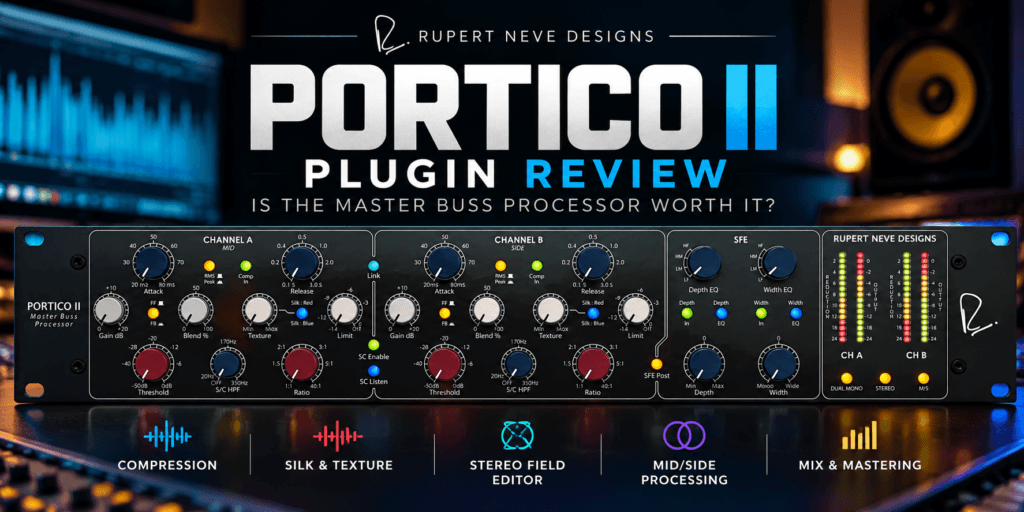
 Portico II Plugin Review: Is the Master Buss Processor Worth It?
When Rupert Neve Designs puts its own name on a software version of one of its hardware processors, expectations are understandably high. The Portico II Master Buss Processor plugin brings the company’s hardware Master Buss Processor into the DAW, combining bus compression, limiting, harmonic coloration, stereo-field processing, and Mid/Side capabilities in one processor.
But there is an important question for producers working entirely in the box: does the Portico II actually give you something useful enough to justify adding another premium plugin to your collection?
In this Portico II plugin review, we’ll look at what Rupert Neve Designs included, how the different processing sections can fit into a real mixing workflow, and who should consider adding it to their setup.
Quick Verdict: The Portico II Master Buss Processor is much more than a basic mix-bus compressor. Its combination of detailed dynamics control, Silk harmonic processing, stereo-field manipulation, and Mid/Side operation makes it particularly appealing to engineers who want one processor capable of shaping the dynamics, tone, and dimensions of a mix. Beginners may find its extensive controls more complicated than necessary, while experienced mixers are more likely to appreciate the flexibility.
Check the Portico II Master Buss Processor at Plugin Boutique
What Is the Portico II Master Buss Processor Plugin?
The Portico II is Rupert Neve Designs’ software recreation of its Portico II Master Buss Processor hardware, originally released in 2011. While the hardware was developed with mastering applications in mind, Rupert Neve Designs says it has also found use in mixing, tracking, and live sound.
Rather than recreating only the compressor, the plugin models the broader processing capabilities of the hardware.
You get compression and limiting, Silk Red and Blue harmonic processing, a Stereo Field Editor (SFE), and several ways of controlling how the dynamics section responds.
The plugin also expands on the hardware with software-specific features, including true Mid/Side processing and a variable high-pass filter for the compressor sidechain.
That makes Portico II less of a traditional “compressor plugin” and more of a complete bus-shaping processor.
Portico II Compression
Compression is naturally one of the main attractions.
The Portico II hardware uses a VCA-based compressor design, and Rupert Neve Designs describes the modeled compressor as capable of smooth and precise dynamics processing, particularly suited to stereo buses.
The familiar compressor controls are here, including:
- Threshold
- Ratio
- Attack
- Release
- Makeup gain
- Blend
- Sidechain high-pass filter
- Limiting
But things become considerably more interesting when you get into the different compressor behaviors.
You can switch between RMS and Peak detection as well as Feed-Forward and Feed-Back compression. The plugin can also operate in Dual Mono, Stereo, or M/S modes.
These aren’t simply features to make the specification sheet longer.
Peak detection can be useful when you want the compressor to react more readily to transients, while RMS detection responds more to the overall energy of the signal. Feed-Forward and Feed-Back operation further changes the way the compressor responds.
For producers still learning compression, that flexibility also creates a potential downside: Portico II gives you plenty of ways to make decisions.
This isn’t necessarily the compressor I’d recommend to someone who is just learning what threshold, ratio, attack, and release do. A simpler stock compressor can be a better teaching tool.
Once you understand compression, however, Portico II gives you considerably more room to determine how you want the compressor to behave.
The Sidechain High-Pass Filter Is More Important Than It Looks
A sidechain high-pass filter is particularly useful on a mix bus.
Imagine a Hip Hop or R&B record with a powerful kick and deep 808.
Without filtering the compressor’s detector signal, all that low-frequency energy can cause the compressor to react heavily whenever the kick or bass hits. Instead of gently controlling the entire mix, you may hear the rest of the record being pulled down by the low end.
The variable sidechain HPF gives you another way to control that behavior.
You’re not necessarily removing bass from the mix. You’re changing how much low-frequency information influences the compressor’s detection circuit.
For bass-heavy music, that’s a genuinely useful distinction.
Silk Red, Silk Blue and Texture
This might be the section that makes Portico II particularly interesting if you’re looking for more than clean dynamics control.
The plugin incorporates Rupert Neve Designs’ Silk and Texture processing.
According to RND, Red Silk emphasizes harmonic content toward the upper mids and highs, while Blue Silk focuses more on the lows and low mids. The Texture control determines how much harmonic content is introduced.
This gives you a tonal component separate from the compressor itself.
That’s important because a VCA compressor doesn’t necessarily need to dramatically color the signal. Rupert Neve Designs itself points users toward the Silk section when additional coloration is desired.
In practical terms, you could use the compressor relatively conservatively for dynamics control and then use Silk and Texture to introduce additional character.
And that’s an important lesson about analog-style plugins generally:
More isn’t automatically better.
If you’re processing an entire mix, subtle harmonic changes can affect every instrument simultaneously. Small adjustments may be all you need.
Stereo Field Editor
Portico II’s Stereo Field Editor (SFE) pushes the plugin beyond what we’d normally expect from a bus compressor.
The section provides Width and Depth controls along with corresponding filters, allowing stereo manipulation to be applied selectively according to frequency.
Width does what you’d expect: it lets you increase or decrease the perceived stereo width.
Depth manipulates the spatial positioning of material in the soundstage.
The frequency-dependent aspect is where this becomes especially useful.
You may want additional width from certain portions of a mix without indiscriminately widening everything—including frequencies you’d rather keep firmly centered.
Again, though, this is the master bus.
A little goes a long way.
If the stereo image already sounds good, there is no requirement to touch the Width knob just because the plugin gives you one.
Mid/Side Processing Makes Portico II Even More Powerful
Portico II can operate in Dual Mono, Stereo, and M/S modes.
In M/S mode, Channel A becomes the Mid channel, and Channel B becomes the Side channel. That allows the compressor, limiter, and Silk processing to affect the center and sides independently.
That opens up some serious possibilities.
You could treat the center—where vocals, kicks, snares, bass, and other important elements often live—differently from the stereo information surrounding it.
You could potentially apply different compression characteristics or harmonic coloration to the sides without applying exactly the same processing to the center.
This is also where I’d put up a giant “USE YOUR EARS” sign.
Mid/Side processing is powerful precisely because you’re changing the relationship between different components of the stereo image. It’s easy to assume something sounds “better” simply because it becomes wider or more exciting.
Bypass frequently. Level-match when possible. And make sure you’re actually improving the record.
Stereo vs. Dual Mono
There’s another interesting option worth experimenting with.
In Stereo mode, Portico II links the compressor’s gain reduction between the left and right channels, which helps preserve the stereo balance and center positioning.
Rupert Neve Designs specifically recommends also trying the same settings in Dual Mono, noting that independent channel behavior can sometimes produce a preferable stereo image on the master bus.
That’s exactly the kind of feature that makes this plugin interesting for engineers who like experimentation.
Neither mode is inherently “better.”
Try both.
Can You Use Portico II on More Than the Master Bus?
Absolutely.
Despite the name, Rupert Neve Designs says the processor can be used on mixes, stems, and individual tracks, not solely mastering chains.
That considerably increases its usefulness.
You could experiment with Portico II on:
Drum buses: Use slower attack settings to preserve transient punch while allowing the compressor to provide cohesion.
Instrument buses: Apply gentle compression and Silk coloration across keyboards, guitars, synths, or other grouped elements.
Vocals: The flexibility of the dynamics section could make it useful on vocal buses, although you probably won’t need every feature.
Mix bus: This is where the complete package makes the most sense—compression, harmonic enhancement, and stereo shaping from a single processor.
And you don’t have to use every section simultaneously.
Sometimes Portico II may be your compressor.
Sometimes you may primarily want Silk.
Sometimes stereo-field processing may be the reason you loaded it.
That flexibility is part of the value.
Is Portico II Good for Hip Hop and R&B?
This is one area where I think the feature set makes a lot of sense.
Modern Hip Hop, Trap Soul and R&B can combine huge low frequencies with vocals, atmospheric keyboards, samples and wide stereo textures.
That creates competing priorities.
You may want the mix to feel glued together without flattening the drums. You may want harmonic character without muddying the low end. And you may want width without weakening the center.
Portico II gives you tools for addressing each of those concerns.
The sidechain HPF can help keep low-frequency energy from dominating compression behavior. Silk gives you options for harmonic character. The Stereo Field Editor provides additional control over width and depth.
That doesn’t mean dropping Portico II onto a Hip Hop mix automatically makes it sound professional.
It means the plugin provides useful tools for solving problems that commonly occur in those mixes.
There’s an important difference.
Is Portico II Beginner Friendly?
I’d call it intermediate-friendly rather than beginner-focused.
You can certainly load a preset and start turning controls, but understanding why you’d choose Peak instead of RMS, Feed-Forward instead of Feed-Back, Stereo instead of Dual Mono, or Mid/Side processing requires some knowledge of dynamics and stereo processing.
That’s not a criticism of Portico II.
It’s actually one of its strengths.
But Pluginera has always taken the position that you do not need expensive plugins to create professional-sounding music. Portico II doesn’t change that.
If you’re still learning compression, your DAW’s stock compressor is probably capable of teaching you the fundamentals.
Once you know what you’re listening for, a processor like Portico II becomes much more meaningful because you can take advantage of the additional options rather than simply buying them.
Portico II Plugin System Requirements and Authorization
Rupert Neve Designs currently provides Portico II for macOS and Windows, with AAX Native, AU, and VST3 formats supported. Authorization uses iLok, with supported options including compatible USB iLok devices, machine authorization, or iLok Cloud.
A mastering or mix-bus processor is too dependent on your material, workflow, monitoring environment, and personal taste to buy solely because somebody else likes it.
Put it on your mixes.
Portico II Plugin Pros and Cons
Pros
- Extensive bus-compression controls
- RMS and Peak detection
- Feed-Forward and Feed-Back operation
- Stereo, Dual Mono and true M/S processing
- Silk Red and Blue harmonic coloration
- Adjustable Texture
- Stereo Field Editor
- Variable sidechain HPF
- Compression, limiting, coloration and spatial processing in one plugin
- Useful beyond the master bus
- 14-day demo available
Cons
- More complex than producers who simply want basic bus compression may need
- iLok authorization won’t appeal to everyone
- The extensive options can encourage unnecessary processing if you aren’t sure what you’re trying to accomplish
- Producers who already own several high-quality bus compressors, saturation plugins, and stereo tools may have considerable functional overlap
Do You Need the Portico II Plugin?
No.
And that may be one of the most important things to say in this Portico II plugin review.
You don’t need Portico II—or any premium analog-modeled processor—to make a professional mix.
Your DAW almost certainly already contains tools capable of compression, saturation, stereo processing, and limiting.
What you’re paying for here is a particular workflow, extensive control, Rupert Neve Designs’ modeled processing, and the convenience of having several related tools inside one processor.
That makes the buying decision very different.
Don’t ask:
“Can I make a good mix without Portico II?”
You absolutely can.
Ask:
“Does Portico II let me shape my mixes in a way that improves my workflow or gives me results I prefer to the tools I already own?”
That’s what the free trial can help you determine.
Portico II Plugin Review: Final Verdict
The Rupert Neve Designs Portico II Master Buss Processor is an unusually comprehensive take on bus processing.
The compressor alone provides considerable flexibility, with Peak/RMS detection, Feed-Forward/Feed-Back operation, sidechain control, and several channel-processing configurations. Add Silk Red/Blue, Texture, limiting, the Stereo Field Editor and true Mid/Side processing, and Portico II becomes much more than another compressor occupying space in your plugin folder.
For beginners, I’d still prioritize learning the processors already inside your DAW before assuming Portico II is the missing ingredient in your mixes.
For producers and engineers who already understand compression and want deeper control over dynamics, harmonic character, and stereo imaging from one processor, Portico II offers a compelling collection of tools.
Most importantly, demo it.
Use the same mix you’ve already worked on. Level-match the processed and unprocessed versions. Try subtle compression. Experiment with Silk Red and Blue. Test Stereo against Dual Mono. Then bypass the plugin.
If you consistently miss what Portico II was doing when you turn it off, you’ve learned far more than any review can tell you.