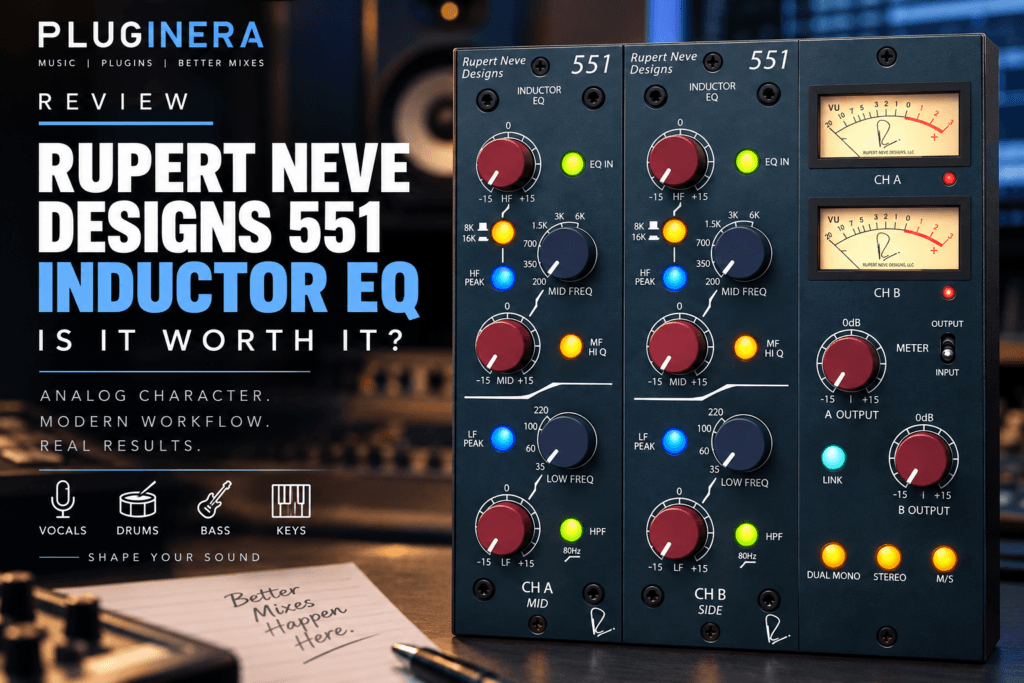
 Rupert Neve Designs 551 Inductor EQ Review: Is It Worth It?
There are EQ plugins designed to fix problems, and then there are EQ plugins you reach for because you actually want to hear what they do.
The Rupert Neve Designs 551 Inductor EQ falls firmly into the second category.
Based on the Rupert Neve Designs 551 500 Series hardware EQ, this plugin brings a three-band inductor EQ inspired by several classic Rupert Neve designs into your DAW. Rather than giving you dozens of bands, a spectrum analyzer, and endlessly adjustable parameters, the 551 takes a much simpler approach.
You choose a frequency. You boost or cut. And you listen.
That simplicity is exactly what makes an EQ like this interesting for producers.
If you make Hip Hop, R&B, Trap, Soul, Pop, or other styles where drums need weight, vocals need presence, and instruments need character, the 551 could become one of those plugins you reach for when a technically clean EQ isn’t giving you the sound you want.
Let’s take a closer look.
What Is The Rupert Neve Designs 551 Inductor EQ?
The 551 Inductor EQ plugin is based on Rupert Neve Designs’ hardware 551 500 Series Inductor EQ.
The hardware uses three EQ bands inspired by classic Rupert Neve designs, along with custom-wound inductors, transformers, and Class-A gain stages.
The low-frequency section takes inspiration from the character of the vintage 1064, while the midrange design draws from the famous 1073 approach. The high-frequency section combines vintage-inspired inductor circuitry with a more modern design.
The result isn’t intended to be a literal clone of one vintage Neve EQ.
Instead, the 551 brings together ideas from several classic designs into one musical three-band equalizer.
The plugin recreates that approach inside your DAW while giving producers access to the 551 without needing a 500 Series rack or the physical hardware.
What Makes An Inductor EQ Different?
This is where the 551 gets interesting.
An inductor is essentially a coil of wire that creates frequency-dependent resistance. When inductors saturate, they can generate harmonics that contribute additional character to the signal.
That makes the philosophy behind an inductor EQ different from something like a modern surgical digital EQ.
A transparent parametric EQ can be fantastic when you need to locate a narrow resonance at 2.73 kHz and remove it precisely.
That’s not really why I would reach for the 551.
I’d use the 551 when I wanted to shape the tone of something.
Think:
- More weight from a kick
- More authority from a bass
- More body from a vocal
- More presence from a snare
- More clarity from keys
- More air from a vocal
- More overall character from a bus
This distinction is important.
Corrective EQ asks: “What needs to be fixed?”
Tonal EQ asks: “How do I want this to sound?”
The 551 makes much more sense when approached from that second perspective.
The 551 EQ Controls
One of the things I like about the 551 concept is how straightforward it is.
You aren’t staring at ten different bands.
Instead, you get three main EQ sections.
Low Frequency Band
The low-frequency section provides four selectable frequencies:
35 Hz, 60 Hz, 100 Hz, and 220 Hz
You can boost or cut the selected frequency by up to 15 dB, and the band can operate as either a shelf or peak filter.
Those frequency choices cover a surprisingly useful range for modern production.
For example, 35 Hz reaches into the deep sub region, while 60 Hz can be extremely useful when shaping kicks and bass.
100 Hz can help control or enhance punch, while 220 Hz gets into the body and low-mid region of many instruments.
Being able to switch between shelf and peak operation gives the section considerably more flexibility than you might expect from four frequency choices.
Midrange Band
The midrange offers six selectable frequencies:
200 Hz, 350 Hz, 700 Hz, 1.5 kHz, 3 kHz, and 6 kHz
Again, you get up to 15 dB of boost or cut.
There’s also a Mid Hi Q option that narrows the bandwidth.
This is important because it means the 551 isn’t limited to broad tonal boosts.
You can use those midrange controls to address certain problem areas as well.
For Hip Hop and R&B production, these frequencies cover a lot of useful territory.
200–350 Hz can influence warmth, thickness, and muddiness.
700 Hz can help shape boxiness or midrange character.
1.5–3 kHz can influence presence and intelligibility.
And 6 kHz can bring out attack and brightness.
Instead of sweeping endlessly looking for frequencies, the 551 forces you to make deliberate choices.
I actually like that.
High Frequency Band
The high-frequency section gives you two frequency choices:
8 kHz and 16 kHz
Like the low band, it can operate in either shelf or peak mode.
This makes the high band useful for everything from adding presence to opening up the very top end of a signal.
On vocals, for example, the 16 kHz shelf could be an interesting place to experiment when you want additional openness without aggressively boosting the upper mids.
On drums or percussion, 8 kHz could help emphasize brightness and attack.
Again, this isn’t about drawing the perfect EQ curve.
It’s about listening.
The 80 Hz High-Pass Filter
The 551 also includes a fixed 80 Hz high-pass filter with a 12 dB-per-octave slope.
A fixed high-pass filter might initially sound limiting compared with modern EQ plugins where you can select any frequency you want.
But 80 Hz is an extremely practical frequency.
For vocals, guitars, keys, percussion, and many other instruments that don’t require deep low-frequency information, it can quickly remove unnecessary rumble and low-end buildup.
One thing I wouldn’t recommend is automatically turning it on for everything.
High-pass filters should solve a problem.
If removing everything below 80 Hz makes an instrument thinner without actually improving the mix, there isn’t much reason to do it.
Use your ears.
Using The 551 On Vocals
Vocals might be one of the most natural applications for this EQ.
Instead of trying to perform every EQ task with the 551, I would use it primarily for broad tonal shaping.
You might use the midrange to help a vocal move forward in the mix or experiment with the high-frequency section to create more openness.
If the vocal contains an ugly resonance that requires a very narrow cut, I’d probably reach for a surgical parametric or dynamic EQ instead.
There’s nothing wrong with using multiple EQs.
One can fix the signal.
The other can shape its personality.
That combination can be extremely powerful.
Using The 551 On Drums
The low-frequency section immediately makes the 551 interesting for drums.
A kick lacking deep weight could potentially benefit from the 35 or 60 Hz options, while 100 Hz can influence punch.
The midrange can then help shape the attack or presence of drums.
But this is also where restraint matters.
Having ±15 dB available doesn’t mean you need to use all of it.
Try making a small adjustment first.
Then bypass the EQ.
If the drum suddenly loses the weight, presence, or excitement you were hearing, you’re probably moving in the right direction.
Using The 551 On Bass
Bass is another obvious candidate.
The 35, 60, and 100 Hz selections give you three useful areas for shaping the bottom end.
But don’t automatically boost the lowest frequency available.
The correct choice depends on the bass sound and its relationship with the kick.
If your kick already dominates the sub frequencies, emphasizing another area of the bass may produce better separation.
This is where EQ becomes less about making an instrument sound impressive by itself and more about making the entire record work.
Using The 551 On Keys And Synths
This might be especially useful for R&B producers.
Electric pianos, pads, analog-style synths, and large chord voicings can consume an enormous amount of frequency space.
The 551 gives you a simple way to shape them.
You could reduce some low-mid energy, bring out presence in the midrange, or add some top-end character.
And because the controls are intentionally limited, you’re encouraged to make decisions based on what you’re hearing rather than what an analyzer tells you.
Mid/Side Processing
The plugin version expands beyond what you can do with a single hardware 551 by providing Mid/Side processing.
That opens up some interesting possibilities on stereo instruments and buses.
For example, you could shape the center differently from the sides or emphasize certain high-frequency information toward the edges of the stereo image.
That’s something I’d consider an advanced feature rather than the first thing a beginner needs to touch.
Start with ordinary stereo EQ.
Learn how the 551 responds.
Then explore Mid/Side processing once you understand the basic sound of the EQ.
What I Like About The 551
The biggest attraction isn’t the number of features.
It’s the philosophy.
Modern EQ plugins can be unbelievably powerful, but sometimes that power encourages us to stare at the screen and make decisions based on graphs.
The 551 takes you in the opposite direction.
You have a limited number of carefully chosen frequencies and straightforward controls.
That encourages you to listen.
For producers trying to improve their mixing skills, I think there’s real value in that workflow.
The frequency choices also make sense for the types of sources producers regularly encounter: vocals, drums, bass, guitars, keys, synths, and buses.
What The 551 Doesn’t Replace
I wouldn’t buy the 551 expecting it to replace every EQ in your plugin folder.
It isn’t designed to.
There are times when you need a highly adjustable parametric EQ.
There are times when dynamic EQ is the better solution.
There are times when you need extremely narrow cuts to remove resonances.
And there are times when you need transparent processing without additional character.
Keep those tools.
The 551 belongs alongside them.
Think of it as another color on your palette rather than your only EQ.
Who Is The 551 Inductor EQ For?
The 551 makes the most sense for producers and engineers who want a character-focused EQ without an overwhelming interface.
I’d especially consider it if you:
- Produce Hip Hop, R&B, Soul, Trap, Pop, or similar genres
- Frequently mix vocals
- Want analog-inspired tonal shaping
- Like classic Neve-style EQ workflows
- Want to practice mixing more with your ears
- Already own a surgical EQ and want something with a different purpose
If you’re looking for an EQ primarily for visual frequency analysis, resonance suppression, or extremely precise corrective work, another EQ may make more sense as your first choice.
Is The Rupert Neve Designs 551 Inductor EQ Worth It?
The answer depends on what you expect from it.
If you’re looking at the 551 purely as a three-band EQ, there are obviously plugins that give you far more controls.
But that’s missing the point.
The appeal of the 551 is the combination of a deliberately simple workflow, carefully selected frequencies, inductor-based character, and a design rooted in Rupert Neve’s classic EQ philosophy.
It’s a tone-shaping EQ.
And sometimes fewer choices are exactly what you need.
Instead of creating another perfect-looking EQ curve, turn a knob and ask yourself one question:
Does the record sound better?
If it does, keep going.
Nope. You’re ready. Let’s make something.