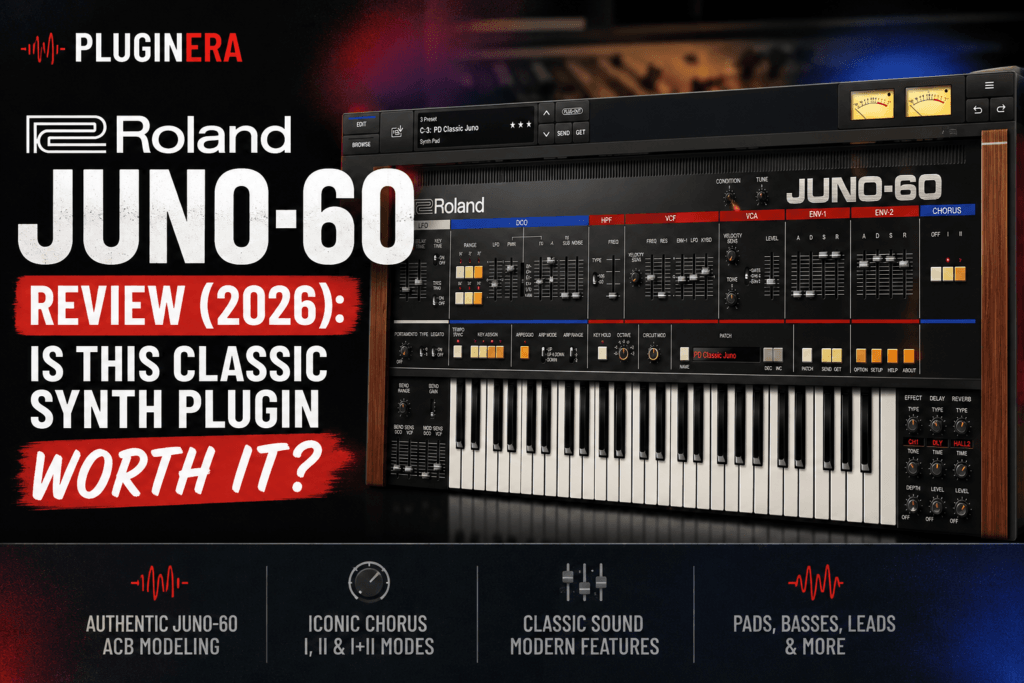
 Roland JUNO-60 Review: Is This Classic Synth Plugin Worth It?
Few synthesizers have a legacy quite like the Roland JUNO-60.
Originally released in 1982, the hardware JUNO-60 became one of Roland’s most recognizable analog polysynths. Its relatively simple architecture, punchy oscillator, warm filter, sub oscillator, and unmistakable chorus helped create a sound that remains relevant decades later.
The problem? Buying an original JUNO-60 today can be expensive, and vintage hardware brings maintenance and reliability concerns along with the nostalgia.
That’s where the Roland JUNO-60 Software Synthesizer comes in.
Roland has recreated its classic instrument as a software plugin using the company’s Analog Circuit Behavior (ACB) modeling technology. Rather than simply sampling an old JUNO, Roland designed the plugin to model the behavior of the original synthesizer’s circuitry while adding a handful of features that make it more practical for modern music production.
But with so many vintage-style synth plugins available today, is the Roland JUNO-60 actually worth buying?
In this Roland JUNO-60 review, we’ll look at its sound, features, workflow, strengths, weaknesses, and how useful it can be for modern producers—especially those making hip hop, R&B, trap soul, pop, synthwave, and other synth-heavy music.
What Is the Roland JUNO-60 Plugin?
The Roland JUNO-60 Software Synthesizer is Roland’s official software recreation of the original JUNO-60.
Instead of radically redesigning the instrument, Roland preserved much of the straightforward architecture that made the hardware synth popular in the first place.
You get the familiar combination of:
- Digitally controlled oscillator (DCO)
- Saw and pulse waveforms
- Pulse-width modulation
- Sub oscillator
- Noise generator
- High-pass filter
- Resonant VCF
- ADSR envelopes
- LFO modulation
- Arpeggiator
- Classic JUNO chorus
Roland then expands the concept with several features that weren’t available on the original hardware, including extended oscillator ranges, a second envelope, additional effects, increased polyphony, and deeper sound-character controls.
The result is essentially a modernized JUNO-60 that still tries to preserve the character and simplicity of the original instrument.
Roland JUNO-60 Key Features
The JUNO-60 isn’t trying to compete with enormous modern synthesizers containing dozens of oscillators and modulation generators.
Its appeal comes from doing a relatively small number of things very well.
ACB Modeling
The biggest feature is Roland’s Analog Circuit Behavior technology.
ACB is designed to model the behavior of individual components and circuits found inside Roland’s original analog instruments. Roland uses the technology across several of its Legendary-series software synthesizers.
For producers, the technical details aren’t necessarily the important part.
What matters is the goal: reproducing the small imperfections and interactions that give vintage analog hardware its character.
That helps the JUNO-60 deliver the slightly warm, imperfect and lively quality producers typically want from this type of synthesizer.
The Classic JUNO Oscillator
Part of the JUNO-60’s charm is its simplicity.
You don’t have three or four oscillators stacked together.
Instead, the core sound comes from a single DCO combined with pulse, saw, sub and noise components.
That might sound limiting compared with modern synths, but it’s actually one of the reasons the JUNO workflow is so fast.
You can quickly build:
- Warm basses
- Soft pads
- Analog keys
- Plucks
- Leads
- Synth brass
- Arpeggios
- Atmospheric textures
The software version also expands the oscillator range beyond the original hardware, giving producers additional flexibility.
For beatmakers who sometimes get lost tweaking massive synthesizers, the JUNO-60’s simplicity can be refreshing.
The JUNO Filter Is a Major Part of the Sound
Another major piece of the JUNO character is its filter.
The JUNO-60 plugin includes the modeled filter of the original instrument along with the ability to switch the high-pass filter behavior to the JUNO-106 style, which has its own characteristic low-frequency response.
This makes filter movement one of the easiest ways to shape patches.
Start with a bright saw wave, lower the cutoff, increase envelope modulation slightly and add some resonance.
Within seconds, you can turn a basic waveform into a warm R&B chord patch or vintage synth bass.
That’s where the JUNO excels.
You don’t need complicated sound-design knowledge to get musical results.
The JUNO Chorus Is the Star of the Show
If there’s one effect responsible for the legendary JUNO sound, it’s the chorus.
The JUNO-60 plugin recreates the original chorus modes:
Chorus I provides a more subtle widening effect.
Chorus II produces a deeper, more obvious modulation.
And engaging I + II simultaneously creates the famous third “secret” chorus configuration.
Roland also goes beyond the original hardware by including a chorus option inspired by the classic BOSS CE-1, along with additional effects.
This is where ordinary synth patches can suddenly become huge.
A basic pad can transform into a wide atmospheric layer.
A simple chord patch can gain the lush stereo movement associated with classic ’80s records.
For R&B producers in particular, this is one of the plugin’s biggest strengths.
Built-In Effects
Roland didn’t stop with chorus.
The JUNO-60 software version includes several additional effects for processing patches directly inside the instrument.
Available options include effects such as:
- Overdrive
- Distortion
- JUNO Chorus I
- JUNO Chorus II
- JUNO Chorus I+II
- CE-1-style chorus
- Delay
- Panning delay
- Flanger
- Reverb
The reverb section also provides several different spaces, including room, hall, plate and modulation-style options.
That means you can create surprisingly polished sounds without immediately loading additional effects in your DAW.
For quick beatmaking, that’s a major advantage.
Circuit Mod and Condition Controls
Two particularly interesting additions are Circuit Mod and Condition.
Circuit Mod lets you adjust aspects of the synth’s modeled circuitry, allowing you to push the character away from an idealized, perfectly clean instrument.
The Condition parameter goes even further by changing the perceived age characteristics of the modeled hardware.
This can be useful when you’re trying to make a production sound less sterile.
For example, instead of loading a pristine pad and immediately reaching for saturation or lo-fi processing, you can introduce some vintage character directly from the instrument.
That’s especially useful for:
- Lo-fi hip hop
- Neo-soul
- Alternative R&B
- Trap soul
- Synthwave
- Retro pop
Small adjustments can help a patch feel like it came from an older piece of hardware rather than a perfectly clean digital instrument.
Two Envelopes Give the Plugin More Flexibility
The original JUNO-60 was intentionally simple.
Roland retains that philosophy while adding a second adjustable envelope to the software version.
That might sound like a minor upgrade, but it significantly expands the sound-design possibilities.
You can create more independent movement between different sections of the synth instead of relying on one envelope for multiple jobs.
It doesn’t turn the JUNO-60 into a giant modular synthesizer.
That’s a good thing.
It simply gives modern producers more flexibility without destroying the fast workflow that makes the JUNO appealing.
Eight-Voice Polyphony
The original JUNO-60 provided six-voice polyphony.
Roland expands the software version to up to eight voices, although you can reduce the voice count to six or fewer when you want behavior closer to the original instrument.
Eight voices are particularly helpful for R&B.
Extended chords containing 7ths, 9ths and additional chord tones can quickly consume polyphony.
The extra voices provide slightly more breathing room when playing richer chord voicings.
The Arpeggiator
Roland also recreates the JUNO’s straightforward arpeggiator.
It includes:
- Up
- Down
- Up & Down
You can also select one-, two- or three-octave ranges.
It’s simple, but that’s exactly the point.
Load a pluck, hold a chord and you can immediately create rhythmic melodic patterns.
Add delay and chorus afterward and you have an instant starting point for synthwave, pop, R&B or melodic hip hop.
What Does the Roland JUNO-60 Sound Like?
This is ultimately the most important part of the review.
And the JUNO-60 has a very recognizable personality.
I’d describe the overall character as:
Warm, smooth, punchy, wide and slightly nostalgic.
It isn’t necessarily the synth you’d choose for extremely aggressive wavetable sounds or futuristic sound design.
Instead, it excels at sounds that feel musical immediately.
Pads are probably one of its strongest areas.
Turn down the filter, use a slower attack, increase the release and activate the chorus.
Instant atmosphere.
Basses can be equally impressive because the sub oscillator adds weight without requiring complicated oscillator stacking.
Plucks and keys work beautifully for melodic production.
And the leads have the smooth analog quality that can sit nicely above modern drums.
Roland JUNO-60 for Hip Hop
Although the original JUNO-60 is strongly associated with the 1980s, the plugin shouldn’t be viewed exclusively as a retro synth.
Its simplicity makes it surprisingly useful for modern hip hop.
For example, you could use it for:
- Dark filtered chords
- Vintage melodic loops
- Analog basslines
- Soft counter melodies
- Atmospheric pads
- Plucked arpeggios
- Lo-fi textures
One particularly effective approach is combining JUNO sounds with modern drums.
Take a warm analog chord progression, filter it aggressively, add chorus and reverb, and then place modern 808s, hi-hats and trap drums underneath it.
That contrast between vintage synthesis and modern drums can create a very distinctive production.
Roland JUNO-60 for R&B and Trap Soul
This might be where the plugin becomes especially interesting.
R&B production often benefits from warm chords, wide pads, soft keys and atmospheric textures.
Those are JUNO specialties.
Try playing minor 7th, major 7th, minor 9th or major 9th voicings through a soft JUNO pad.
Add Chorus I.
Lower the cutoff.
Increase the release.
Add a little reverb.
You can quickly create the kind of lush harmonic bed that works beautifully underneath R&B vocals.
For trap soul, you can darken those same sounds and combine them with:
- Deep 808s
- Sparse drums
- Ambient vocal textures
- Reversed samples
- Guitar melodies
- Half-time percussion
The JUNO doesn’t have to dominate the production.
Sometimes its best role is simply providing warmth and atmosphere behind everything else.
Roland JUNO-60 for Synthwave and Retro Pop
Naturally, this is where the JUNO feels completely at home.
The original instrument helped define the sonic vocabulary producers now associate with vintage electronic music.
You can quickly build:
- Pulsing basslines
- Huge analog pads
- Bright arpeggios
- Synth brass
- Retro leads
- Dreamy plucks
Add the built-in chorus and suddenly you’re deep into ’80s territory.
If you produce synthwave, retro pop or music inspired by classic electronic records, the JUNO-60 can easily become one of your go-to instruments.
Presets
You don’t have to design every patch from scratch.
Roland includes a collection of presets covering sounds such as basses, leads, pads and plucks, providing plenty of starting points for producers who prefer browsing sounds before tweaking them.
The relatively simple interface also means presets are easy to customize.
If a pad is too bright, lower the filter.
If it’s too dry, add chorus.
If the attack is too immediate, slow the envelope.
If it sounds too clean, experiment with Condition or Circuit Mod.
That’s another advantage of the JUNO architecture.
You can actually understand what’s happening without being a synthesis expert.
Is the JUNO-60 Easy to Use?
Yes.
In fact, ease of use is one of its biggest strengths.
Some modern synthesizers can feel like opening a cockpit.
The JUNO-60 is almost the opposite.
The interface encourages you to move controls and listen.
Oscillator.
Filter.
Envelope.
LFO.
Chorus.
That’s essentially the heart of the instrument.
For beginners learning subtractive synthesis, this can actually make the JUNO-60 a useful educational tool.
Instead of scrolling through endless modulation menus, you can learn how oscillator shape, filtering, envelopes and modulation interact.
CPU Usage
There is one important consideration.
Roland acknowledges that its Legendary-series synthesizers can be relatively CPU intensive because ACB performs detailed modeling of the original analog circuitry.
That doesn’t necessarily mean you’ll have problems running the JUNO-60, especially on a modern computer.
But producers working on large sessions may want to pay attention to CPU usage when running many instances.
Freezing, bouncing or rendering completed synth parts can help reduce the load.
Roland JUNO-60 System Requirements
The plugin is available for modern Windows and macOS systems and supports common plugin formats including VST3, AU and AAX. Internet connectivity is required for software authentication.
Roland currently lists requirements including:
Windows
- Windows 10 64-bit or newer supported versions
- Intel Core i5 or better
- 10 GB RAM or more
- 200 MB or more storage
macOS
- macOS 11 or later
- Intel Core i5 or Apple silicon
- 10 GB RAM or more
- 200 MB or more storage
Always check Roland’s current compatibility information before purchasing if you’re running a newly released operating system or an older computer.
Roland JUNO-60 Pros and Cons
Pros
Authentic Roland recreation
This isn’t simply a third-party synth inspired by the JUNO. Roland created the plugin using its own ACB modeling technology.
Fantastic chorus
The classic JUNO chorus is one of the main reasons to own this instrument.
Extremely easy to use
You can create useful sounds quickly without navigating complicated modulation systems.
Excellent for pads and chords
R&B, synthwave and pop producers should find plenty to like here.
Useful modern additions
Eight-voice polyphony, additional effects, a second envelope, Circuit Mod and Condition controls expand the original concept.
Great for learning synthesis
The straightforward interface makes understanding subtractive synthesis easier.
Cons
Not a massive sound-design synth
If you want extensive wavetable manipulation, dozens of modulation sources and deep sequencing, this isn’t that kind of instrument.
Potentially heavier CPU usage
ACB modeling can be demanding compared with simpler virtual analog instruments.
The simplicity won’t appeal to everyone
Advanced sound designers may find the architecture restrictive.
Roland Cloud Manager is part of the ecosystem
Installation and authentication are handled through Roland Cloud Manager, so it’s another software-management application you’ll need installed.
Who Should Buy the Roland JUNO-60?
I’d recommend considering the JUNO-60 if you produce:
- R&B
- Hip hop
- Trap soul
- Synthwave
- Pop
- Neo-soul
- Lo-fi
- Electronic music
- ’80s-inspired music
It’s particularly appealing for producers who want classic analog character without spending hours designing sounds.
If you want to load a synth, create a warm chord patch in a couple of minutes and continue building your beat, the JUNO philosophy makes a lot of sense.
Who Should Skip It?
The JUNO-60 may not be your first choice if you’re primarily interested in extreme modern synthesis.
Producers who need deep wavetable manipulation, granular synthesis, complex modulation routing or enormous multi-layer patches may get more mileage from a modern powerhouse synth.
The JUNO is about something different.
It’s about character, immediacy and musicality.
And that’s exactly why its relatively simple design has remained attractive for so long.
Is the Roland JUNO-60 Worth It in 2026?
For the right producer, yes.
The Roland JUNO-60 isn’t impressive because it has the longest feature list.
It’s impressive because you can load it, move a few controls and quickly arrive at something that sounds musical.
The combination of the oscillator, sub oscillator, filter and iconic chorus creates a recognizable analog character that works just as well for modern R&B chords as it does for retro synthwave.
Roland’s software version also strikes a sensible balance between authenticity and convenience.
You still get the relatively simple JUNO workflow, but additions like expanded polyphony, two envelopes, additional effects, Circuit Mod and Condition make it easier to integrate into modern productions.
At the time of this review, Plugin Boutique lists the JUNO-60 at $199, though plugin pricing and promotions can change, so it’s worth checking the current offer before buying.
If your production style revolves around warm pads, analog basses, lush chords, vintage plucks and atmospheric synth textures, the JUNO-60 deserves serious consideration.
Final Verdict
Rating: 9/10
The Roland JUNO-60 Software Synthesizer succeeds because it doesn’t try to turn the JUNO into something it was never meant to be.
It’s straightforward.
It’s musical.
And most importantly, it has character.
For hip hop and R&B producers, the real value lies in its ability to quickly generate warm chord sounds, pads, basses and atmospheric layers that can contrast beautifully with modern drums and 808s.
Synthwave and retro-pop producers have even more reason to consider it.
There are certainly deeper synthesizers available, but sometimes having fewer options helps you make music faster.
And that’s ultimately the JUNO-60’s greatest strength.
If you want the classic JUNO sound inside your DAW with several useful modern upgrades, the Roland JUNO-60 remains a compelling synth plugin in 2026.
Check the current Roland JUNO-60 price and availability at Plugin Boutique before purchasing.