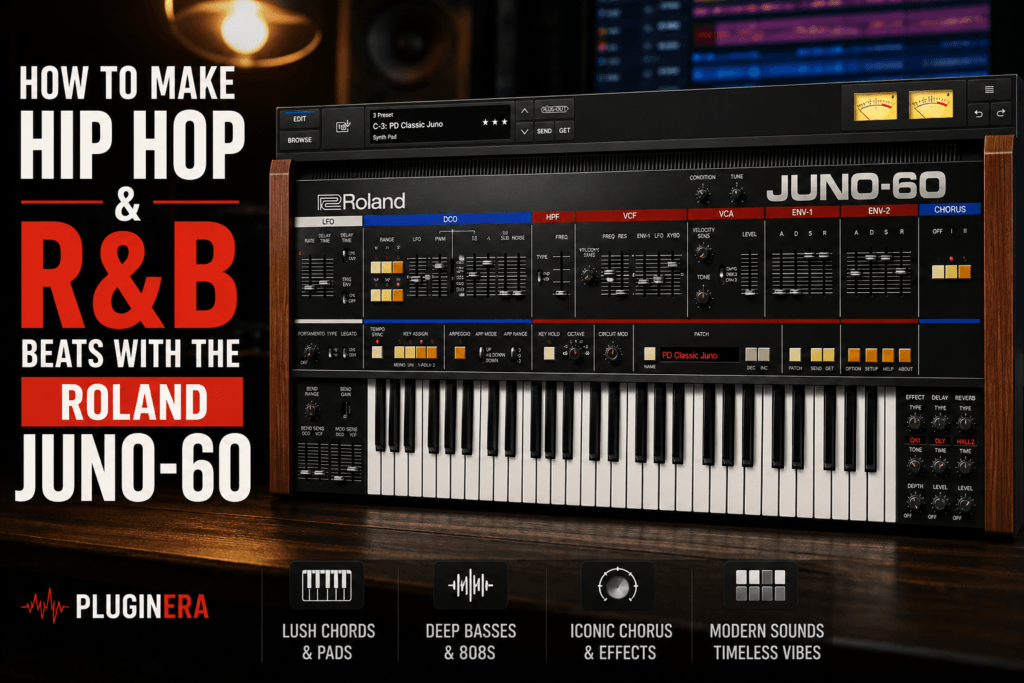
 How to Make Hip Hop & R&B Beats with the Roland JUNO-60
The Roland JUNO-60 might be based on a synthesizer from the early 1980s, but its sound fits surprisingly well into modern hip hop and R&B production.
Warm analog chords, lush pads, deep basses, dreamy plucks, atmospheric leads—the JUNO sound can handle many of the elements producers use to build R&B, trap soul, melodic hip hop, and alternative R&B beats.
And you don’t need complicated sound design to get there.
The Roland JUNO-60 software synthesizer keeps much of the straightforward architecture of the original hardware while adding modern conveniences such as additional effects, expanded polyphony, a second envelope, and deeper sound-character controls.
In this guide, we’ll look at how to make hip hop and R&B beats with the Roland JUNO-60, including sound selection, chord progressions, basses, melodies, sound design, arrangement, and mixing.
Why the Roland JUNO-60 Works for Hip Hop & R&B
Modern hip hop and R&B don’t always need huge, complicated sounds.
In fact, some of the best beats are built around a handful of carefully selected sounds.
That’s where the JUNO-60 shines.
Its basic architecture gives you access to:
- Saw and pulse waveforms
- Sub oscillator
- Noise
- Resonant filter
- LFO modulation
- ADSR envelopes
- Arpeggiator
- Classic JUNO chorus
- Delay and reverb
- Circuit Mod and Condition controls
Roland’s software version uses Analog Circuit Behavior (ACB) technology to recreate characteristics of the original JUNO-60 circuitry.
Rather than giving you hundreds of parameters, the JUNO encourages you to start with a simple sound and shape it quickly.
For beatmaking, that’s a major advantage.
Step 1: Start With the Chords
For R&B especially, I’d usually start with the harmony.
The JUNO-60 is excellent for warm chords because even relatively basic patches become wide and lush once you introduce its chorus.
Instead of starting with simple triads, try using:
- Major 7th chords
- Minor 7th chords
- Major 9th chords
- Minor 9th chords
- Sus2 chords
- Sus4 chords
- Add9 chords
- Inversions
These immediately give your progression more of an R&B character.
For example, try a progression in E minor:
Em9 – Cmaj7 – Am9 – Bm7
Or something moodier in F minor:
Fm9 – Dbmaj7 – Abmaj7 – Eb7
Don’t worry about playing huge chords in both hands.
Sometimes four carefully selected notes sound better than an enormous seven-note voicing.
Create a Warm JUNO Chord Patch
You can start from a preset or build a simple patch yourself.
Try this general recipe:
Oscillator: Saw
Sub Oscillator: Low to moderate
Filter Cutoff: Around 40–60%
Resonance: Low
Attack: Slightly softened
Decay: Medium
Sustain: High
Release: Medium
Chorus: I or II
Reverb: Moderate
Don’t treat those values as strict rules.
Move the controls while your chord progression is playing.
That’s one of the easiest ways to find the sweet spot.
Lowering the filter cutoff creates a darker tone.
Increasing the release makes the chords flow into one another.
Adding chorus creates width.
And adding reverb pushes the synth farther into the background.
Within a few minutes, you can create a lush foundation for an R&B beat.
Step 2: Use the JUNO Chorus to Create Width
The chorus is one of the defining elements of the JUNO sound.
Roland recreates the original Chorus I and Chorus II modes, along with the combined I+II configuration associated with the hardware instrument.
For R&B chords, start with Chorus I.
It can provide width without making the sound overly obvious.
If you want something more dramatic, try Chorus II.
For an exaggerated vintage texture, experiment with I+II.
The important thing is not to assume that more width is always better.
If your JUNO chords occupy a huge portion of the stereo field, leave space for vocals, percussion, guitars, background textures, and other instruments.
Sometimes the softer chorus setting works better in the complete beat.
Step 3: Darken the Sound for Trap Soul
The same JUNO patch can move from traditional R&B toward trap soul with only a few adjustments.
Start by lowering the filter cutoff.
Then increase the release slightly.
Add more reverb.
You can also experiment with the plugin’s Condition and Circuit Mod controls to introduce additional character.
The goal is to move away from a pristine synth sound.
You want something that feels:
Dark.
Warm.
Imperfect.
Atmospheric.
Combine that with a slower chord progression and suddenly the vintage JUNO character feels much more contemporary.
Try tempos around 65–85 BPM for slower R&B and trap soul.
You could also work around 130–160 BPM and compose with a half-time feel.
Step 4: Create a Simple Counter Melody
Once the chords are established, resist the temptation to immediately add five more instruments.
Instead, create one simple counter melody.
The JUNO-60 works especially well for:
- Soft leads
- Plucks
- Bell-like synths
- Filtered arpeggios
- High atmospheric melodies
Try creating a brighter patch than your chords.
If your chords are dark and wide, make the melody thinner and more focused.
For example:
Chords: Warm saw pad
Counter melody: Filtered pulse-wave pluck
This creates contrast.
Keep Your Melodies Simple
R&B melodies don’t necessarily need to be complicated.
Try using only three or four notes from the scale.
Leave gaps.
Repeat phrases.
Change the ending occasionally.
For example, if you’re working in E minor, you might build a melody around:
E – G – B – D
Those notes outline an Em7 chord.
You can then introduce nearby scale tones to create movement.
The important thing is giving the melody space to breathe.
If you expect a vocalist to eventually perform over the beat, you don’t want the synthesizer playing a lead line constantly.
Step 5: Use the Arpeggiator for Movement
The JUNO-60 includes an arpeggiator with Up, Down, and Up & Down patterns and selectable octave ranges.
This can be extremely useful when your beat feels too static.
Instead of writing another melody manually, hold one of your existing chords and let the arpeggiator generate movement.
Then experiment with:
- Filter cutoff
- Delay
- Chorus
- Octave range
- Note length
- Reverb
You can create a subtle rhythmic layer underneath your main progression.
For modern R&B, keep it understated.
An arpeggio doesn’t necessarily need to sit at the front of the mix.
Filter out some high frequencies, reduce its volume, and let it provide motion in the background.
Step 6: Create a JUNO Bass
The JUNO-60 can also produce excellent bass sounds.
The key is the sub oscillator.
Start with a relatively simple oscillator sound and introduce enough sub to add weight.
Try:
Waveform: Pulse or saw
Sub: Moderate to high
Cutoff: Low
Resonance: Minimal
Attack: Fast
Release: Short
Chorus: Off
This gives you a warm analog bass that can work underneath R&B chords.
For a more vintage R&B production, you could let the JUNO bass handle the entire low end.
For modern trap soul, however, I’d usually choose between the JUNO bass and an 808 rather than allowing both to dominate the same frequencies.
JUNO Bass vs. 808
If you’re using an 808, think of the JUNO differently.
Instead of creating another huge sub bass, create a more midrange-focused bass layer.
Then let the 808 handle the deepest frequencies.
You could have:
JUNO bass: Character and midrange
808: Sub-bass and impact
But be careful.
If both sounds occupy the same low frequencies, your mix can quickly become muddy.
Use EQ, arrangement, or octave placement to separate them.
Sometimes the best decision is simply choosing one.
Step 7: Add Modern Drums
This is where the production starts moving away from the 1980s.
You have vintage-inspired synthesizers.
Now put modern drums underneath them.
For R&B, try:
- Warm kick
- Tight snare or clap
- Soft hi-hats
- Rimshots
- Shakers
- Percussion
- Occasional open hats
For trap soul, introduce:
- Deep 808
- Harder kick
- Trap hi-hats
- Snare/clap layers
- Rolls
- Percussion
- Sparse fills
The contrast is powerful.
Your harmonic elements can sound vintage while the drums clearly place the record in a modern context.
Step 8: Don’t Overcomplicate the Drum Pattern
A lush synth progression doesn’t need an equally complicated drum pattern.
Start with the snare.
For a slow R&B groove, establish the backbeat first.
Then add the kick.
Instead of putting kicks everywhere, use them to reinforce important moments in the progression.
Next, add hi-hats.
Try varying velocity instead of programming every hat at exactly the same level.
Finally, introduce small percussion details.
The goal is groove—not filling every empty space.
Step 9: Make the Beat Feel Human
One potential problem with synth-heavy production is that everything can become overly precise.
Every chord hits perfectly.
Every drum lands perfectly.
Every note has identical velocity.
That can make the beat feel mechanical.
Try moving certain MIDI notes slightly away from the grid.
Change velocities.
Allow some notes within your chords to hit harder than others.
You can also automate parameters such as:
- Filter cutoff
- Chorus
- Reverb
- Delay
- Envelope settings
These subtle changes help the arrangement evolve.
Step 10: Create Atmosphere
One of my favorite uses for the JUNO-60 in R&B is creating sounds that aren’t necessarily meant to be noticed.
Create another pad.
Make it extremely dark.
Add a lot of reverb.
Play only one or two notes.
Turn it down.
Now you have an atmospheric layer sitting behind the main music.
You can also create:
- Filtered drones
- Reverse synths
- High sustained notes
- Noise textures
- Distant arpeggios
- Long reverb tails
These elements can make a beat feel much bigger without adding obvious instrumentation.
Step 11: Use Automation to Create Transitions
Don’t let your JUNO patch sound exactly the same for three minutes.
Automation can create arrangement changes without requiring new sounds.
For example, automate the filter cutoff.
During the verse, lower it.
During the pre-chorus, gradually open it.
When the chorus arrives, let the patch become brighter.
Suddenly the beat feels like it’s building.
You can do something similar with reverb.
Reduce the reverb during tighter sections.
Increase it during transitions.
Then bring it back down when the drums return.
These small changes create movement.
Step 12: Arrange the Beat Beyond the Loop
This is where many promising beats fall apart.
You create an incredible eight-bar JUNO loop.
Then it repeats for three minutes.
Instead, start thinking about sections.
A simple R&B arrangement might look like:
Intro – 8 bars
JUNO chords with atmosphere.
Verse – 16 bars
Bring in drums and bass.
Pre-Chorus – 8 bars
Open the filter and introduce another synth layer.
Chorus – 8 bars
Full drums, wider chords, counter melody.
Verse 2 – 16 bars
Strip the production back again.
Chorus – 8 bars
Return to the full arrangement.
Bridge – 8 bars
Change the chords, filter the drums, or introduce a new JUNO patch.
Final Chorus – 8–16 bars
Bring everything back.
Outro – 4–8 bars
Return to the chords or atmosphere.
The exact structure isn’t important.
The principle is.
Something should change.
Easy Arrangement Changes You Can Make
You don’t need an entirely new melody every eight bars.
Instead:
Remove the drums.
Drop the bass.
Mute the melody.
Open the filter.
Change the chord inversion.
Add an arpeggio.
Introduce a higher pad.
Remove the kick.
Add reverb to the final chord.
Reverse a synth note into the next section.
Small changes can turn one eight-bar idea into a complete beat.
Step 13: Mix the JUNO Chords
JUNO patches can become surprisingly large once chorus and reverb are involved.
That means you need to leave space for the rest of the production.
Start with EQ.
If the chord patch doesn’t need deep bass, use a high-pass filter to remove unnecessary low frequencies.
You might roll off somewhere around 80–150 Hz, depending on the patch and arrangement.
Don’t automatically use a specific number.
Listen to the sound in context.
The goal is creating space for your kick, bass, and 808.
Control the Low-Mids
Warm synths often build up around the low-midrange.
If your mix sounds cloudy, check roughly:
200–500 Hz
You don’t necessarily need a huge EQ cut.
Sometimes reducing a couple of dB is enough.
And if the patch already sounds good in the full mix, don’t EQ it simply because you think you’re supposed to.
Step 14: Create Space for Vocals
If you’re producing R&B, this is extremely important.
Your instrumental shouldn’t occupy every frequency.
The singer needs space.
JUNO pads and chords can become very wide and rich, which sounds impressive when they’re soloed.
But that same richness can compete with vocals.
Try:
- Lowering the synth volume
- Reducing midrange buildup
- Darkening the filter
- Shortening reverb
- Removing unnecessary layers
- Using stereo width strategically
A great R&B instrumental can feel slightly empty before the vocalist arrives.
That’s okay.
The vocal is supposed to complete the record.
Step 15: Layer the JUNO With Other Instruments
You don’t have to make the entire beat with the JUNO-60.
In fact, it can sound even better when paired with contrasting instruments.
Try combining it with:
Electric Piano
Use an electric piano for the main chords and a JUNO pad underneath.
Guitar
Play JUNO chords while a clean or ambient guitar handles the melody.
Piano
Use a darker JUNO pad behind a brighter acoustic piano.
Samples
Layer vintage JUNO textures underneath chopped samples.
Modern Synths
Use the JUNO for warm analog sounds while another synth handles more aggressive or digital textures.
Contrast creates depth.
A Complete JUNO-60 R&B Beat Recipe
If you want a simple starting point, try this.
Tempo: 74 BPM
Key: E minor
Chords
Use:
Em9 – Cmaj7 – Am9 – Bm7
Choose a warm JUNO pad.
Lower the cutoff.
Add Chorus I.
Use moderate reverb.
Bass
Create a simple bass following the root movement:
E – C – A – B
Add rhythmic variations instead of following every chord exactly.
Drums
Use a warm kick, tight clap, soft hi-hats, and a few percussion elements.
Keep the groove sparse.
Melody
Create a soft pulse-wave pluck.
Use notes from E minor.
Keep the phrase short and repetitive.
Atmosphere
Duplicate the chord patch.
Make it darker.
Increase the reverb.
Play sustained notes or simplify the chords.
Turn it down until you almost don’t notice it.
Arrangement
Start with chords.
Bring drums in after eight bars.
Introduce bass.
Add the melody during the chorus.
Remove elements during the second verse.
Open the filter heading into the final chorus.
Now you’ve turned a basic JUNO patch into the foundation of an entire R&B beat.
A Complete JUNO-60 Trap Soul Beat Recipe
Try something darker.
Tempo: 70 BPM
Key: F minor
Chords
Fm9 – Dbmaj7 – Abmaj7 – Eb7
Use a dark JUNO pad with a slower attack.
808
Follow the chord roots but add slides or passing notes sparingly.
Drums
Use trap hi-hats, a clap or snare, deep kick, and minimal percussion.
Melody
Create a thin JUNO pluck with delay.
Use a short three- or four-note phrase.
Texture
Add a second JUNO patch with heavy reverb.
Filter it aggressively.
Keep it extremely low in the mix.
That gives you the atmospheric foundation associated with darker R&B and trap soul production without requiring dozens of instruments.
Common Mistakes to Avoid
Using Too Much Chorus
The JUNO chorus sounds great.
That doesn’t mean every patch needs maximum chorus.
Too much width can make the mix feel unfocused.
Using Too Much Reverb
R&B benefits from atmosphere, but excessive reverb can push everything backward.
Use reverb intentionally.
Adding Too Many Synth Layers
Three excellent sounds usually beat eight mediocre ones.
Let the JUNO’s character do some of the work.
Making Every Patch Huge
If your chords, bass, lead, pad, and arpeggio are all enormous, nothing feels enormous.
Create contrast.
Ignoring the Arrangement
Don’t spend two hours perfecting an eight-bar loop and five minutes arranging it.
A finished beat needs movement.
Final Thoughts
The Roland JUNO-60 proves that vintage synthesizers don’t have to produce vintage-sounding music.
Its warm oscillator, sub oscillator, filter, envelopes, chorus, arpeggiator, and modern software additions give hip hop and R&B producers plenty of tools for creating contemporary sounds.
The key is how you use them.
Start with lush extended chords.
Darken the filter.
Use chorus for width.
Create a simple counter melody.
Add modern drums and 808s.
Use atmospheric layers sparingly.
And most importantly, arrange the idea into a complete track.
The JUNO-60 doesn’t need to be the most complicated synth in your collection.
That’s actually part of its appeal.
Its straightforward architecture encourages you to stop endlessly designing sounds and start making music.
For hip hop, R&B, trap soul, neo-soul, and melodic production, that makes the Roland JUNO-60 much more than a nostalgia piece.
It’s a classic synth sound that can still fit comfortably inside a modern beat.