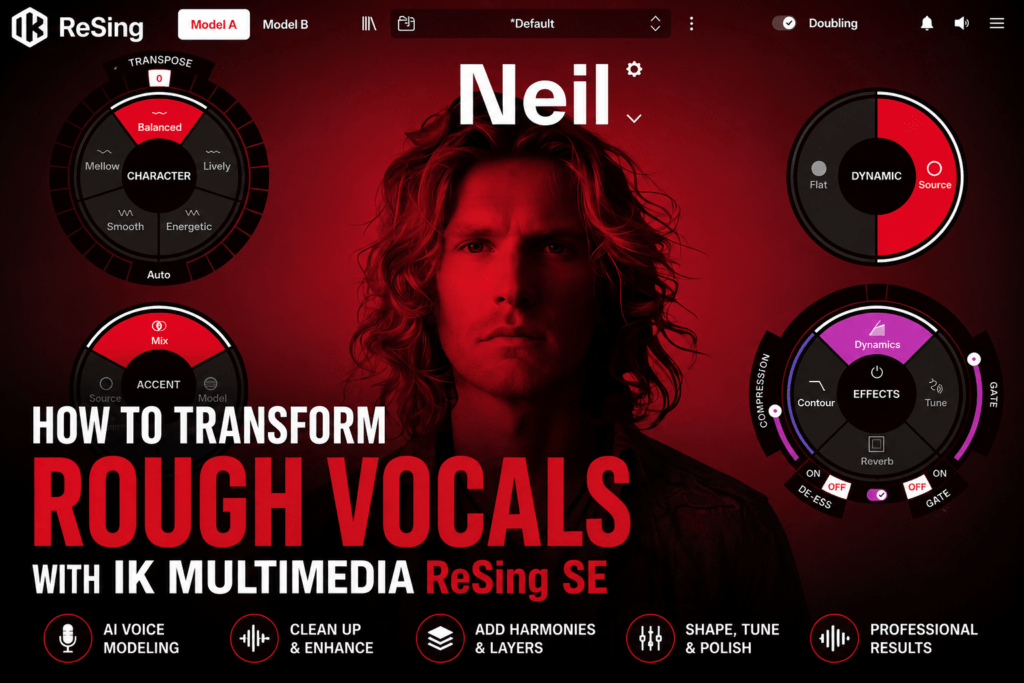
 How to Transform Rough Vocals with IK Multimedia ReSing SE
You don’t need to be a professional singer to create convincing vocal demos anymore. Whether you’re a producer sketching song ideas, a songwriter recording melodies on your phone, or an artist experimenting with different vocal styles, IK Multimedia ReSing SE makes it possible to transform rough guide vocals into polished AI-generated performances.
Unlike traditional pitch correction software, ReSing SE uses AI voice modeling to recreate your vocal performance using a different voice while preserving the melody, timing, and expression of your original recording.
In this guide, you’ll learn how to use ReSing SE to turn simple vocal ideas into production-ready performances.
Why Use ReSing SE?
Many producers have incredible musical ideas but aren’t confident vocalists.
Instead of spending hours recording dozens of takes—or hiring a singer before a song is finished—you can quickly create realistic vocal demos using AI voice models.
ReSing SE is perfect for:
- Songwriters creating demos
- Beat makers writing hooks
- Producers pitching songs
- Artists experimenting with melodies
- Content creators producing vocals quickly
It’s designed to speed up creativity without interrupting your workflow.
Step 1: Record the Cleanest Vocal Possible
Although ReSing SE can work with rough recordings, better source material always produces better results.
When recording your guide vocal:
- Record in a quiet room.
- Use a decent microphone if available.
- Minimize background noise.
- Sing confidently—even if you’re not perfectly in tune.
- Avoid clipping or distortion.
Don’t worry about sounding like a professional singer. Focus on delivering the melody with clear timing and emotion.
Step 2: Import Your Vocal
Open ReSing SE and either:
- Drag your audio file into the project window, or
- Record directly inside the software (if supported by your workflow).
The software analyzes your performance before preparing it for AI voice transformation.
Step 3: Choose an AI Voice Model
One of the most exciting parts of ReSing SE is selecting a new vocal identity.
Choose the voice that best matches your production.
For example:
- Warm male vocals
- Bright pop vocals
- Modern contemporary styles
- Smooth melodic performances
Each voice gives your melody an entirely different personality while maintaining your original phrasing.
Don’t hesitate to audition multiple voices before committing.
Step 4: Shape the Vocal Character
ReSing SE includes controls that let you customize the generated performance.
Experiment with settings such as:
- Character
- Accent
- Timbre
- Energy
- Dynamics
Small adjustments can dramatically change how expressive the finished vocal sounds.
Spend time finding the balance that fits your track.
Step 5: Blend Source and AI Performance
One of ReSing SE’s most useful features is blending aspects of your original vocal with the AI-generated voice.
If the AI version sounds too polished or too artificial, blending the two performances can create a more natural result.
Subtle blending often delivers the most convincing vocals.
Step 6: Add Harmonies
Modern Hip Hop, R&B, and Pop productions rely heavily on layered vocals.
Instead of recording multiple harmony takes, ReSing SE can quickly generate supporting vocal layers.
Try creating:
- Third harmonies
- Fifth harmonies
- Octave doubles
- Background stacks
- Chorus layers
These additional voices can instantly make hooks feel bigger and more professional.
Step 7: Polish the Vocal
Once you’ve created your AI vocal, use ReSing SE’s built-in processing tools.
Fine-tune your vocal with:
- Pitch correction
- Compression
- EQ
- Dynamics
- Reverb
These effects help the vocal sit naturally in your mix before moving into your DAW for final production.
Step 8: Export Into Your DAW
After finalizing the vocal inside ReSing SE, export the processed performance into your favorite DAW.
From there you can:
- Add delay throws
- Automate effects
- Layer additional harmonies
- Apply saturation
- Mix with the rest of your production
This allows ReSing SE to fit seamlessly into professional production workflows.
Tips for Better AI Vocals
To get the best possible results:
- Record clean guide vocals.
- Keep breaths natural.
- Don’t over-process the source recording beforehand.
- Experiment with multiple voice models.
- Use subtle processing instead of extreme settings.
- Layer harmonies for bigger choruses.
- Blend the original vocal when needed.
Remember, AI works best when it has a solid performance to build from.
Creative Ideas for Producers
ReSing SE isn’t limited to replacing lead vocals.
You can also use it to:
- Build demo vocals before hiring singers.
- Test different vocal styles.
- Create songwriting references.
- Generate layered background vocals.
- Experiment with vocal textures.
- Transform sung melodies into new musical ideas.
For producers, it’s less about replacing artists and more about accelerating creativity.
Final Thoughts
IK Multimedia ReSing SE gives producers and songwriters an exciting new way to develop ideas without being limited by their vocal ability. By combining AI voice modeling, harmony generation, vocal shaping, and built-in processing tools, it streamlines the demo creation process and encourages experimentation.
Whether you’re producing Hip Hop, R&B, Pop, EDM, or cinematic music, ReSing SE can help transform rough recordings into polished vocal performances that are ready for the next stage of production.
If you’ve ever recorded a melody and wished it sounded more refined, ReSing SE is an innovative tool that’s well worth exploring.