 Serato Sample Review For Beatmakers: Is It Worth It?
Sampling has always been one of the foundations of Hip-Hop production, but the tools producers use to sample have changed dramatically.
What once required hardware samplers, careful record chopping, manual pitch adjustment, and a lot of patience can now happen inside a DAW in seconds.
Serato Sample is built around that idea.
Rather than trying to become a complete production environment, Serato Sample focuses on one job: helping you take audio and quickly turn it into something you can chop, rearrange, pitch, stretch, and play.
And with the addition of real-time stem separation, Serato Sample has become considerably more powerful than a basic sample-chopping plugin.
But with so many DAWs already including capable samplers, is Serato Sample actually worth buying?
In this Serato Sample review for beatmakers, we’ll look at its workflow, sound manipulation tools, stem separation, strengths, limitations, and who I think will get the most value from it.
What Is Serato Sample?
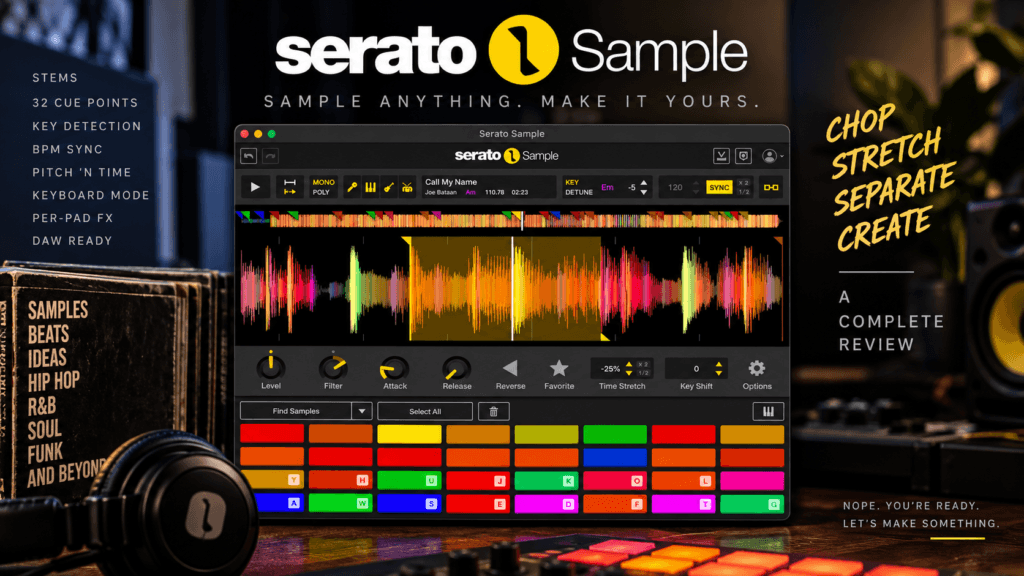
Serato Sample is a sampler plugin designed to run directly inside your DAW.
It supports VST, VST3, AU, and AAX formats, making it compatible with a wide range of production environments.
The basic workflow is simple:
Load an audio file.
Serato Sample analyzes the audio, detects information such as its BPM and key, and gives you tools to start finding and triggering sections of the sample.
You can create as many as 32 cue points, which can then be played from MIDI hardware, your computer keyboard, or programmed directly into your DAW’s piano roll.
But that’s only the beginning.
Serato Sample also gives you tools for:
- Sample chopping
- BPM synchronization
- Key detection and shifting
- Time stretching
- Stem separation
- Keyboard Mode
- Reverse playback
- Filtering
- Attack and release control
- Mono and polyphonic playback
- Per-pad output routing
That combination makes Sample feel less like a traditional “load a WAV file and trigger it” sampler and more like a dedicated environment for flipping audio into something new.
Serato Sample’s Biggest Strength: Speed
The biggest advantage of Serato Sample isn’t necessarily one individual feature.
It’s workflow.
When I’m making a Hip-Hop beat, I don’t want the technical side of sampling to interrupt the creative process.
I want to hear something interesting, load it, find the section I like, chop it, and start playing.
That’s where Serato Sample makes a lot of sense.
Its Find Samples feature can automatically identify potential sections of an audio file and assign them across its pads. You can also create slices at repeating musical intervals or simply place your cue points manually.
You aren’t forced to use the automatic options, either.
If you already know exactly where you want your chops, you can set the cue points yourself.
That’s important because automatic chopping should accelerate creativity—not replace your ears.
Up To 32 Cue Points
Sample chopping is at the heart of the plugin.
Serato Sample provides 32 colored cue points that can be mapped to different sections of your source audio.
For Hip-Hop production, that’s a lot of creative room.
You might chop:
A four-bar soul progression into individual chords.
A vocal performance into individual phrases.
A drum break into separate kicks, snares, and percussion hits.
Or tiny fragments of a sample that barely resemble the original recording.
Once those chops are mapped, you can perform them from a MIDI keyboard or pad controller.
That brings some of the physicality of hardware sampling into the DAW.
Instead of arranging everything with a mouse, you can play the sample.
And sometimes the imperfect rhythm you create with your fingers becomes the groove that makes the entire beat work.
Serato Stems Changes The Sampling Workflow
This is where modern Serato Sample gets particularly interesting.
Serato’s Stems technology can separate audio into four core components:
Vocals, melody, bass, and drums.
Think about what that means from a producer’s perspective.
Maybe you love the chords in a sample but don’t want the original drums.
Remove the drums.
Maybe you only want the vocal.
Isolate it.
Maybe the bass clashes with the bassline you’re writing.
Remove the original bass and build your own.
Or perhaps you want the drums and melody but don’t want the vocal.
You can create that combination too.
This changes sampling from simply asking:
“Where should I chop this?”
to:
“Which pieces of this recording do I actually want?”
That’s a major creative difference.
Individual Stem Levels And Automation
The current Serato Sample 2.2 workflow goes even further.
Individual vocal, melody, bass, and drum stem levels can now be adjusted, and Serato exposes stem on/off and level parameters to the host DAW for automation.
That creates some genuinely interesting production possibilities.
Imagine beginning a section with only the melody stem.
Then slowly introducing the vocal.
Drop the drums before the chorus.
Bring the bass back during the transition.
Now stem separation isn’t simply something you do before making the beat.
It can become part of the arrangement itself.
That’s the kind of feature that can turn a technical capability into an actual creative tool.
Pitch ‘n Time Is Still A Major Part Of The Appeal
Pitching samples is part of the DNA of sample-based music.
Sometimes you pitch a sample because it needs to match the key of your beat.
Other times you pitch it because changing the pitch completely changes its personality.
Serato Sample incorporates Serato’s Pitch ‘n Time technology for pitch shifting and time stretching.
That allows you to change pitch independently from tempo or stretch the timing of your sample without automatically changing its pitch.
For producers, this means you can take a sample at one BPM and fit it into a completely different production without relying on old-school pitch-and-speed relationships unless you actually want that effect.
You can also intentionally manipulate both for creative results.
And that’s an important distinction.
The goal isn’t always transparency.
Sometimes making the sample sound strange is the whole point.
BPM And Key Detection
Another major workflow advantage is automatic analysis.
Serato Sample can detect the key and BPM of your source audio and synchronize the sample to your DAW project.
That’s especially useful when you’re experimenting.
Let’s say your beat is at 84 BPM and you find a sample recorded at a completely different tempo.
Instead of manually stretching it until everything lines up, Serato Sample can handle much of that process for you.
The same applies to key.
Once you know the sample’s detected key, you have a starting point for deciding how you want it to interact with the rest of your production.
But remember:
Detection tools are assistants.
Your ears still make the final decision.
Keyboard Mode Is Surprisingly Powerful
One of my favorite concepts in Serato Sample is Keyboard Mode.
Instead of only triggering a chop from a single pad, Keyboard Mode lets you spread a sample across your keyboard and play it chromatically.
That essentially turns a tiny piece of audio into a playable instrument.
Grab a vocal syllable.
A piano note.
A strange texture.
A synth tone.
Even a tiny fragment from a larger recording.
Map it across the keyboard and suddenly you’re writing melodies with something that wasn’t originally an instrument at all.
For producers interested in sound design, this can be just as useful as traditional sample chopping.
Per-Pad Controls Give You More Control
Each chop doesn’t have to behave exactly like every other chop.
Serato provides individual pad controls for parameters including level, filtering, attack, release, pitch, playback speed, and reverse.
That’s a bigger deal than it initially sounds.
Maybe one chop has an aggressive transient that needs to be softened.
Adjust the attack.
Maybe another chop has too much low-frequency content.
Filter it.
Reverse another chop.
Pitch another one.
Change the level of another.
Now you’re not simply rearranging pieces of the same recording.
You’re creating a new instrument from those pieces.
Mono And Poly Modes
Serato Sample also lets you choose between mono and polyphonic voicing.
Mono mode is particularly useful for classic chopped-sample workflows because triggering a new chop can prevent previous chops from continuing to overlap.
Poly mode allows multiple chops to play simultaneously.
That can be useful when you want to layer pieces or create chord-like combinations.
Neither mode is inherently better.
They’re simply different creative choices.
Per-Pad Output Routing Is Excellent For Mixing
One feature I especially appreciate is per-pad output routing.
Individual pads can be sent to separate channels in your DAW for their own processing.
That means your sample doesn’t have to remain one giant stereo signal.
You could send one chop through saturation.
Another through reverb.
Another through delay.
Another through distortion.
Or simply EQ different pieces independently.
For producers who like to treat their sampler as an instrument and then mix its individual components, this makes Serato Sample considerably more flexible.
Beatgrids Help With Difficult Samples
Not every sample was recorded perfectly to a grid.
Older recordings especially can drift in tempo because they were performed by actual musicians rather than locked to modern DAW quantization.
Serato Sample includes Beatgrids, allowing you to establish beats and bars so irregular material can sync more accurately with your production.
This is particularly valuable for the exact kind of material many Hip-Hop producers want to sample.
Old soul.
Jazz.
Funk.
R&B.
Live instrumentation.
Sometimes the timing imperfections are part of what makes those records feel good.
The goal isn’t necessarily to destroy that feel.
It’s to get enough control that the sample works with your beat.
What I Like About Serato Sample
The strongest thing about Serato Sample is how many sampling tasks happen inside one workflow.
You can analyze a sample, find chops, separate stems, change the pitch, stretch the timing, reverse individual chops, filter them, play them chromatically, and route them into your DAW.
That’s a lot of functionality without turning the plugin into a giant production environment.
I also like that Serato hasn’t completely automated the creative process.
Features such as Find Samples can get you started quickly, but you’re still free to ignore its choices and make your own chops.
That’s exactly how I want production technology to work.
Help me move faster without making the creative decisions for me.
What Could Be Better?
Serato Sample won’t replace every sampling tool for every producer.
If you already use an MPC, Maschine, Ableton’s sampling tools, or another deeply integrated sampling environment, you may already have a workflow you love.
And producers who want extremely deep sample editing may eventually want more specialized tools alongside Sample.
Stem separation also deserves realistic expectations.
No stem-separation technology can magically recreate multitrack recordings that it doesn’t possess. Results can vary depending on the source material, and complex recordings can produce artifacts.
Stems can also be demanding on your computer. Serato itself notes that stem processing is CPU intensive, particularly when you’re using multiple instances or working on older hardware.
So while Stems is incredibly useful, I wouldn’t judge Serato Sample solely on the expectation of perfectly extracting every element from every recording.
Is Serato Sample Good For Hip-Hop?
Absolutely as a workflow fit.
Hip-Hop producers often want to move quickly from discovery → chop → performance → manipulation → beat.
Serato Sample is designed around that process.
Boom bap producers can chop soul and jazz records.
Trap producers can extract melodies or vocals and completely transform them.
R&B producers can turn vocal phrases into atmospheric textures.
Lo-fi producers can manipulate old recordings.
And producers who don’t traditionally think of themselves as “sample-based producers” can use Keyboard Mode to turn practically any audio into a playable instrument.
The plugin isn’t limited to Hip-Hop, but Hip-Hop producers are an obvious audience for what it does.
Serato Sample vs. Your DAW’s Built-In Sampler
This is probably the biggest question.
Why buy Serato Sample if your DAW already has a sampler?
Because you’re not necessarily paying for the ability to play a sample.
Most modern DAWs can already do that.
You’re paying for the workflow surrounding it.
Serato combines fast chopping, automatic analysis, BPM synchronization, Pitch ‘n Time processing, Stems, cue-point performance, and creative manipulation into one interface.
Whether that’s valuable depends on your existing workflow.
If your DAW already lets you sample exactly the way you want, Serato Sample may be unnecessary.
But if sampling inside your DAW currently feels like a collection of disconnected steps, Sample’s streamlined workflow becomes much more compelling.
Who Is Serato Sample For?
Serato Sample makes the most sense for producers who regularly work with audio and want to manipulate it quickly.
That includes:
- Hip-Hop producers
- R&B producers
- Beatmakers
- Remix producers
- Sample-based producers
- Producers who frequently work with vocals
- Producers interested in creative sound design
- DAW users who want a more focused sampling workflow
You don’t have to be an old-school crate-digging producer to benefit from it.
If you’re constantly dragging loops, vocals, melodies, or recordings into your DAW, there’s something here for you.
Is Serato Sample Worth It?
Serato Sample is currently listed at $129 on Plugin Boutique, though pricing and promotions can change. (Plugin Boutique)
Whether it’s worth that price depends heavily on how you produce.
If you rarely sample and you’re already happy with your DAW’s built-in tools, you probably don’t need another sampler.
But if manipulating audio is a major part of your production process, the value proposition becomes much stronger.
You’re getting a workflow that combines 32 cue points, automatic BPM and key analysis, Pitch ‘n Time processing, real-time four-part stem separation, individual stem control, per-pad editing, Keyboard Mode, Beatgrids, and flexible output routing. (Serato)
More importantly, those features work toward the same goal:
Getting from hearing an idea to actually making the beat faster.
And that’s where I think Serato Sample succeeds.
Final Thoughts
The best sampling tools shouldn’t make you think about the tool.
They should make you think about what you can do with the sound.
That’s the appeal of Serato Sample.
Load something interesting.
Find a piece you like.
Separate it.
Chop it.
Pitch it.
Stretch it.
Reverse it.
Play it.
Then make it yours.
There are certainly producers who won’t need it, especially if they’ve already developed a fast sampling workflow with the tools they own.
But for producers who want a dedicated sampler that combines traditional chopping with modern tools like real-time stem separation, Serato Sample is a compelling creative option for beatmakers.
And perhaps its biggest strength isn’t what it can do to a sample.
It’s how quickly it can get the technical work out of your way so you can get back to making music.
Nope. You’re ready. Let’s make something.