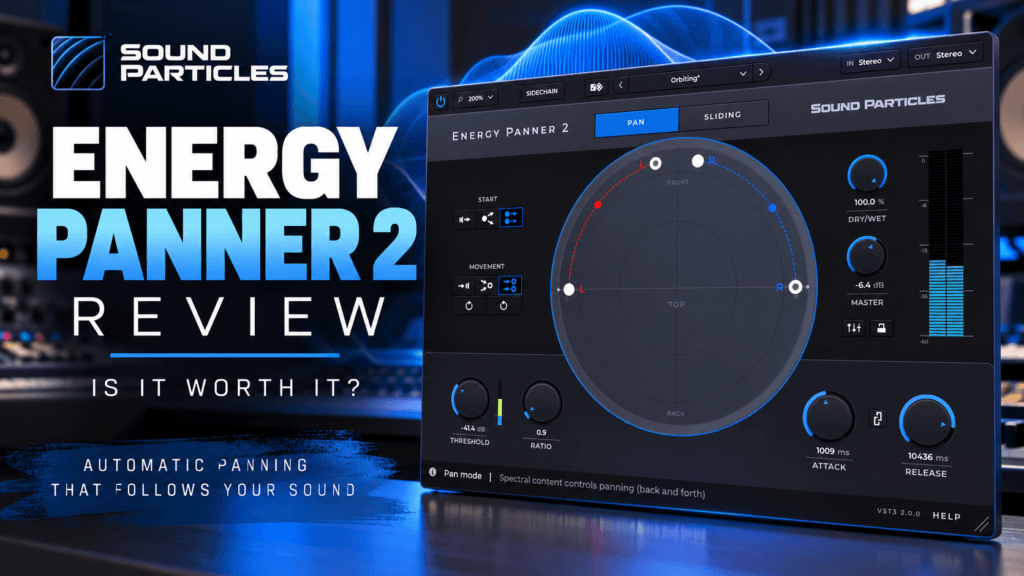
 Creating a wide, immersive mix involves more than simply turning up a stereo widening plugin. Sometimes, the secret to making a production feel bigger is introducing movement.
That’s where Sound Particles Energy Panner 2 comes in.
Unlike traditional panning plugins that rely on fixed positions or manually programmed automation, Energy Panner 2 uses the intensity of your audio to control how sounds move across the stereo field.
That means your percussion, synthesizers, background vocals, and sound effects can move naturally in response to their own dynamics.
But does that make Energy Panner 2 a worthwhile addition to your plugin collection?
In this Energy Panner 2 review, we’ll explore its features, how it works, practical production applications, and whether it’s worth buying.
What Is Energy Panner 2?
Energy Panner 2 is a dynamic audio panning plugin developed by Sound Particles, a company specializing in spatial audio and immersive sound technology.
Its main purpose is simple: automatically move sounds based on their intensity.
With conventional panning, you position an instrument somewhere between the left and right speakers. If you want that instrument to move, you typically need to automate its position.
Energy Panner 2 approaches this differently.
Instead of requiring you to draw automation curves, the plugin analyzes the incoming audio and uses changes in intensity to control movement.
For example, imagine a synthesizer playing a melodic phrase.
As certain notes become louder, Energy Panner 2 can move the sound farther along a defined path. When the notes become quieter, the movement can respond accordingly.
The result is a more dynamic listening experience without requiring extensive automation.
Energy Panner 2 supports traditional stereo mixing as well as advanced immersive audio formats.
For everyday music producers, however, its stereo capabilities may be the most immediately useful.
Energy Panner 2 Features
1. Energy-Based Automatic Panning
The standout feature of Energy Panner 2 is its ability to control panning using audio intensity.
Rather than following a fixed LFO or automation curve, movement responds to the actual dynamics of the incoming signal.
This opens up interesting possibilities for music production.
A percussion loop could move across the stereo field in response to its rhythmic accents.
A synthesizer could shift positions as individual notes become louder.
Background vocal layers could move subtly during more energetic passages.
Because movement follows the audio, the results can feel connected to the performance rather than simply added on top of it.
2. Two Different Panning Modes
Energy Panner 2 includes two primary movement modes: Pan Mode and Sliding Mode.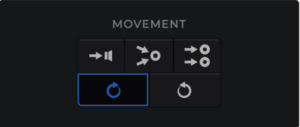
Pan Mode
Pan Mode moves audio between defined starting and ending positions based on signal intensity.
As the incoming sound becomes louder, it moves farther toward the destination.
As the intensity decreases, the sound can return toward its original position.
This mode is particularly useful for creating movement that responds to individual notes or drum hits.
Sliding Mode
Sliding Mode works differently.
When the incoming audio crosses a defined threshold, the sound moves along a selected trajectory.
Instead of automatically returning to its original position when the signal becomes quieter, it maintains its new position until another qualifying signal triggers additional movement.
This can create evolving spatial effects that feel less repetitive.
For experimental electronic music, ambient productions, and cinematic sound design, Sliding Mode could be especially interesting.
3. Independent Panning Paths
One of the notable additions in Energy Panner 2 is independent movement paths for input channels.
This gives producers greater control over how different channels move through the stereo or immersive sound field.
Rather than treating every input channel as though it must follow the same movement, you can establish separate paths.
For stereo synthesizers, atmospheric textures, and complex sound effects, this provides additional creative flexibility.
4. Threshold, Ratio, Attack, and Release Controls
Energy Panner 2 includes several controls that may look familiar if you’ve worked with compressors.
These include:
- Threshold: Determines the signal intensity needed to trigger movement.
- Ratio: Controls how strongly the panning responds after crossing the threshold.
- Attack: Determines how quickly movement responds to changes in intensity.
- Release: Controls how quickly the response recovers.
- Dry/Wet: Blends the processed signal with the original audio.
These parameters allow you to shape the behavior of the movement rather than simply turning the effect on or off.
For example, a slower response might work well for a sustained synthesizer pad, while a faster response could create more noticeable movement on short percussion hits.
The important thing is to adjust these controls while listening to the entire mix.
An effect that sounds impressive in isolation can become distracting when combined with vocals, drums, and other instruments.
5. Sidechain-Controlled Movement
Another creative feature is external sidechain support.
Instead of using the processed track’s own intensity to control movement, Energy Panner 2 can respond to another audio source.
Imagine placing the plugin on a background synthesizer while using a lead vocal as the sidechain trigger.
As the vocal changes in intensity, the synthesizer’s position can respond.
You could also experiment with using percussion to influence the movement of atmospheric effects.
This creates opportunities for rhythmic interaction between instruments without manually drawing panning automation.
6. Multiple Visualizations and Built-In Mixer
Energy Panner 2 provides Circular, Polygon, and Room views to help visualize sound movement.
These displays make it easier to understand where audio is moving and how the chosen settings affect its position.
The plugin also includes a built-in mixer for adjusting individual output channel levels.
For producers working in more complex spatial formats, this additional control can be valuable.
7. Stereo and Immersive Audio Support
Although Energy Panner 2 is useful in a conventional stereo session, its capabilities extend beyond two-channel mixing.
It supports binaural output, multichannel formats, and Ambisonics up to sixth order.
It also includes custom speaker format configuration.
These features make it relevant to sound designers, film composers, game audio professionals, and producers interested in immersive audio.
However, you don’t need a surround sound studio to benefit from the plugin.
A standard stereo monitoring setup is enough to explore its core creative features.
How to Use Energy Panner 2 in Music Production
Let’s look at several practical ways to incorporate Energy Panner 2 into a production.
Adding Movement to Synth Pads
Synth pads are excellent candidates for subtle stereo movement.
In R&B, Trap Soul, and ambient music, pads often provide atmosphere behind the main melody and vocals.
Instead of leaving a pad completely stationary, Energy Panner 2 can introduce movement that responds to its dynamics.
Try this approach:
- Insert Energy Panner 2 on your pad track.
- Select a stereo output configuration.
- Choose Pan Mode.
- Establish a relatively narrow movement path.
- Adjust the threshold until the louder portions of the pad produce movement.
- Experiment with slower attack and release settings.
- Reduce the Dry/Wet balance if the movement becomes too obvious.
The goal isn’t necessarily to create dramatic left-to-right motion.
Sometimes, small changes in positioning can make a sustained instrument feel more interesting.
Creating Dynamic Hi-Hat and Percussion Effects
Percussion is another interesting application.
Consider a shaker or hi-hat loop with varying velocity levels.
Energy Panner 2 can respond to the intensity differences between individual hits, creating movement that follows the groove.
For a Hip-Hop or Trap Soul beat, try applying the plugin to secondary percussion rather than the main kick or snare.
This allows you to experiment with stereo motion while maintaining a stable rhythmic foundation.
Start with a moderate movement range and adjust the response until the effect complements the groove.
Enhancing Background Vocals
Background vocals can benefit from thoughtful stereo placement.
Instead of using identical panning positions throughout a song, Energy Panner 2 can introduce movement that responds to the vocal performance.
This may be useful for ad-libs, harmonies, and atmospheric vocal textures.
However, subtlety is important.
Constantly moving every vocal layer can make a mix feel unfocused.
Keep the lead vocal anchored and experiment with movement on selected supporting elements.
Adding Motion to Sound Effects and Transitions
Risers, impacts, sweeps, and transitional effects are natural candidates for creative panning.
Because these sounds often change dramatically in intensity, Energy Panner 2 can produce interesting movement without requiring extensive automation.
Try using it on a riser leading into a chorus.
As the sound builds, the plugin can move it along a defined path, helping create a sense of motion before the next section arrives.
For cinematic transitions and experimental productions, Sliding Mode is worth exploring.
Energy Panner 2 vs Traditional Panning
Traditional DAW panning remains one of the most important mixing tools.
You can position instruments, create separation, and establish a balanced stereo image without purchasing additional plugins.
So what does Energy Panner 2 add?
| Traditional Panning | Energy Panner 2 |
|---|---|
| Primarily static positioning | Dynamic, intensity-driven movement |
| Manual automation for movement | Automatic response to audio intensity |
| Simple left/right placement | Configurable movement paths |
| Built into most DAWs | Dedicated creative plugin |
| Ideal for basic mix placement | Ideal for responsive spatial effects |
Energy Panner 2 isn’t necessarily a replacement for your DAW’s panning controls.
Instead, it provides another way to introduce movement and creative variation.
For most producers, conventional panning should remain the foundation.
Energy Panner 2 becomes useful when you want the positioning of a sound to evolve in response to the music.
Energy Panner 2 vs Brightness Panner 2
Sound Particles also offers Brightness Panner 2, which uses a related concept with a different source of control.
The primary difference is what triggers the movement.
Energy Panner 2 responds to the intensity of the incoming audio.
Brightness Panner 2 can respond to spectral brightness, pitch, or MIDI notes.
This means Energy Panner 2 is especially suited to movement driven by changes in loudness, while Brightness Panner 2 provides additional options for movement related to tonal or melodic changes.
Neither approach is automatically better.
The right choice depends on how you want sounds to behave in your production.
Is Energy Panner 2 Good for Hip-Hop and R&B?
Absolutely, it has potential applications in both genres.
Modern Hip-Hop and R&B productions frequently combine centered vocals and drums with wide synthesizers, atmospheric effects, and layered percussion.
Energy Panner 2 can be useful for adding controlled movement to these supporting elements.
For example, a Trap Soul production might feature a centered kick, snare, bass, and lead vocal.
A stereo pad could move gently behind the vocal, while a secondary percussion loop adds rhythmic motion around the edges.
This approach can create additional interest without overcrowding the center of the mix.
The key is restraint.
Not every instrument needs movement, and not every mix benefits from dramatic stereo effects.
The best results will likely come from selecting a few elements that genuinely benefit from additional motion.
Energy Panner 2 Pros and Cons
Pros
- Automatic panning driven by audio intensity
- Two distinct movement modes
- Independent channel movement paths
- External sidechain support
- Useful threshold, ratio, attack, and release controls
- Built-in output mixer and visualizations
- Stereo, binaural, and immersive audio capabilities
- Creative applications for music production and sound design
Cons
- Not essential for producers who only need basic panning
- Requires experimentation to achieve musical results
- Excessive movement can distract from important mix elements
- Some immersive features may be unnecessary for stereo-only producers
- Manual automation may still be preferable for precisely timed movement
Is Energy Panner 2 Worth It?
Energy Panner 2 is worth considering if you frequently work with synthesizers, atmospheric textures, percussion, or creative sound effects.
Its biggest advantage is the ability to create panning movement that responds directly to the dynamics of your audio.
Rather than spending time programming automation, you can establish movement parameters and let the performance influence the result.
However, it isn’t an essential mixing plugin for everyone.
If you’re just beginning to learn mixing, understanding basic panning, EQ, compression, and stereo balance should take priority.
Those foundational skills will have a much greater impact on your productions.
On the other hand, if you’re comfortable with the fundamentals and want to explore more creative spatial effects, Energy Panner 2 offers an interesting approach.
Check out Sound Particles Energy Panner 2 at Plugin Boutique to explore the latest product details and availability.
Frequently Asked Questions
What does Energy Panner 2 do?
Energy Panner 2 automatically controls audio panning based on changes in signal intensity. This allows sounds to move across the stereo or immersive sound field without requiring manual automation.
Can Energy Panner 2 be used for vocals?
Yes. It can be used creatively on background vocals, ad-libs, and vocal effects. For most conventional mixes, keeping the main lead vocal stable is generally a good starting point.
Does Energy Panner 2 work in stereo?
Yes. Although it supports immersive audio formats, Energy Panner 2 also works in standard stereo sessions.
Is Energy Panner 2 better than regular panning?
Not necessarily. Regular panning is ideal for establishing a stable stereo balance, while Energy Panner 2 is designed for creative movement that responds to audio intensity.
Can Energy Panner 2 be used in Reason?
Energy Panner 2 is offered in VST3 format, making it a potential option for compatible versions of Reason that support VST3 plugins. Always verify your Reason version and operating system compatibility before purchasing.
Is there an Energy Panner 2 demo?
Sound Particles offers a trial version. Check the manufacturer’s trial conditions and restrictions before using it in a project.
Final Thoughts
Sound Particles Energy Panner 2 offers a different perspective on stereo movement.
Rather than treating panning as something that must remain static or follow manually programmed automation, it allows the dynamics of a performance to influence spatial positioning.
For producers creating Hip-Hop, R&B, Trap Soul, electronic music, and cinematic soundscapes, that opens up interesting creative possibilities.
It’s not a replacement for learning proper stereo placement, and it won’t automatically make every mix sound wider or more professional.
But when used intentionally, it can add movement, atmosphere, and character to supporting elements.
Our verdict: Energy Panner 2 is a worthwhile creative tool for producers who want more expressive spatial movement, but it’s an optional addition rather than a mixing necessity.
Explore Energy Panner 2 at Plugin Boutique
Related Reading
Continue learning about mixing, stereo placement, and music production with these Pluginera articles:
- How to Mix Vocals in Reason: A Beginner’s Guide — Learn how to establish vocal clarity and balance before introducing creative effects.
- How to Build a Vocal Chain in Reason (Step-by-Step) — Understand the processors that help vocals sit properly in a mix.
- How to EQ a Mix for Streaming — Discover how frequency balance influences the clarity of your productions.
- Do You Really Need Expensive Plugins to Get a Professional Mix? — Explore when third-party plugins are worth purchasing.
- Mix With Stock Plugins for Beginners — Build stronger mixing fundamentals using the tools you already own.