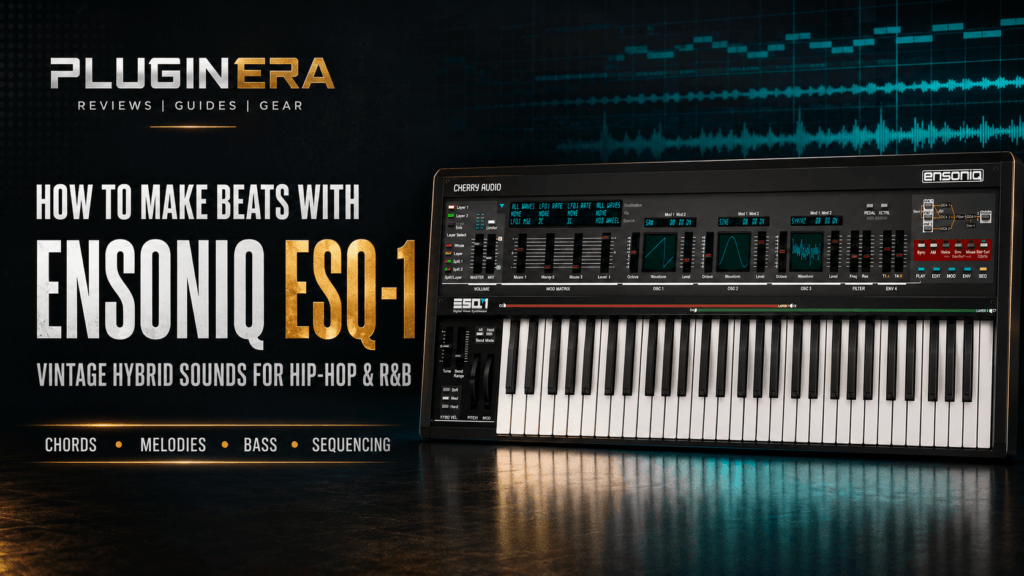
 Cherry Audio Ensoniq ESQ-1 brings the distinctive sound of one of the 1980s’ most influential hybrid synthesizers into a modern production workflow.
By combining digital oscillators with modeled analog filtering, the ESQ-1 can produce warm pads, glassy keys, gritty basses, metallic bells, evolving textures, and cinematic sequences. Those characteristics make it useful for much more than retro synthwave.
The plugin can also bring personality to hip-hop, R&B, trap soul, pop, and sample-inspired production.
In this guide, we’ll walk through how to make beats with Cherry Audio Ensoniq ESQ-1—from selecting sounds and building chords to programming drums, arranging the beat, and creating a polished mix.
This article contains affiliate links. If you purchase through one of these links, Pluginera may earn a commission at no additional cost to you.
Why Use Ensoniq ESQ-1 for Beatmaking?
Many modern producers work with the same collections of clean piano presets, analog pads, and digital bells. These sounds are effective, but they can make it difficult for a beat to develop its own identity.
Cherry Audio Ensoniq ESQ-1 offers a different starting point.
Its 32 original digital waveforms can sound bright, hollow, gritty, metallic, vocal, or intentionally imperfect. These waveforms are passed through a modeled Curtis analog filter, giving them warmth and movement.
This hybrid architecture is especially useful for producing:
- Moody R&B chords
- Dark trap soul melodies
- Vintage hip-hop samples
- Synthwave-inspired beats
- Lo-fi keyboard textures
- Atmospheric pads
- Digital bells and mallets
- Gritty synth basses
- Cinematic intros
- Rhythmic sequences
The ESQ-1 has enough character to inspire a complete beat, but it is still flexible enough to fit into contemporary productions.
Step 1: Choose a Direction for the Beat
Before browsing presets, decide what type of beat you want to create.
This prevents you from spending too much time switching between unrelated sounds.
The ESQ-1 works particularly well for three beatmaking directions.
Dark Trap Soul
Start with a glassy bell, digital keyboard, or atmospheric pad. Use a minor key, slow tempo, and spacious drum pattern.
A tempo between 65 and 85 BPM usually works well for this style.
Vintage R&B
Look for warm pads, synth brass, electric-keyboard textures, or soft plucks. Add extended chords and a grooving bass line.
Try working between 75 and 100 BPM.
Sample-Inspired Hip-Hop
Choose a textured key, brass, string, or pad sound. Create a short musical phrase, record it as audio, and process it like a sample.
Tempos between 75 and 95 BPM work well for traditional hip-hop, while faster double-time tempos can move the idea toward modern trap.
For this tutorial, we’ll create a dark R&B and trap soul beat at 78 BPM in E minor.
Step 2: Start with a Chord Progression
Create a four- or eight-bar chord progression before adding drums.
The ESQ-1’s pads and keyboard sounds are excellent for building the harmonic foundation of a beat.
Try this progression in E minor:
Em9 – Cmaj7 – Am7 – Bm7
The notes are:
- Em9: E – G – B – D – F♯
- Cmaj7: C – E – G – B
- Am7: A – C – E – G
- Bm7: B – D – F♯ – A
You do not need to play every note in each chord. Removing the root or spreading the notes across multiple octaves can create a smoother, more spacious progression.
For example, try these voicings:
- Em9: G – B – D – F♯
- Cmaj7: G – B – C – E
- Am7: G – A – C – E
- Bm7: F♯ – A – B – D
These voicings move between chords with relatively small changes, creating the smooth voice leading commonly heard in modern R&B.
Step 3: Select a Main ESQ-1 Sound
Browse the pad, key, bell, and polyphonic categories until you find a sound that matches the direction of the beat.
Do not worry about finding a perfect preset. Look for a sound with the right basic tone and then shape it to fit the track.
For dark R&B, try starting with:
- A soft digital pad
- A glassy keyboard
- A muted bell
- A breathy synth texture
- A warm polyphonic patch
Once you find a suitable preset, make a few basic adjustments.
Lower the Filter Cutoff
Reducing the cutoff removes excessive brightness and creates a darker sound.
Do not close the filter so much that the chords lose all definition. The goal is to soften the upper frequencies while preserving enough clarity for the harmony to remain audible.
Shorten the Release
Long releases can cause consecutive chords to overlap and make the arrangement sound muddy.
Shorten the amplifier release until each chord fades naturally before the next chord creates excessive buildup.
Adjust the Effects
Many ESQ-1 presets use large amounts of delay, chorus, and reverb.
These effects can sound impressive while browsing, but they may take up too much space in a complete beat. Reduce the effect mix and add additional ambience later through your DAW if necessary.
Check Both Layers
Cherry Audio Ensoniq ESQ-1 uses a dual-layer architecture. If a preset sounds too large, one layer may be contributing unnecessary width or density.
Lower the volume of one layer or temporarily disable it. Sometimes a simpler version of the preset will fit the beat more effectively.
Step 4: Create a Secondary Melody
After recording the chord progression, add a short secondary melody.
Avoid playing continuously across the entire loop. A memorable two- or three-note phrase can be more effective than a complicated melody.
Load a second instance of the ESQ-1 and choose a sound that contrasts with the chords.
If the chords use a soft pad, try:
- A digital bell
- A short pluck
- A metallic mallet
- A narrow synth lead
- A filtered keyboard sound
Use notes from the E natural minor scale:
E – F♯ – G – A – B – C – D
Begin by targeting notes already present in the chords. This helps the melody feel connected to the harmony.
For example, create a phrase using:
B – D – F♯ – E
Play the phrase near the end of every second bar and leave space between repetitions.
Small variations can keep it interesting. Change the final note, move one note up an octave, or remove part of the phrase before the hook.
Step 5: Use the Arpeggiator for Additional Movement
Cherry Audio Ensoniq ESQ-1 includes an independent arpeggiator for each synthesis layer.
The available pattern modes include:
- Arp
- Leap
- Order
- Random
Use the arpeggiator to create subtle motion underneath the main chords.
Select a soft pluck or muted digital sound and play the same chord progression. Choose a simple arpeggiator pattern, reduce the velocity, and filter the sound so it remains in the background.
Adding swing and humanization can make the pattern feel less mechanical.
You can also adjust the chance settings so some notes are occasionally skipped. This creates variation without requiring you to manually program a complicated MIDI pattern.
The arpeggiator should support the groove rather than compete with the main melody. If it becomes distracting, simplify the pattern or use it only during the hook.
Step 6: Experiment with the Polyphonic Sequencer
The ESQ-1 also includes a 16 x 4 polyphonic step sequencer for each layer.
The sequencer can control notes and modulation, making it useful for both melodic patterns and evolving sound design.
Try using it to create:
- Repeating bass patterns
- Rhythmic chord pulses
- Filter movement
- Pitch variations
- Effect changes
- Percussive synth sequences
For this beat, use the sequencer to create a subtle filtered pulse.
Choose a short synth sound and program a pattern that plays on only a few steps. Lower the volume and remove some high frequencies so the sequence sits behind the chords.
You can also assign one of the macro-motion lanes to the filter cutoff. Slight movement across the pattern will prevent the sound from feeling static.
Record the sequencer into your DAW as audio or MIDI once you find an idea you like. This allows you to edit the performance and arrange it more freely.
Step 7: Add the Drums
Once the musical foundation is established, build the drum pattern.
Because the ESQ-1 can produce wide and harmonically complex sounds, the drums should be relatively focused.
Kick
Start with a punchy kick that has enough low-end weight without an overly long tail.
Create a simple pattern that follows the natural rhythm of the chord progression. Avoid filling every available space.
For a slow trap soul beat, place the main kick near the beginning of the bar and add one or two additional hits around the snare.
Snare or Clap
Place the main snare or clap on beat three if you are working at 78 BPM in a halftime feel.
Layering a short clap with a deeper snare can create additional width and impact, but check the phase and timing between the samples.
Hi-Hats
Begin with steady eighth-note or sixteenth-note hi-hats.
Change the velocity of individual notes to create movement. Add occasional rolls, triplets, or open hats near transitions, but do not overcrowd the pattern.
The goal is to create a pocket around the chords and melody.
Percussion
Use rimshots, snaps, shakers, or subtle percussion to add groove.
Place these sounds in the spaces between the kick and snare. A small amount of percussion can make the beat feel more detailed without distracting from the ESQ-1 textures.
Step 8: Create the Bass Line
You can use either an 808 or an ESQ-1 bass patch, depending on the style of the beat.
Using an 808
For a modern trap soul sound, choose a clean 808 and follow the root notes of the progression:
E – C – A – B
Keep the first version simple. Once the root movement works, add slides, octave changes, or short passing notes.
Make sure the 808 is tuned correctly and does not clash with the low frequencies of the chord sound.
Using an ESQ-1 Synth Bass
For a more vintage R&B or synthwave-influenced beat, select a bass preset inside the ESQ-1.
Try combining a simple oscillator waveform with one of the more harmonically complex digital waves. Close the filter slightly and use a short envelope to create a focused attack.
The ESQ-1’s bass can also be layered quietly with an 808.
High-pass the ESQ-1 layer to remove unnecessary sub frequencies and use it to add midrange character. This can help the bass remain audible on phones and smaller speakers.
Step 9: Turn the Loop into an Arrangement
A strong loop is only the beginning of a complete beat.
Create a full arrangement by introducing and removing elements over time.
A simple structure might look like this:
Intro: 8 Bars
- Chords only
- Filtered or reduced high frequencies
- No full drums
- Optional texture or reversed melody
Hook: 8 Bars
- Full chord sound
- Main melody
- Complete drums
- Bass or 808
- Arpeggiator or sequence
Verse: 16 Bars
- Simplified chords
- Fewer melody notes
- Reduced percussion
- Occasional melodic fills
- Space for vocals
Second Hook: 8 Bars
- Restore the full arrangement
- Add an octave melody or additional layer
- Introduce a new percussion sound
- Increase the width or brightness
Bridge: 8 Bars
- Remove the kick or bass
- Change the chord voicing
- Use a different ESQ-1 preset
- Automate the filter or effects
- Introduce a sequenced variation
Final Hook: 8 or 16 Bars
- Bring back the complete beat
- Add small drum variations
- Increase melodic intensity
- End with a clean stop, chord tail, or filtered outro
This structure can be adjusted depending on whether the beat is intended for an artist, instrumental release, or content demonstration.
Step 10: Create Transitions with the ESQ-1
The ESQ-1’s filters, effects, and modulation tools make it useful for creating transitions.
Filter Automation
Automate the low-pass filter cutoff during the intro. Gradually open it as the first hook approaches.
You can also close the filter during the final bar of a verse before restoring the full frequency range at the hook.
Reverb Throws
Increase the reverb mix on the final chord or melody note before a new section.
Record the effect as audio if you want more control over the reverb tail.
Delay Automation
Raise the delay feedback on the last melodic phrase before a transition. Return it to its normal setting when the next section begins.
Pitch Effects
Use pitch bend, glissando, or oscillator tuning to create a rising or falling effect.
These techniques can generate transitions that feel connected to the beat’s main sound palette.
Reverse Audio
Record an ESQ-1 chord or effect as audio and reverse it. Place the reversed sound before a hook, snare, or major chord change.
Step 11: Resample the ESQ-1 Like a Vintage Record
One of the best ways to use Cherry Audio Ensoniq ESQ-1 in hip-hop is to treat it like a source for sampling.
Create a short four- or eight-bar progression and record it as audio.
Then experiment with:
- Pitching the audio down
- Reversing individual notes
- Chopping the progression
- Rearranging the chops
- Filtering the sample
- Adding saturation
- Reducing the sample rate
- Applying tape-style processing
- Recording the sample at half speed
- Adding subtle timing imperfections
You can also create an entire musical passage inside the ESQ-1 before converting it to audio.
Layer chords, a melody, and a sequenced texture. Record the combined result and process it as though it came from an older record.
This approach allows you to create original samples while retaining complete control over the composition.
Step 12: Mix the ESQ-1 Sounds
The ESQ-1 can produce harmonically rich and extremely wide presets, so careful mixing is important.
High-Pass Unnecessary Low Frequencies
Pads, keys, and atmospheric sounds may contain low-frequency information that competes with the kick and bass.
Apply a high-pass filter and remove only what the sound does not need. Avoid filtering so aggressively that the instrument becomes thin.
Control the Low Midrange
If the beat sounds muddy, inspect the area between approximately 200 and 500 Hz.
Instead of automatically cutting every instrument, determine which sound is causing the buildup. A small reduction in the chord layer may create enough space.
Reduce Excessive Width
Wide patches can sound impressive but may leave little room for vocals and other instruments.
Reduce the ESQ-1’s stereo expansion, lower one layer, or narrow the sound with a utility plugin.
Keep the kick, snare, bass, and main vocal area stable near the center.
Manage Reverb and Delay
Long delays and reverbs can blur the rhythm of the beat.
Shorten the decay, reduce the wet level, or filter the effect return. Using less ambience on the main chord sound can make the groove feel more immediate.
Use Compression Carefully
Many synth sounds do not need heavy compression.
Use compression only if the performance is inconsistent or if you want to change the envelope. A slow attack can preserve the initial impact, while a faster attack can soften an overly sharp digital transient.
Leave Headroom
Avoid pushing every instrument close to maximum level.
Leave enough space on the master output for mixing and mastering. A balanced production with controlled peaks will usually sound larger than a session in which every channel is competing for loudness.
Tips for Better ESQ-1 Beats
Modify Presets Instead of Using Them Unchanged
A few adjustments to the filter, envelope, layer balance, and effects can turn a factory preset into something that feels more personal.
Build the Beat Around One Main Sound
Choose one ESQ-1 patch as the centerpiece. Let the remaining instruments support it rather than introducing several competing textures.
Use Contrast
Pair a dark pad with a brighter melody or a wide chord sound with a narrow, centered lead.
Contrast helps each part remain identifiable.
Commit Sounds to Audio
Recording a synth part as audio encourages arrangement decisions and allows you to reverse, chop, stretch, and process it creatively.
Leave Space for the Artist
If the beat is intended for vocals, avoid placing melodies in every available space.
Use instrumental phrases to answer the imaginary vocal rather than compete with it.
Automate the Layers
Lower or disable one ESQ-1 layer during the verse and restore it during the hook. This creates arrangement contrast without requiring an entirely new sound.
Frequently Asked Questions
Is Cherry Audio Ensoniq ESQ-1 good for hip-hop?
Yes. Its textured keys, bells, pads, basses, and digital waveforms can add distinctive color to hip-hop productions. It is also an excellent source for creating original samples.
Can the ESQ-1 make trap soul beats?
Yes. Filtered bells, dark keyboard sounds, evolving pads, and atmospheric textures make it particularly useful for trap soul and alternative R&B.
Is the ESQ-1 only suitable for ’80s music?
No. Although it naturally excels at retro music, its hybrid sound engine, modulation, layering, and effects can also produce contemporary and experimental sounds.
Can I make an entire beat with the ESQ-1?
You can use it for chords, melodies, basses, sequences, effects, and some synthesized percussion. Most producers will still use external drum samples for the primary kick, snare, and hi-hat pattern.
Should I use presets or design sounds from scratch?
Both approaches work. Presets provide fast starting points, while editing the oscillators, filters, envelopes, layers, and effects will make the sounds more original.
Can I use the ESQ-1 with an 808?
Yes. Remove unnecessary low frequencies from the ESQ-1 chords and melodies so the 808 has enough room. You can also layer a filtered ESQ-1 bass with an 808 to add midrange definition.
Final Thoughts
Cherry Audio Ensoniq ESQ-1 is more than a recreation of a vintage synthesizer. It is a flexible beatmaking instrument with enough character to influence the direction of an entire production.
Its digital oscillators provide gritty, metallic, glassy, and atmospheric textures, while the modeled analog filter keeps those sounds warm and musical. The dual-layer architecture, multistage envelopes, arpeggiators, polyphonic sequencers, and built-in effects make it possible to create everything from simple keyboard patches to evolving rhythmic soundscapes.
For hip-hop and R&B producers, the ESQ-1 is particularly valuable as an alternative to the polished sounds found in many modern synths.
Use it to create moody chords, unusual bells, warm pads, vintage basses, original samples, and cinematic transitions. Shape the presets to fit your track, leave room for the drums and vocals, and use arrangement automation to keep the production evolving.
If you want your beats to combine vintage digital grit, analog warmth, and modern flexibility, Cherry Audio Ensoniq ESQ-1 offers an inspiring place to begin.