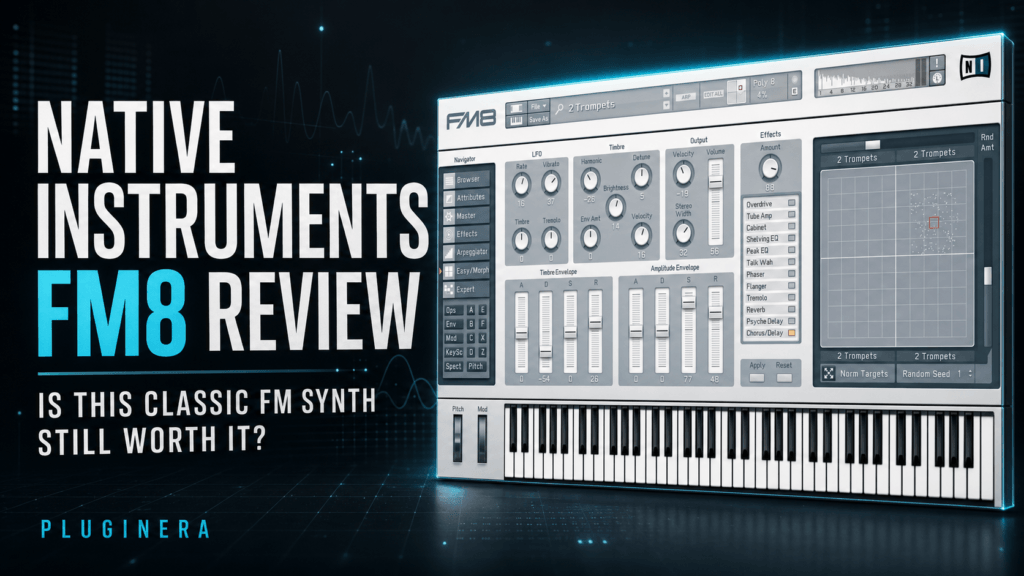
 Native Instruments FM8 Review: Is This Classic FM Synth Still Worth It?
This article may contain affiliate links. If you make a purchase through one of these links, Pluginera may earn a commission at no additional cost to you.
Some software synthesizers stay relevant because they are constantly redesigned. Others survive because their sound never stops being useful. Native Instruments FM8 belongs in the second category.
FM8 has been around for years, and its interface no longer looks as modern as the newest synth plugins. However, its sharp digital character, expressive electric pianos, glassy bells, metallic plucks, evolving pads, aggressive basses, and flexible sound-design engine can still fit comfortably into music made in 2026.
For hip hop and R&B producers in particular, FM8 offers the kinds of sounds that can quickly become the foundation of a beat. It can produce dreamy keys for trap soul, bright bells for melodic hip hop, glossy electric pianos for contemporary R&B, and unmistakably digital textures for ’80s- and ’90s-inspired production.
At the time of writing, FM8 is available for $10 instead of its regular $99 price at Plugin Boutique, with the promotion scheduled to end August 16. Prices and promotions can change, so always check the current listing before buying.
Check the current FM8 price at Plugin Boutique
So, is Native Instruments FM8 still worth buying in 2026? Let’s take a closer look.
Native Instruments FM8 Review: The Quick Verdict
FM8 is still worth it in 2026 for producers who want a deep, distinctive FM synthesizer without paying premium-synth prices. Its strongest qualities are its clean digital sound, extensive preset library, flexible modulation matrix, morphing system, advanced arpeggiator, and surprisingly approachable Easy Edit page.
The main drawback is its age. The interface looks dated, can feel cramped on a high-resolution display, and does not provide the polished visual feedback found in newer synthesizers. Programming FM sounds from scratch also takes more patience than using a traditional subtractive synth.
Those limitations matter much less if you primarily want excellent presets that can be quickly customized. At a deep sale price—especially the current $10 promotion—FM8 delivers exceptional value.
FM8 is best for:
- Hip hop, R&B, trap soul, pop, EDM, and synthwave producers
- Glassy bells, digital keys, electric pianos, plucks, pads, and basses
- Producers who want both preset-based simplicity and deep sound design
- Musicians interested in classic FM tones and modern variations
- Sound designers who enjoy complex modulation and evolving timbres
You may want to skip it if:
- A large, modern, scalable interface is essential to your workflow
- You only want warm analog-style sounds
- You expect FM synthesis to be as immediate as a basic subtractive synth
- You already own a Komplete bundle that includes FM8
What Is Native Instruments FM8?
FM8 is a software synthesizer built around frequency modulation synthesis, commonly shortened to FM synthesis. Instead of relying mainly on filters to shape harmonically rich oscillators, FM synthesis uses one operator to modulate the frequency of another.
Changing the relationships between these operators can create everything from clean sine-like tones to bright, metallic, harmonically complex sounds.
This synthesis method became famous through classic digital hardware instruments, and its sound remains closely associated with electric pianos, bells, mallets, basses, brass, and other crisp digital textures.
FM synthesis is powerful, but it can also become complicated quickly. FM8 attempts to make the process easier with a visual modulation matrix, overview pages, an Easy Edit section, and a large collection of finished presets.
Beginners can start by browsing sounds and adjusting a few broad controls, while experienced users can open the deeper pages and build patches at the operator level.
That balance is one of the biggest reasons FM8 has remained useful for so long.
FM8’s Most Important Features
A Large Factory Sound Library
FM8’s full product description lists more than 1,200 professionally designed sounds, covering digital pianos, bells, brass, basses, pads, leads, effects, arpeggios, and morphing patches.
The library is important because FM synthesis is not always beginner-friendly. You do not need to understand carriers, modulators, ratios, feedback, and complex envelopes before making music. You can load a preset, play a progression, and then shape the sound from there.
Many of the included sounds have the crisp attack and harmonic detail that help synth parts remain audible in a crowded beat. Presets can also be searched by useful sound attributes, making FM8 far more practical as a preset instrument than its age might suggest.
The FM Matrix
The matrix is the heart of FM8. It displays the relationships between its operators and lets you control how strongly one signal modulates another.
This gives you a clear overview of the patch’s structure instead of forcing you to jump between several pages just to understand how a sound is connected.
Simple routings can create smooth keys and basses, while more complex routings and feedback can introduce metallic harmonics, grit, movement, and unpredictable textures.
The matrix is still one of FM8’s greatest strengths. It does not make FM synthesis effortless, but it makes a complicated process much easier to visualize.
Easy Edit for Faster Customization
You do not have to enter the matrix every time a preset needs adjustment. FM8’s Easy Edit page provides broad, musical controls that change several deeper parameters behind the scenes.
This is useful when a preset is close to what you need but feels too bright, too dark, too aggressive, or too static. Instead of rebuilding it, you can make quick tonal and envelope adjustments while the beat is playing.
For producers who prefer making music over programming synthesizers, Easy Edit is one of the most valuable parts of FM8.
Detailed Operator and Envelope Editing
Each operator has a dedicated editing page for controlling its waveform, frequency behavior, amplitude, panning, velocity response, modulation, and multi-breakpoint envelope.
FM8 also includes overview pages that let you see important operator or envelope settings together. Envelopes can be linked when you want several parts of a patch to follow the same shape, then unlinked for more detailed editing.
This depth allows FM8 to produce sounds that change dramatically over time. A patch can begin as a soft key, introduce brighter harmonics during the sustain, and finish with a metallic or atmospheric release.
The Morph Square
FM8’s Morph Square lets you blend between four different timbres. Each corner represents a variation of the sound, and moving the morph control creates new combinations between them.
The movement can be automated from a DAW or controlled through MIDI. That makes the Morph Square useful for more than sound-design experiments.
It can add subtle development to a pad, increase the intensity of a lead during a chorus, or make a repeated melodic part evolve across an arrangement.
For producers who struggle to keep an eight-bar loop interesting, automating the Morph Square can create movement without adding another instrument.
A Flexible Arpeggiator
FM8 includes an arpeggiator that can transform held notes into melodic and rhythmic patterns. You can adjust note order, accents, transposition, note length, velocity, shuffle, and tempo. It also includes 48 templates for quickly building sequences.
The keyboard can be split so that one area triggers the arpeggiator while another remains available for chords or bass notes. This makes it possible to create layered musical performances from a single FM8 instance.
The arpeggiator is especially useful for trap, R&B, pop, synthwave, and electronic music. A basic bell or pluck preset can become a complete melodic idea once rhythm, octave movement, and velocity variation are introduced.
Twelve Built-In Effects
FM8 includes twelve effects for finishing sounds inside the plugin. The collection includes distortion and amp-style processing, cabinet coloration, EQ, phaser, flanger, tremolo, and other sound-shaping tools.
These effects can add warmth and weight to patches that initially sound too clean. They can also push FM8 in the opposite direction by making basses, leads, and effects more aggressive.
The effects section is not a replacement for a modern collection of dedicated mixing plugins, but it is more than capable of making a preset feel finished before it reaches the mixer.
How Does FM8 Sound in 2026?
FM8 sounds unapologetically digital—and that is a strength rather than a flaw.
Electric Pianos and Keys
FM synthesis is closely associated with bright, expressive electric pianos, and FM8 handles them extremely well. Its keys can sound clean and polished, soft and glassy, or sharp enough to cut through drums and bass.
For R&B, reducing some of the high-frequency bite and adding chorus, saturation, or reverb can turn a pristine preset into a warmer chord instrument.
Velocity sensitivity also makes these sounds more expressive when the progression is played rather than drawn at one fixed velocity.
Bells, Plucks, and Mallets
Bells and plucks are among FM8’s strongest sound categories. The synth can create detailed attacks and harmonics that are difficult to achieve with a basic analog-style instrument.
These tones work naturally in melodic hip hop, trap, drill, R&B, pop, and cinematic production. A bright preset can carry the main melody, while a darker variation can sit behind vocals without taking over the mix.
Pads and Evolving Textures
FM8 is not limited to short, percussive sounds. Its flexible envelopes and morphing system can produce wide pads, cold atmospheres, shifting digital textures, and expressive background layers.
The pads often have more harmonic motion than a simple filtered saw wave. This makes them valuable when you want a sustained sound that adds emotion without requiring a complicated chord rhythm.
Basses, Leads, and Brass
FM8 can create clean sub-basses, punchy digital basses, aggressive growls, sharp leads, and bold synthetic brass. Feedback, complex operator routings, and built-in distortion can push the engine far beyond classic electric-piano territory.
Its brighter sounds can become harsh if they are not balanced carefully, but that same edge helps them remain present in dense arrangements. A small amount of filtering, EQ, or saturation is often enough to make them sit naturally in a modern mix.
Is FM8 Good for Hip Hop and R&B?
Yes. FM8 is particularly useful for hip hop and R&B because its core strengths match several sounds regularly used in those genres.
For trap soul and contemporary R&B, start with an electric piano or soft digital key. Lower the brightness, lengthen the release, add subtle modulation, and place it in a dark reverb. Layering a quiet pad underneath can make the progression feel wider and more emotional.
For melodic hip hop and trap, look for bells, mallets, and short plucks. Use velocity changes to avoid a robotic pattern, then automate the Morph Square or filter the melody during the verse to create arrangement contrast.
For ’80s- and ’90s-inspired R&B, FM8’s digital pianos, brass, basses, and glossy pads provide an immediate connection to the character of classic FM hardware. These sounds can remain polished or be processed with chorus, tape saturation, and reverb for a more nostalgic result.
For experimental hip hop, the matrix, feedback, morphing, and randomization features can create unusual textures that do not sound like another recycled sample or familiar wavetable preset.
FM8 is capable of providing the main musical idea, background atmosphere, counter-melody, and bass from a single instrument.
The key is choosing complementary sounds rather than stacking several bright FM patches in the same frequency range.
Is FM8 Easy to Use?
FM8 is easy to play, but it is not always easy to program.
Loading presets, searching the library, using the arpeggiator, and making broad adjustments on the Easy Edit page are all approachable. A beginner can get useful sounds without understanding the deeper engine.
Designing a polished FM patch from scratch has a steeper learning curve. Small changes to operator ratios or modulation amounts can dramatically affect the sound, and the relationship between carriers and modulators may initially feel less intuitive than opening a filter on a subtractive synth.
The good news is that FM8 lets you grow into its deeper features.
Start with presets. Learn how the Easy Edit controls affect them. Next, examine the matrix and change one modulation amount at a time. The existing presets can function as practical lessons in how FM sounds are constructed.
The Interface: FM8’s Biggest Weakness
The sound engine remains capable, but the interface shows its age.
FM8 organizes its many features logically, yet the overall presentation feels smaller and less fluid than current synths. On a high-resolution monitor, some producers may find the controls and text cramped.
The browser and editing pages are functional, but they do not have the modern visual polish of newer instruments.
That does not stop FM8 from making excellent sounds, but it affects the experience. Producers who value large animated displays, drag-and-drop modulation, and immediate visual feedback may find the workflow dated.
FM8 is easiest to appreciate when treated as a powerful musical instrument with an older control panel—not as a modern interface showcase.
FM8 System Requirements and Compatibility
According to the current Plugin Boutique listing, FM8 supports:
Windows
- Windows 10 or 11, 64-bit
- VST and AAX plugin formats
- 4 GB RAM, with 6 GB recommended
macOS
- macOS 13, 14, or 15, 64-bit
- Native Apple Silicon support
- VST, AU, and AAX plugin formats
- 4 GB RAM, with 6 GB recommended
An internet connection is required for downloading and activating the software. Once activated, FM8 can be used offline.
System support can change, so verify compatibility with your computer, operating system, and DAW before purchasing.
FM8 Pros and Cons
Pros
- Distinctive, high-quality digital FM sound
- Excellent electric pianos, bells, plucks, pads, basses, and textures
- Large factory preset library
- Easy Edit page makes preset customization approachable
- Deep FM matrix and detailed operator editing
- Flexible multi-breakpoint envelopes
- Four-way sound morphing with automation
- Powerful arpeggiator with 48 templates
- Twelve useful built-in effects
- Loads compatible patches from classic FM hardware
- Native Apple Silicon support
- Outstanding value during deep sales
Cons
- Interface looks and feels dated
- Controls can feel cramped on high-resolution displays
- FM programming has a steeper learning curve
- Workflow lacks the visual immediacy of newer synthesizers
- Producers seeking mainly warm analog tones may need additional processing
Who Should Buy Native Instruments FM8?
FM8 is a strong choice for producers who want digital sounds with clarity, movement, and harmonic complexity.
It is particularly easy to recommend for hip hop, R&B, trap soul, pop, synthwave, EDM, cinematic music, and experimental production.
Preset-focused producers receive a large collection of finished sounds and straightforward macro editing. Sound designers receive a mature synthesis engine with deep routing, modulation, envelopes, morphing, and effects.
Before purchasing, check whether FM8 is already included in a Native Instruments Komplete bundle you own.
If it is not, buying FM8 separately can be an inexpensive way to add a very different sonic color to a collection dominated by analog, wavetable, or sample-based instruments.
Is Native Instruments FM8 Worth It in 2026?
FM8 is still worth it, but the answer depends on price and priorities.
At its regular $99 price, FM8 makes the most sense for producers who specifically want its deep FM engine, extensive library, arpeggiator, and sound-morphing tools.
There are newer synthesizers with larger interfaces and more modern workflows, so the decision is less automatic at full price.
At a substantial discount, FM8 becomes much easier to recommend. At the current $10 promotional price, it offers an extraordinary amount of sound and synthesis power for very little money.
Even if you primarily use it as a preset instrument for electric pianos, bells, pads, and basses, it can justify that price quickly.
See the latest FM8 price and promotion at Plugin Boutique
Final Verdict
Native Instruments FM8 proves that a synthesizer does not need a fashionable interface to remain musically relevant.
Its GUI has aged, and FM synthesis still requires patience when you move beyond presets. However, the sound remains detailed, expressive, and immediately recognizable.
FM8 can deliver pristine electric pianos, sparkling bells, unusual plucks, moving pads, bold brass, and powerful basses while offering far more programming depth than a typical preset instrument.
For hip hop and R&B producers, FM8 is especially valuable because it covers both nostalgic digital tones and modern melodic textures.
You can use it for a polished R&B progression, a dark trap-soul melody, an ’80s-inspired pad, or an experimental sound that changes throughout the arrangement.
FM8’s sound has aged far better than its interface.
If you can accept the older workflow—particularly when the plugin is heavily discounted—it remains one of the strongest low-cost additions a producer can make to a synth collection in 2026.
Frequently Asked Questions
Is FM8 good for beginners?
Yes, if beginners start with the preset library and Easy Edit page. Programming FM sounds from scratch takes more time to learn, but deep sound design is optional.
Is FM8 good for R&B?
Is FM8 good for hip hop and trap?
Yes. FM8 works especially well for melodic bells, dark plucks, atmospheric pads, unusual textures, and aggressive basses. Its arpeggiator can also help generate rhythmic melodic ideas.
Does FM8 work natively on Apple Silicon Macs?
The current Plugin Boutique requirements list native Apple Silicon support. Check the latest requirements before buying, especially if you are using a newly released macOS version.
Can FM8 load sounds from classic FM hardware?
Native Instruments states that FM8 can load compatible patches from classic FM hardware units, making it useful for accessing vintage-style FM sounds as well as creating new ones.
Is FM8 outdated?
Its interface is dated, but its synthesis engine and sound library remain useful. Whether it feels outdated depends on how heavily you value a modern visual workflow compared with sound, flexibility, and price.