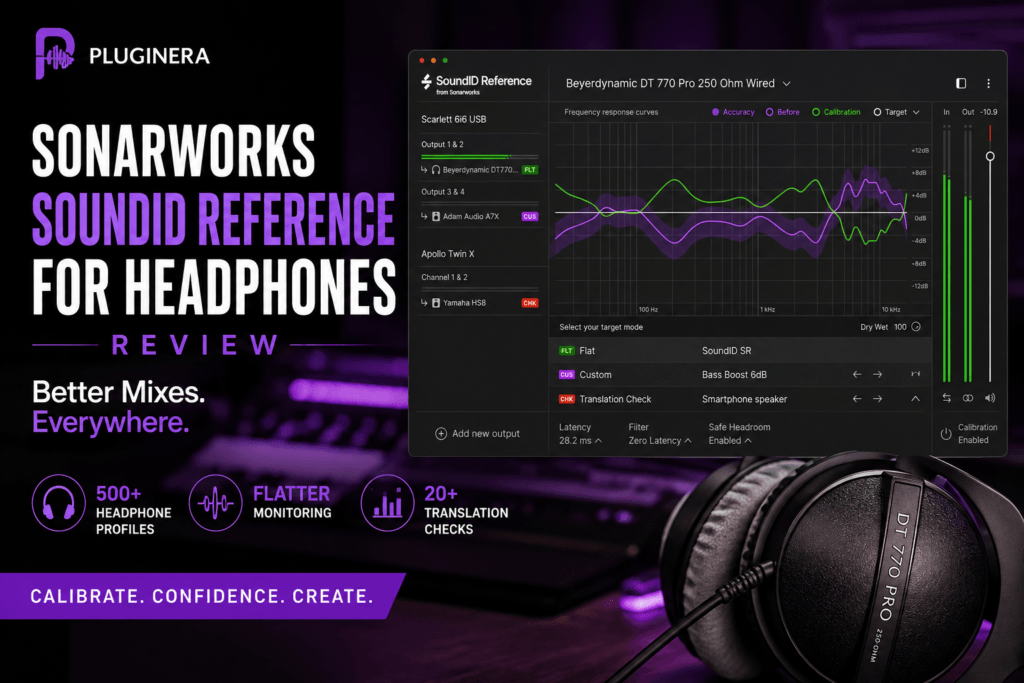
 Sonarworks SoundID Reference for Headphones Review: Is It Worth It?
Mixing on headphones is convenient, affordable, and sometimes unavoidable. But there’s one major problem: your headphones have their own sound.
Some models exaggerate the bass. Others push the upper mids or treble. And even expensive studio headphones aren’t necessarily perfectly neutral.
That means you can spend hours getting a mix sounding great in your headphones, only to play it in your car and wonder where the bass went.
Sonarworks SoundID Reference for Headphones is designed to solve that problem.
Instead of replacing your headphones, SoundID Reference applies a calibration profile that compensates for their frequency response, giving you a flatter and more consistent monitoring environment.
But does headphone calibration actually make enough of a difference to justify buying another piece of studio software?
In this SoundID Reference for Headphones review, we’ll look at how it works, its most useful features, its strengths and weaknesses, and whether it’s worth adding to your mixing setup.
What Is Sonarworks SoundID Reference for Headphones?
SoundID Reference for Headphones is headphone calibration software developed by Sonarworks.
The idea behind it is straightforward.
Every headphone model has a particular frequency response. One pair might emphasize 80–150 Hz, while another might have a noticeable boost in the upper mids.
Those characteristics influence the decisions you make while mixing.
If your headphones naturally produce too much bass, for example, you may compensate by turning the bass down in your mix. When you listen somewhere else, the mix can suddenly sound thin.
SoundID Reference attempts to compensate for those characteristics.
You select your headphone model, and the software loads a calibration profile designed to bring its response closer to a neutral reference.
Sonarworks currently provides calibration profiles for more than 500 headphone models, covering popular headphones from brands including Audio-Technica, Beyerdynamic, Sennheiser, Sony, AKG, Audeze and many others.
The result isn’t a new pair of headphones.
Instead, you’re hearing your existing headphones through a corrected monitoring curve designed to make mixing decisions more reliable.
SoundID Reference for Headphones: Key Features
SoundID Reference might sound like a simple headphone EQ system, but Sonarworks has built several useful monitoring tools around the core calibration technology.
500+ Headphone Calibration Profiles
The foundation of SoundID Reference is its headphone profile library.
You’ll find profiles for popular studio headphones such as:
- Audio-Technica ATH-M50x
- Beyerdynamic DT 770 Pro
- Beyerdynamic DT 990 Pro
- Sennheiser HD 600
- Sennheiser HD 650
- Sennheiser HD 560S
- Sony MDR-7506
- Audeze LCD-X
- AKG K702
- AKG K712 Pro
Once your headphone profile is loaded, SoundID Reference applies the appropriate correction automatically.
That makes getting started remarkably easy.
Flat Target Curve
The default SoundID Reference experience is built around a flat target.
Essentially, the software attempts to remove some of the coloration introduced by your headphones so you’re making decisions from a more neutral starting point.
This can initially sound strange.
If you’ve spent hundreds of hours listening to the same headphones, you’ve become accustomed to their frequency response.
Turn on calibration and suddenly the bass might seem quieter, the mids might become more noticeable, or the top end may change considerably.
That’s not necessarily a bad thing.
You’re hearing the compensation that SoundID Reference is applying.
Give yourself some time to adjust before making judgments about whether the calibrated sound is “better.”
The real question is:
Do your mixes translate better?
That’s ultimately what matters.
Custom Target Curves
You aren’t forced to mix with a completely flat response.
SoundID Reference includes Custom Target controls that allow you to modify the target curve in real time. You can also determine which frequency range receives calibration.
This is useful because not everyone wants the exact same monitoring experience.
For example, you might prefer a slight low-end tilt while producing Hip Hop or R&B.
You could create a monitoring curve that remains relatively neutral while providing a little more low-frequency energy.
The important distinction is that you’re intentionally choosing that monitoring response instead of unknowingly compensating for your headphones.
Translation Check
Translation Check is one of my favorite concepts in SoundID Reference.
It lets you simulate 20+ different devices and listening environments, helping you evaluate how your mix might behave outside your studio headphones.
That matters because your listeners aren’t sitting in your studio.
They’re listening through:
- Phones
- Laptops
- Earbuds
- Bluetooth speakers
- Car stereos
- Hi-fi systems
- Consumer headphones
A mix that only sounds good through your studio headphones isn’t finished.
Translation Check gives you another way to identify potential problems before exporting the final mix.
For beatmakers in particular, this can be extremely useful.
You might discover that your 808 disappears on smaller playback systems or that your vocal sample becomes overly harsh through another listening simulation.
Instead of exporting the beat, walking to the car, taking notes, returning to the studio and repeating the process, you can perform additional translation checks directly inside your workflow.
You should still test important mixes on real playback systems, but Translation Check can make that process more efficient.
Three Filter Modes
SoundID Reference includes three filter processing modes:
Zero Latency
Designed for situations where latency needs to remain minimal, such as recording or playing virtual instruments.
Mixed
A compromise between latency and phase accuracy.
Linear Phase
Designed to provide maximum phase accuracy, making it particularly useful during mixing and mastering when latency isn’t as important.
Having multiple modes means you don’t have to use the same calibration processing throughout your entire session.
DAW Plugin and Systemwide Calibration
Another major advantage is that SoundID Reference isn’t limited to your DAW.
The Headphones edition includes both a DAW plugin and standalone Systemwide application. The plugin is available in AU, VST2, VST3 and AAX formats.
The DAW plugin can live on your monitoring path while you’re producing or mixing.
Systemwide calibration is even more interesting.
It allows you to maintain the calibrated monitoring response while listening to audio outside your DAW.
That means you can listen to Spotify, YouTube, reference tracks and other audio through the same corrected monitoring environment.
This can help your ears become accustomed to the calibrated response of your headphones.
Using SoundID Reference for Mixing
Setting up SoundID Reference for headphone mixing is relatively straightforward.
Step 1: Select Your Headphones
Open SoundID Reference and find your headphone model in the supported profile library.
Make sure you choose the exact version of your headphones.
Different impedances or revisions of the same headphone can have different profiles.
Step 2: Load the Calibration Profile
SoundID Reference applies the correction curve associated with that headphone model.
Switch calibration on and off.
You’ll probably hear an immediate difference.
Don’t automatically assume whichever version sounds more exciting is more accurate.
You’re evaluating your monitoring environment, not mastering your song.
Step 3: Listen to Reference Tracks
Before mixing, spend some time listening to professionally released songs you know extremely well.
This is important.
You need to learn what a great record sounds like through your newly calibrated monitoring setup.
Step 4: Mix Normally
Once you’ve adjusted, start making your normal mixing decisions.
Pay particular attention to:
- Kick and 808 balance
- Sub-bass levels
- Vocal presence
- Snare brightness
- Hi-hat harshness
- Reverb levels
- Stereo width
- Overall tonal balance
Step 5: Use Translation Check
Toward the end of the mix, switch through several Translation Check environments.
Don’t try to make the mix perfect on every simulation.
Instead, look for major problems.
If the bass completely disappears in one environment, investigate.
If the vocals suddenly become painfully bright, investigate.
If your drums remain punchy and the important musical elements remain audible across multiple playback simulations, you’re probably moving in the right direction.
Step 6: Check Calibration Off
Before finishing, bypass SoundID Reference occasionally.
It’s useful to understand what the correction is doing.
Just remember:
SoundID Reference is a monitoring tool.
You don’t want the headphone correction accidentally printed into the final audio you’re delivering to listeners.
Why SoundID Reference Can Be Especially Useful for Beatmakers
Better 808 Decisions
The low end is one of the hardest parts of Hip Hop, Trap and R&B mixing.
Your kick and 808 might sound massive through headphones while completely overwhelming a car system.
Or the opposite can happen.
Your headphones exaggerate bass, so you turn your 808 down. Then you play the beat somewhere else and there’s barely any low end.
Calibration can give you a more consistent reference point.
That can make it easier to judge:
- 808 volume
- Kick-to-808 balance
- Sub frequencies
- Bass saturation
- Low-mid buildup
For producers working primarily on headphones, that alone can be extremely valuable.
More Reliable High-End Decisions
Bright headphones can cause the opposite problem.
If your headphones exaggerate high frequencies, you may make your beat too dark trying to compensate.
That affects hi-hats, snares, vocals, synths and percussion.
A more neutral monitoring response can help you make better EQ decisions instead of constantly fighting the natural sound of your headphones.
Better Reverb Decisions
Reverb can be surprisingly difficult to judge through headphones.
Producers often use too much because headphones create an extremely isolated listening experience.
Combining calibrated monitoring with multiple reference tracks and Translation Check can help you develop a better sense of how much ambience your mix actually needs.
Individually Calibrated Headphones vs Average Profiles
There’s an important distinction worth understanding.
The standard SoundID Reference profiles are based on measurements of a particular headphone model.
But two physical pairs of the same headphones aren’t necessarily identical.
Manufacturing tolerances can create small differences between individual units.
Sonarworks therefore also offers individually calibrated headphones.
According to Sonarworks’ Plugin Boutique listing, individual calibration can account for differences between the left and right drivers and provide approximately ±0.9 dB accuracy across the audio frequency spectrum.
For many home-studio producers, the standard averaged profile will be the logical starting point.
Engineers looking for greater precision can consider individual calibration.
What I Like About SoundID Reference for Headphones
It Improves the Headphone Mixing Workflow
You aren’t buying another compressor, EQ or saturation plugin.
You’re improving the environment through which you judge every compressor, EQ and saturation plugin you already own.
That’s a meaningful distinction.
Monitoring influences virtually every mixing decision.
Huge Headphone Library
Support for more than 500 headphone models means there’s a good chance popular studio headphones already have a profile available.
Always check Sonarworks’ current compatibility list before purchasing.
Translation Check Is Genuinely Useful
Being able to quickly evaluate a mix against different listening scenarios is valuable.
It’s not a replacement for checking your music in the car or on real consumer devices.
But it can help expose problems earlier.
Systemwide Calibration
This may be one of the most underrated features.
Listening to professionally mixed music through the same calibrated environment you’re using for your own productions can accelerate the process of learning that monitoring response.
You Can Customize the Target
SoundID Reference doesn’t force you into one monitoring curve.
Custom Target lets experienced users adjust the response while maintaining a known reference point.
What Could Be Better?
SoundID Reference isn’t perfect.
There’s an Adjustment Period
Your favorite headphones may initially sound worse with calibration enabled.
That’s because you’re accustomed to their coloration.
Give yourself time to learn the calibrated response.
It Can’t Fix Everything About Headphones
Frequency response isn’t the only thing that determines how headphones sound.
Calibration doesn’t change:
- Driver quality
- Distortion
- Physical comfort
- Soundstage
- Transient performance
- Open-back vs closed-back behavior
SoundID Reference can improve the frequency-response reference, but it can’t turn inexpensive headphones into high-end studio monitors.
Your Headphones Need to Be Supported
SoundID Reference works best when Sonarworks has a calibration profile for your exact model.
Fortunately, the supported library is extensive, but checking compatibility before purchasing is essential.
Headphones Still Aren’t Speakers
Headphones remove the acoustic interaction between speakers and your room, but they also create a different stereo experience.
Hard-panned elements can feel extremely separated, and you don’t physically experience low frequencies in the same way you would through speakers.
SoundID Reference improves headphone monitoring.
It doesn’t magically make headphones identical to studio monitors.
SoundID Reference for Headphones vs Buying Better Headphones
Here’s where things get interesting.
Suppose you have a decent pair of studio headphones.
Should you buy SoundID Reference or upgrade the headphones?
If your existing headphones are comfortable, detailed and supported by Sonarworks, calibration may provide more immediate mixing value than moving to another similarly priced headphone.
But SoundID Reference shouldn’t be viewed as a substitute for quality headphones.
Think of the combination as:
Good headphones + calibration + experience + reference tracks
That’s the real monitoring system.
SoundID Reference simply improves one part of that chain.
Who Should Buy SoundID Reference for Headphones?
SoundID Reference makes the most sense for:
- Bedroom producers
- Home studio owners
- Producers who primarily mix on headphones
- Traveling producers
- Beatmakers working in untreated rooms
- Mixing engineers who need portable monitoring
- Producers struggling with mix translation
- Engineers who frequently switch between studios
- Anyone using supported headphones with a noticeably colored response
It can be particularly valuable if you’re unable to properly treat your room.
Instead of fighting room reflections and speaker placement, you can build a more controlled headphone-based monitoring workflow.
Who Might Not Need It?
SoundID Reference may be less essential if you already have:
- An accurately treated mixing room
- High-quality monitors you know extremely well
- Headphones with a response you’ve learned over many years
- Another headphone calibration solution you’re happy with
Even then, SoundID Reference can still be useful as a secondary monitoring reference.
But it’s most compelling for producers whose primary monitoring environment is headphones.
Is SoundID Reference Good for Beginners?
Yes — with one warning.
Don’t let calibration replace learning how to listen.
SoundID Reference won’t automatically create balanced mixes.
It won’t tell you where to EQ your 808.
It won’t decide how loud your vocals should be.
And it won’t fix poor arrangement or sound-selection decisions.
What it can do is give you a more consistent environment for learning those skills.
That’s arguably more valuable.
Instead of constantly wondering whether your mix sounds strange because of your headphones, you have a more standardized reference point from which to make decisions.
Is Sonarworks SoundID Reference for Headphones Worth It?
For producers who do most of their mixing on headphones, SoundID Reference for Headphones is absolutely worth considering.
Its biggest advantage isn’t that it makes music sound more exciting.
In fact, calibrated audio can initially sound less exciting.
The advantage is confidence.
Confidence that your headphones aren’t exaggerating the bass.
Confidence that you’re not removing too much treble because your headphones are overly bright.
Confidence that the tonal balance you’re hearing has a better chance of translating to other playback systems.
And that’s exactly what you want from a monitoring tool.
SoundID Reference also goes beyond simple calibration with Custom Target controls, multiple filter modes, Systemwide operation and Translation Check.
For Hip Hop and R&B producers working from bedrooms, apartments or untreated studios, the ability to build a more trustworthy headphone monitoring environment can be particularly valuable.
SoundID Reference for Headphones Review: Final Verdict
Rating: 9/10
Pros
- 500+ supported headphone profiles
- Simple calibration workflow
- DAW plugin and Systemwide operation
- Custom Target curves
- Three filter modes
- Translation Check
- Excellent for headphone-based studios
- Helpful for improving mix translation
- Native Apple Silicon support
- Can be activated on up to three devices
Cons
- Requires supported headphones
- Calibrated sound can take time to get used to
- Doesn’t replace good headphones or mixing experience
- Headphone calibration still doesn’t completely replicate mixing on speakers
Pluginera Verdict
Highly Recommended
Sonarworks SoundID Reference for Headphones addresses one of the biggest problems facing home producers: not being able to completely trust what they’re hearing.
For producers mixing Hip Hop, Trap, R&B, Pop and electronic music on headphones, getting the low end and overall tonal balance right is critical.
SoundID Reference gives you a more neutral foundation for making those decisions.
If your mixes consistently sound good in your headphones but fall apart when you get into the car, SoundID Reference may be one of the more useful studio purchases you can make.
Check the latest price for Sonarworks SoundID Reference for Headphones at Plugin Boutique.
Disclosure: This article may contain affiliate links. If you purchase through one of these links, Pluginera may earn a commission at no additional cost to you.