 There is no shortage of plugins promising producers instant vintage character. But getting a convincing lo-fi sound usually involves more than simply adding vinyl crackle to a clean piano.
The best lo-fi sounds have movement, imperfections, warmth, texture, and a sense that the instrument has already passed through some kind of aging process.
LANDR Retro is designed specifically around that idea.
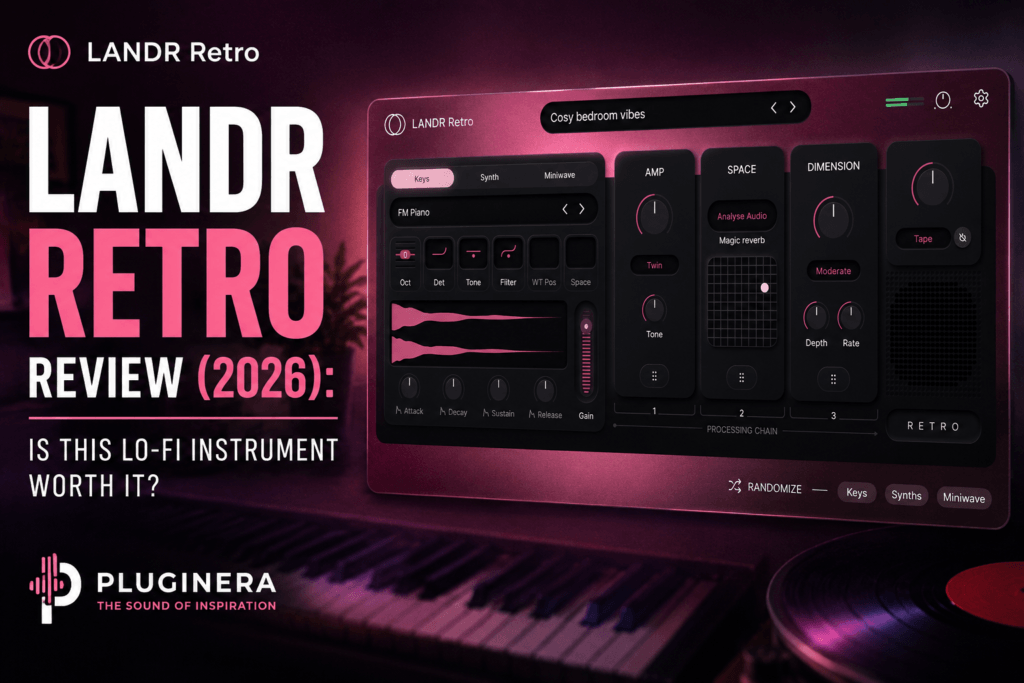
Instead of being another massive virtual instrument packed with thousands of sounds, LANDR Retro takes a more focused approach. It combines sampled keyboards, analog-style synthesis, a mini-wave engine, built-in effects, and several types of vintage processing inside one streamlined instrument.
The result is a plugin built for quickly creating warm keys, dusty chords, nostalgic pads, and textured melodic layers.
That makes it particularly interesting for producers working in lo-fi Hip Hop, R&B, Neo-Soul, chillhop, Hip Hop, Trap Soul, and sample-inspired production.
But does LANDR Retro offer enough to justify adding another virtual instrument to your collection?
In this LANDR Retro review, we’ll take a closer look at how the instrument works, its sound design capabilities, its effects, and who will get the most value from it.
What Is LANDR Retro?
LANDR Retro is a multi-layer virtual instrument designed around vintage and lo-fi sounds.
Rather than relying on a single sound engine, Retro combines three different layers:
- Keys
- Synth
- Mini-wave
The Keys layer provides the organic foundation using sampled electric and acoustic keyboard sounds.
The Synth layer introduces analog-style pads and electronic textures.
The Mini-wave layer adds another layer of movement, grit, and tonal character.
Each layer can be independently enabled and gain-staged, allowing you to combine organic and electronic sounds into a single patch.
LANDR then adds several onboard effects and vintage-processing options to push those sounds further into lo-fi territory.
The concept is straightforward:
Start with a musical sound, layer additional texture underneath it, and then give the entire patch vintage character.
It’s a workflow that makes a lot of sense for modern beat production.
LANDR Retro’s Three-Layer Sound Engine
The most important feature in Retro is its layered architecture.
Instead of forcing producers to stack several separate virtual instruments inside their DAW, Retro allows three complementary sounds to exist inside a single patch.
Keys Layer
The Keys engine is where many producers will probably start.
It contains sampled electric and acoustic keyboard sounds that can serve as the main harmonic element of a beat.
Think:
warm chords, mellow keys, dusty electric-piano textures, nostalgic melodies, and understated harmonic parts.
For Hip Hop and R&B production, these types of sounds are extremely useful because they can establish the mood of a track almost immediately.
You could load a patch, play a minor seventh or ninth chord progression, and already have the foundation for a beat.
Synth Layer
The Synth engine provides an analog-style pad layer.
Instead of having your keyboard sound sitting completely by itself, you can blend a subtle synth underneath it.
That can turn a relatively simple keyboard patch into something wider and more atmospheric.
For example, you could keep the Keys layer prominent while bringing the Synth layer in quietly behind it.
The keys provide definition while the synth adds width and sustain.
This could work especially well for Trap Soul and atmospheric R&B, where producers frequently combine keyboard sounds with dark pads.
Mini-Wave Layer
The third engine is the Mini-wave layer.
This is where Retro can become more interesting from a sound-design perspective.
Rather than simply stacking another traditional instrument underneath the keys, the Mini-wave engine can introduce additional texture and movement.
Blending all three engines gives you the ability to create sounds that feel more like complete sampled textures rather than pristine virtual instruments.
And that is arguably where LANDR Retro’s concept works best.
Instead of asking:
“Which piano should I use?”
You can start asking:
“What kind of texture should this chord progression have?”
That subtle difference can encourage a much more creative approach to beatmaking.
Shape Each Layer Independently
LANDR gives each of Retro’s three sound engines its own ADSR envelope and tone control.
That is important because layering sounds only works when you have enough control to make those sounds complement one another.
For example, you could create:
Keys: Fast attack with a moderate release
Synth: Slower attack with a long release
Mini-wave: Shorter and darker texture
Now the three layers perform different jobs.
The keys provide the initial chord.
The synth gradually appears underneath it.
The Mini-wave provides texture.
Suddenly one MIDI performance can sound much more complex than the notes you’re actually playing.
This is one of the areas where Retro could be especially useful for producers who want sophisticated textures without diving into complicated synthesis.
Built-In Lo-Fi Character
Of course, calling an instrument “Retro” would not mean much if it only produced clean keyboard sounds.
LANDR includes four dedicated character modes:
Vinyl
Adds the type of texture associated with records and sampled vinyl.
Digit
Pushes the sound toward older digital coloration.
Bitcrush
Introduces more obvious digital degradation and grit.
Tape
Adds a warmer, worn magnetic character associated with tape and cassette-style processing.
These modes make it possible to move quickly from a relatively polished instrument toward something that sounds aged and imperfect.
And for beatmakers, that can eliminate several steps.
A traditional lo-fi chain might require a piano plugin followed by saturation, noise, filtering, modulation, and additional processing.
Retro attempts to put much of that aesthetic directly inside the instrument.
Space, Dimension, and Amp Effects
LANDR Retro also includes three primary effects for shaping the finished sound.
Space
Space handles ambience and reverb.
LANDR says the Space engine analyzes the audio to help determine an appropriate reverb response.
For atmospheric beats, this could be useful for pushing keys farther into the background without setting up a separate reverb plugin.
Dimension
Dimension is designed to add stereo width.
That could be particularly effective on the Synth layer when creating wide pads behind a narrower keyboard sound.
Amp
Amp introduces drive and additional character.
This gives producers another way to make sounds more aggressive or saturated when the cleaner presets aren’t gritty enough.
Together, these effects reinforce Retro’s biggest strength:
speed.
The plugin isn’t trying to turn every producer into a sound-design engineer.
It’s trying to get you from an idea to an interesting sound quickly.
The Randomizer Is More Useful Than It Sounds
One of the more interesting LANDR Retro features is its randomization system.
Retro includes randomization controls for individual layers as well as global settings.
That means you don’t necessarily have to completely randomize the instrument.
Suppose you find a Keys sound you love.
You could keep that layer while experimenting with different supporting textures.
That creates an interesting workflow for beatmaking.
Find a chord progression.
Get your primary keyboard tone right.
Then start generating different combinations underneath it.
You may stumble across a texture you would never have deliberately created.
For producers dealing with creative block, features like this can be surprisingly valuable.
What Does LANDR Retro Sound Like?
The overall aesthetic is exactly what the name suggests:
warm, imperfect, nostalgic, textured, and slightly worn.
But Retro doesn’t have to be limited to stereotypical lo-fi beats with rain sounds and vinyl crackle.
Its layered design could work across several genres.
Lo-Fi Hip Hop
This is the obvious application.
Warm keyboard chords combined with Vinyl or Tape character can quickly create the foundation for mellow boom-bap drums.
R&B
Pull back some of the heavier degradation and Retro becomes an interesting source of atmospheric electric keys and pads.
Add extended chords such as minor 7ths, major 7ths, 9ths, and 11ths and you have a strong starting point for contemporary R&B.
Trap Soul
Dark keys combined with a wide synth layer could work extremely well underneath sparse drums and an 808.
Neo-Soul
The electric-keyboard side of Retro makes it suitable for lush chord progressions, particularly when combined with subtle tape character.
Sample-Inspired Hip Hop
This may actually be one of the plugin’s most interesting uses.
Create a layered Retro patch, play several chords, render the performance to audio, and then chop that recording like a sample.
Now you’re effectively creating your own source material.
LANDR Retro for Hip Hop Producers
Hip Hop producers should pay particular attention to this instrument.
A huge part of Hip Hop production revolves around finding interesting source material.
LANDR Retro can essentially become a sample-generation instrument.
For example:
Play an 8-bar chord progression.
Add the Synth layer.
Bring in some Mini-wave texture.
Apply Tape or Vinyl character.
Add Space.
Bounce everything to audio.
Then chop it.
Pitch it.
Reverse pieces.
Filter it.
Resample it.
At that point, the original virtual instrument performance becomes something closer to a record you sampled.
That opens up considerably more possibilities than simply browsing presets.
LANDR Retro for R&B Producers
R&B producers can take almost the opposite approach.
Instead of destroying the sound, keep things relatively clean.
Start with the Keys engine and build a lush chord progression.
Something like:
Cm9 – Abmaj7 – Fm9 – G7
Then blend the Synth engine quietly underneath.
Increase the release slightly.
Add Dimension for width.
Use a touch of Space.
Finish with subtle Tape character.
Now you have the type of warm, atmospheric keyboard bed that could sit underneath vocals without requiring an elaborate sound-design chain.
This is where Retro’s simplicity becomes an advantage.
Presets and Workflow
LANDR includes curated, mix-ready presets designed for musical performance across different genres.
But Retro’s interface encourages you to treat presets as starting points rather than finished destinations.
That’s the better approach.
Find something close.
Then adjust the layer balance.
Change the envelopes.
Darken the tone.
Switch the character mode.
Adjust Space or Dimension.
Within a few changes, the patch can become something more personal.
The relatively streamlined architecture also means you don’t have to navigate dozens of synthesis pages before understanding what’s happening.
LANDR Retro System Requirements
LANDR Retro supports both macOS and Windows.
According to the current Plugin Boutique listing, the requirements include:
macOS: 10.15 or later, including Intel and Apple Silicon
Windows: Windows 10 or later, 64-bit
Plugin formats: VST, AU, and AAX
DAW: 64-bit DAW required
Memory: At least 4 GB RAM recommended.
That should make Retro compatible with most modern music-production setups.
What I Like About LANDR Retro
There are several things that stand out about Retro.
The Layered Architecture
Combining keys, synthesis, and additional texture inside one instrument makes it easy to create complex sounds without stacking multiple plugins.
Fast Workflow
Retro is designed for making music rather than endlessly programming patches.
That’s a major advantage for beatmakers.
Built-In Vintage Processing
Vinyl, Digit, Bitcrush, and Tape give you multiple ways to age your sounds without immediately reaching for another effects plugin.
Great Fit for Beatmakers
The overall sound palette makes sense for Hip Hop, lo-fi, R&B, Trap Soul, Neo-Soul, and chill production.
Randomization
Being able to randomize individual layers can generate new ideas without completely destroying a patch you already like.
What Could Be Better?
Retro’s focused design can also be viewed as its biggest limitation.
This isn’t intended to compete with enormous workstation instruments or advanced synthesizers.
If you want thousands of traditional instruments, deep modulation routing, complex wavetable synthesis, or extremely detailed sound programming, Retro probably isn’t going to replace the larger instruments already in your collection.
And if you already own several premium electric-piano libraries, analog synths, and dedicated lo-fi effects, you can certainly recreate similar signal chains manually.
Retro’s value comes from putting those ideas into one fast workflow.
That’s an important distinction.
You’re not necessarily buying capabilities that have never existed before.
You’re buying convenience, creative direction, and an instrument designed specifically around a particular aesthetic.
LANDR Retro Pros and Cons
Pros
- Three-layer sound engine
- Sampled keyboard sounds
- Analog-style synth layer
- Mini-wave texture engine
- Individual ADSR controls
- Individual tone controls
- Vinyl, Digit, Bitcrush, and Tape character modes
- Built-in Space, Dimension, and Amp effects
- Layer and global randomization
- Fast workflow
- Strong fit for Hip Hop and R&B production
- Useful for creating your own samples
- Easy to understand
Cons
- Specialized toward vintage and lo-fi sounds
- Not intended to replace a massive workstation
- Advanced synthesists may want deeper modulation
- Producers with extensive lo-fi plugin collections may already own tools capable of creating similar textures
Who Should Buy LANDR Retro?
LANDR Retro makes the most sense for producers who want character quickly.
I’d especially recommend looking at it if you produce:
- Lo-fi Hip Hop
- R&B
- Neo-Soul
- Trap Soul
- Chillhop
- Boom Bap
- Alternative Hip Hop
- Sample-based music
It’s also a good option for newer producers who love vintage sounds but don’t necessarily want to learn complicated synthesis before making music.
Experienced producers may find a different use for it: creating original sample material quickly.
Build a patch, record a progression, bounce it, manipulate the audio, and move on.
That workflow could make Retro useful even in a plugin collection that is already fairly large.
Is LANDR Retro Worth It?
LANDR Retro succeeds because it doesn’t try to be everything.
It’s a focused instrument built around one central goal:
creating warm, nostalgic, imperfect sounds quickly.
The combination of sampled keys, analog-style synthesis, the Mini-wave engine, vintage character modes, effects, and randomization gives producers enough control to customize sounds without turning the plugin into a complicated synthesizer.
For lo-fi producers, the appeal is obvious.
But I think Hip Hop and R&B producers may get even more mileage out of it.
Use Retro as a traditional keyboard instrument and you can create warm chord progressions and atmospheric melodies.
Use it as a sound-design tool and you can generate original material to resample, chop, pitch, and manipulate.
That’s what makes LANDR Retro more interesting than simply calling it another “lo-fi plugin.”
It’s essentially a fast texture-building instrument for beatmakers.
If your productions regularly need dusty keys, warm pads, vintage coloration, and sounds that feel slightly less perfect than modern digital instruments, LANDR Retro is definitely worth checking out.
Pluginera Rating: 8.7/10
Best For
Lo-Fi Hip Hop • R&B • Trap Soul • Neo-Soul • Chillhop • Sample-Based Hip Hop
Pluginera Verdict
LANDR Retro combines keys, synths, textures, and vintage processing into an instrument that makes creating nostalgic sounds remarkably fast. It’s not the deepest virtual instrument available, but for producers who value vibe and workflow over endless programming, that’s exactly the point.
Check Out LANDR Retro
If LANDR Retro sounds like a good fit for your productions, you can check out the latest pricing, specifications, and availability through Plugin Boutique.
[Check LANDR Retro on Plugin Boutique]
Disclosure: This article may contain affiliate links. If you purchase through one of these links, Pluginera may earn a commission at no additional cost to you.